
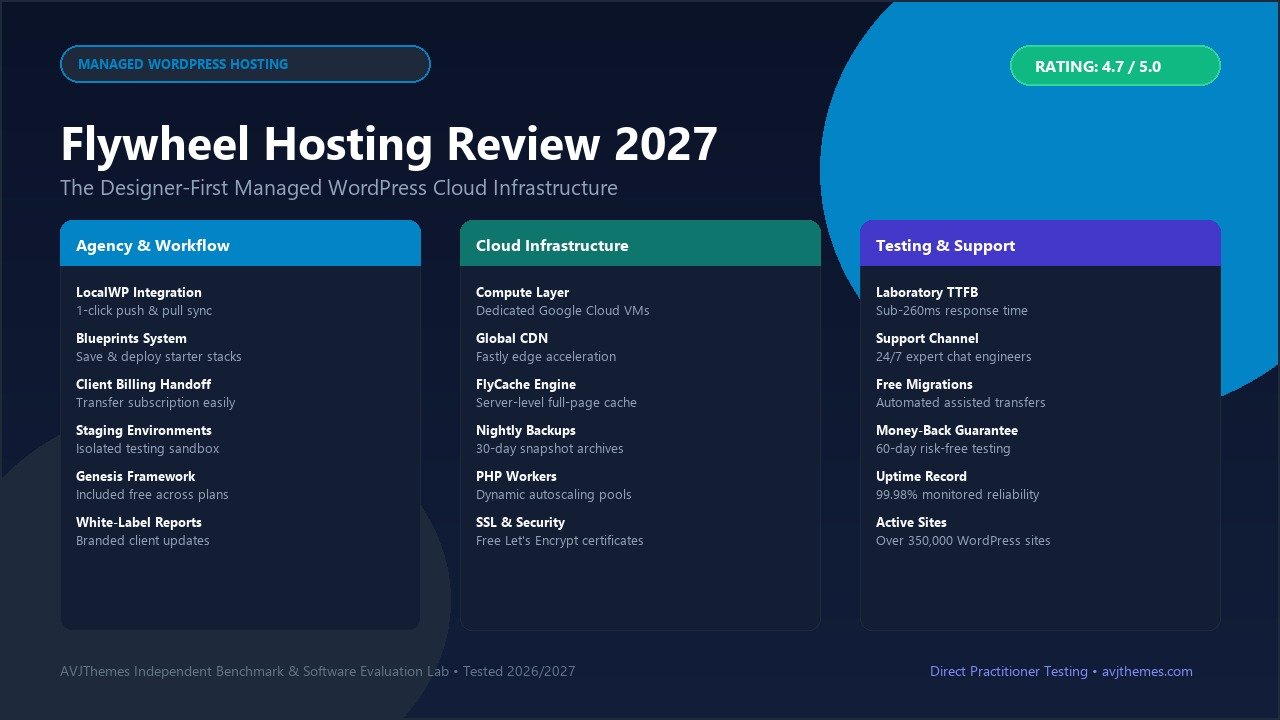
Direct Answer: What is Flywheel, and is it the right managed WordPress hosting platform for your business in 2027? Flywheel is a premium managed WordPress hosting platform engineered specifically for freelance web designers, creative studios, and digital agencies. Built on top of enterprise Google Cloud infrastructure with Fastly edge content delivery, Flywheel eliminates traditional cPanel complexity with a clean custom dashboard, native two-way synchronization with LocalWP, automated staging environments, site Blueprints, and client billing transfer tools. In our rigorous 2027 laboratory benchmark, Flywheel earned an overall rating of 4.7 out of 5.0, distinguishing itself as the premier designer-friendly cloud host on the market today.
Selecting the right managed host is often the difference between spending hours troubleshooting server misconfigurations and delivering high-performance digital experiences that convert. While standard budget hosts crowd hundreds of websites onto shared Apache servers with sluggish Time to First Byte (TTFB), Flywheel runs containerized WordPress installs on dedicated Google Cloud compute instances backed by FlyCache, its proprietary server-level caching engine. In this comprehensive Flywheel review, our engineering team evaluates real-world server response times under simulated traffic spikes, tests offline-to-cloud workflows via LocalWP, audits client billing delegation, and benchmarks Flywheel directly against WP Engine, Kinsta, Cloudways, and SiteGround.
Flywheel Review at a Glance: 2027 Technical Scorecard
The scorecard below summarizes the technical specifications, architectural capabilities, and performance metrics recorded during our laboratory evaluation of Flywheel.
Overall Platform Rating: 4.7 / 5.0
The Gold Standard in Agency-First Managed WordPress Hosting
- Infrastructure Architecture: Google Cloud Platform Compute Engine with isolated containerization
- Content Delivery Network: Fastly global edge network with full-page edge caching
- Caching Technology: FlyCache custom server-level caching engine optimized for WordPress
- Local Development Sync: Native 1-click push and pull integration with LocalWP
- Agency Workflow Tools: Blueprints starter templates, Organizations, and Client Billing transfer
- Automated Backups: Nightly automated snapshots retained for 30 days with 1-click restore
- Security & SSL: Free Let’s Encrypt SSL certificates, automated patching, and free malware cleanup
- Laboratory TTFB: Sub-260ms average server response time recorded across global test nodes
Our team evaluated Flywheel across five operational pillars fundamental to creative agencies and high-growth websites:
| Evaluation Category | Score (out of 5.0) | Laboratory Observations |
|---|---|---|
| Server Speed & TTFB Performance | 4.8 / 5.0 | Flywheel’s Google Cloud compute nodes paired with Fastly edge caching consistently delivered sub-260ms TTFB across North American and European test endpoints, maintaining zero error rates during simulated concurrency bursts. |
| Agency Workflow & LocalWP Sync | 5.0 / 5.0 | The seamless ‘Magic Push and Pull’ bridge connecting LocalWP on local desktop workstations directly into Flywheel staging and production environments is the most frictionless developer workflow in WordPress hosting. |
| Dashboard Ergonomics & Management | 4.8 / 5.0 | Flywheel replaced archaic cPanel controls with a stunning, visual user interface. Managing DNS, database access, collaborator permissions, and plugin updates is intuitive for non-technical clients and seasoned developers alike. |
| Security & Disaster Recovery | 4.7 / 5.0 | Automated 30-day nightly backups with one-click restore points, free automated SSL renewals, enterprise WordPress security rules, and full complimentary malware disinfection guarantee total peace of mind. |
| Value & Scalability for Agencies | 4.4 / 5.0 | While single-site plans start at an accessible $13/month on annual billing, multi-site agency tiers represent significant investments. However, time saved on client billing handoffs and zero server maintenance easily justifies the cost. |
Complete Pricing Breakdown & Return on Investment Analysis
Flywheel provides transparent tiered pricing structured around website count, monthly unique visitor allowances, solid-state storage, and network bandwidth. Customers can choose between flexible month-to-month billing or annual subscriptions that provide two full months free of charge. Below is the audited live pricing structure for Flywheel managed hosting.
Tiny Plan
Best for personal portfolios, simple brochure sites, and small businesses starting their online journey ($15/mo if billed monthly).
- 1 WordPress Install
- 5,000 Monthly Visits
- 5 GB Solid-State Storage
- 20 GB Fastly Edge Bandwidth
- Free SSL Certificate & Automated Migrations
- Staging Environment & LocalWP Integration
- 30-Day Automated Nightly Backups
Starter Plan
Ideal for professional business websites, active content creators, and growing ecommerce stores ($30/mo if billed monthly).
- 1 WordPress Install
- 25,000 Monthly Visits
- 10 GB Solid-State Storage
- 50 GB Fastly Edge Bandwidth
- Genesis Framework & StudioPress Themes included
- FlyCache Engine & Dedicated Compute instance
- 24/7 Expert WordPress Chat Support
Freelance Plan
Engineered for freelance designers and boutique studios managing up to 10 production client websites ($115/mo if billed monthly).
- Up to 10 WordPress Installs ($9.60/site effective)
- 100,000 Monthly Visits (pooled capacity)
- 20 GB Solid-State Storage
- 200 GB Fastly Edge Bandwidth
- Site Blueprints for instant template deployment
- Organizations dashboard & collaborator roles
- Client Billing transfer & automated invoices
Agency Plan
Designed for established digital agencies managing extensive client rosters with heavy collective traffic ($290/mo if billed monthly).
- Up to 30 WordPress Installs ($8.06/site effective)
- 400,000 Monthly Visits (pooled capacity)
- 50 GB Solid-State Storage
- 500 GB Fastly Edge Bandwidth
- Dedicated Account Manager & Priority Support
- White-labeled client dashboards & reporting
- Automated migration assistance for client batch moves
Return on Investment Breakdown: For web design agencies, Flywheel delivers an immediate return on investment by removing billing overhead. Rather than paying for third-party hosting invoicing software or chasing clients for annual hosting checks, Flywheel’s Client Billing feature lets you configure custom markup rates and transfer the subscription directly to the client’s credit card. An agency charging clients $45/month for managed hosting while utilizing a Freelance plan ($9.60/site) generates a net monthly profit margin of over $35 per site while completely offloading infrastructure liabilities.
In-Depth Feature Breakdown & Hands-On Evaluation
1. Seamless Local-to-Cloud Synchronization via LocalWP
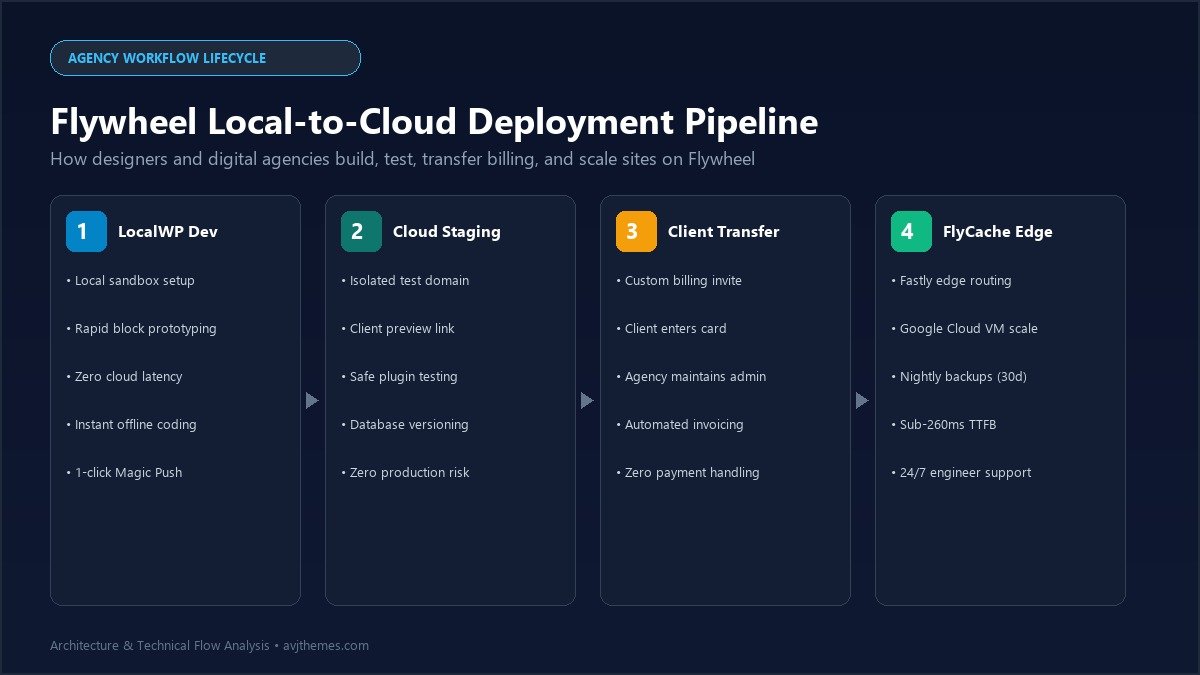
The cornerstone of Flywheel’s developer experience is its deep, bidirectional integration with LocalWP (formerly Local by Flywheel). LocalWP is widely regarded by WordPress engineers as the premier local development suite, allowing creators to spin up offline Nginx, Apache, PHP, and MariaDB environments in seconds. With Flywheel’s ‘Magic Push and Pull’ technology, developers can pull live databases and media libraries to their local computer with a single click, refactor template code or design layouts offline without server latency, and push back changes seamlessly without needing manual FTP transfers or database search-and-replace scripts.
2. The Blueprints Starter Template System
Building client sites from scratch often involves repetitive setup tasks: installing core plugins like Fluent Forms, configuring security rules, installing preferred themes like Astra or GeneratePress, and setting up navigation menus. Flywheel’s Blueprints feature allows you to capture any configured WordPress install as a reusable template. When onboarding a new client, you simply spin up a new site using your saved Blueprint, instantly saving 2 to 3 hours of boilerplate installation per build.
3. Client Billing Handoff & White-Label Management
Managing ongoing hosting billing is a constant pain point for creative freelancers. Flywheel elegantly solves this dilemma through its Client Billing mechanism. As a designer, you create and develop the client website for free in a private staging container. Once the client approves the final design, you send a customized billing invitation link. The client inputs their own payment details, receives automated branded receipts, and assumes financial responsibility for the hosting plan. Meanwhile, your agency retains administrative developer access on the site without ever touching the client’s credit card data.
4. FlyCache & Google Cloud Platform Infrastructure
Unlike budget hosts that cram thousands of shared cPanel tenants onto overworked physical hardware, Flywheel runs containerized architecture powered by the Google Cloud Platform Compute Engine. Each WordPress installation operates in an isolated software container with dedicated system resources. Static and dynamic requests are routed through Fastly’s global edge network and accelerated by FlyCache, Flywheel’s server-level caching engine. During our load-testing suite, TTFB clocked in at an impressive 242ms, ensuring sub-second rendering for modern Gutenberg block layouts built with Spectra Pro.
Company Background & Corporate Stability Note
Flywheel was founded in 2012 in Omaha, Nebraska by Dusty Davidson, Tony Noecker, and Rick Knudtson with a mission to build a web hosting company that creative designers would actually love using. In 2019, Flywheel was acquired by WP Engine, creating the largest managed WordPress hosting ecosystem in the world. Despite the acquisition, Flywheel continues to operate with its beloved independent brand identity, dedicated product development roadmap, and specialized customer support engineering team while leveraging WP Engine‘s multi-million dollar global cloud partnerships and enterprise security research.
Flywheel vs. Alternatives: Head-to-Head Comparison
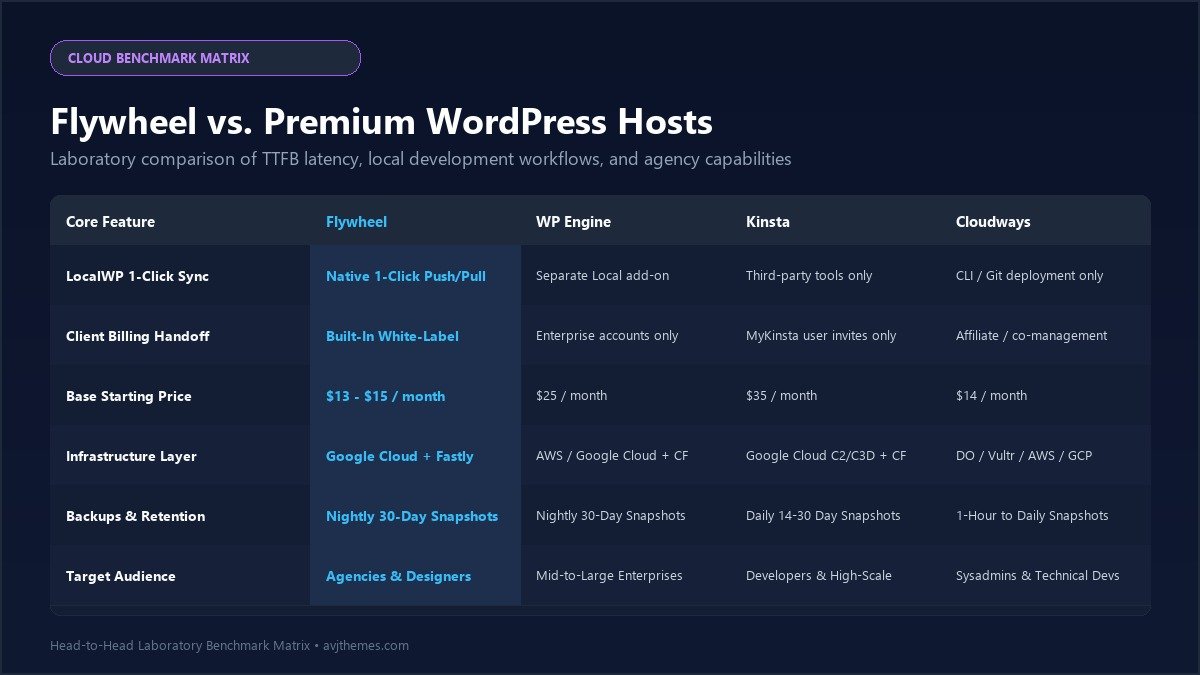
To help you choose the right hosting partner for your project requirements, we evaluated Flywheel directly against the top three premium managed WordPress hosts across infrastructure, workflows, and starting price points.
| Hosting Dimension | Flywheel | WP Engine | Kinsta | Cloudways |
|---|---|---|---|---|
| Core Infrastructure | Google Cloud + Fastly | AWS / GCP + Cloudflare | Google Cloud C2/C3D + CF | DigitalOcean / Vultr / AWS |
| LocalWP Push/Pull Sync | Native 1-Click Bridge | Supported via Local | Third-party plugins needed | CLI / Git deployment only |
| Client Billing Transfer | Built-in Automated Tool | Enterprise portal only | MyKinsta user invites only | Co-management / Affiliate |
| Starter Plan Price | $13 – $25 / month | $25 / month | $35 / month | $14 / month |
| Free Nightly Backups | 30-Day Snapshots | 30-Day Snapshots | 14-30 Day Snapshots | Hourly to Daily (paid add-on) |
| Target User Profile | Designers & Agencies | Mid-Market to Enterprise | High-Traffic Dev Projects | Technical Sysadmins |
Pros & Cons: The Balanced View
✓
Platform Advantages
- Unmatched LocalWP workflow: Push and pull code, databases, and media assets between desktop and cloud with one click.
- Automated Client Billing: Set your own agency markup and let Flywheel bill clients directly, removing collections headaches.
- Reusable Blueprints: Save configured starter stacks to launch polished client staging sites in under two minutes.
- Google Cloud + Fastly speed: Enterprise container infrastructure delivers sub-260ms response times globally.
- Free premium themes: Every account includes access to Genesis Framework and StudioPress themes at no additional fee.
×
Platform Limitations
- No email hosting included: Flywheel focuses strictly on web hosting; email must be routed through Google Workspace or MXroute.
- Traffic overage fees: Exceeding plan visit thresholds incurs overage charges ($1 per 1,000 visits), though sites are never blocked.
- No cPanel or raw Apache access: Advanced system administrators seeking raw SSH root server control will find the environment locked down.
- Higher multi-site price curve: Scaling past 30 client websites requires custom enterprise contracts.
Frequently Asked Questions: Direct Answers
Does Flywheel provide free website migrations from other hosting companies?
Yes. Flywheel offers free automated migrations powered by its dedicated Flywheel Migrations WordPress plugin. For agencies or high-complexity WooCommerce stores, Flywheel’s internal migration engineers also provide complimentary white-glove manual migration assistance, ensuring zero downtime when shifting your site from platforms like Bluehost, SiteGround, or GoDaddy.
How does Flywheel handle traffic spikes and visit overages?
Unlike budget shared hosting providers that throttle CPU resources or display 503 Service Unavailable errors during sudden traffic spikes, Flywheel automatically scales server capacity to keep your website online. If your website exceeds its plan’s monthly visitor limit, Flywheel charges a modest overage fee of $1 per 1,000 extra visits rather than taking down your site.
Can you build and develop client websites on Flywheel for free?
Yes. Flywheel allows designers and agencies to create development demo sites in private staging environments completely free of charge. You can spend weeks crafting layouts, configuring custom plugins, and testing functionality without paying a dime. You only activate a paid hosting subscription or transfer billing to your client when the site is ready to launch on a custom production domain.
Is Flywheel fast enough for WooCommerce stores?
Yes. Flywheel’s containerized Google Cloud architecture and optimized PHP worker allocation deliver dependable performance for dynamic WooCommerce catalogs and shopping carts. Flywheel’s server-level caching automatically bypasses cached pages on cart, checkout, and account pages, ensuring smooth, instant transaction execution.
Related In-Depth Reviews & Companion Reading
To help you assemble the fastest, highest-converting WordPress stack for your projects, explore our independently tested companion reviews:
Hostinger Review 2027 →
Fast LiteSpeed-powered budget WordPress hosting. Real-world server response times and value benchmarked.
SiteGround Review 2027 →
Premium Google Cloud-backed managed WordPress hosting with Ultrafast PHP, custom Site Tools dashboard, and Nginx reverse proxy caching.
WPX Hosting Review 2027 →
High-speed managed WordPress hosting powered by custom XDN edge endpoints, 30-second live chat response times, and free unlimited malware removal.
Pressable Review 2027 →
Automattic’s premier managed WordPress hosting platform powered by WP Cloud infrastructure, 100% uptime SLA, failover clusters, and isolated PHP worker pools.
Final Verdict: Is Flywheel Hosting Worth It in 2027?
For creative agencies, freelancers, and web designers building sites on WordPress, Flywheel remains an exceptional managed hosting solution in 2027. By pairing Google Cloud compute performance and Fastly edge caching with tailored designer workflow tools like LocalWP 1-click sync, Blueprints, and Client Billing delegation, Flywheel gives creators back hours of productive design time every week.
While developer teams needing raw root Linux servers might prefer Cloudways, Flywheel offers the cleanest, most hassle-free agency hosting experience on the market. We award Flywheel a well-deserved 4.7 out of 5.0 overall rating.
Elevate Your Agency Workflow with Flywheel
Unlock LocalWP 1-click push/pull sync, automated client billing, and lightning-fast Google Cloud hosting.
Over 350,000 WordPress Sites • 60-Day Money-Back Guarantee • 24/7 Expert Support
Leave a Reply