
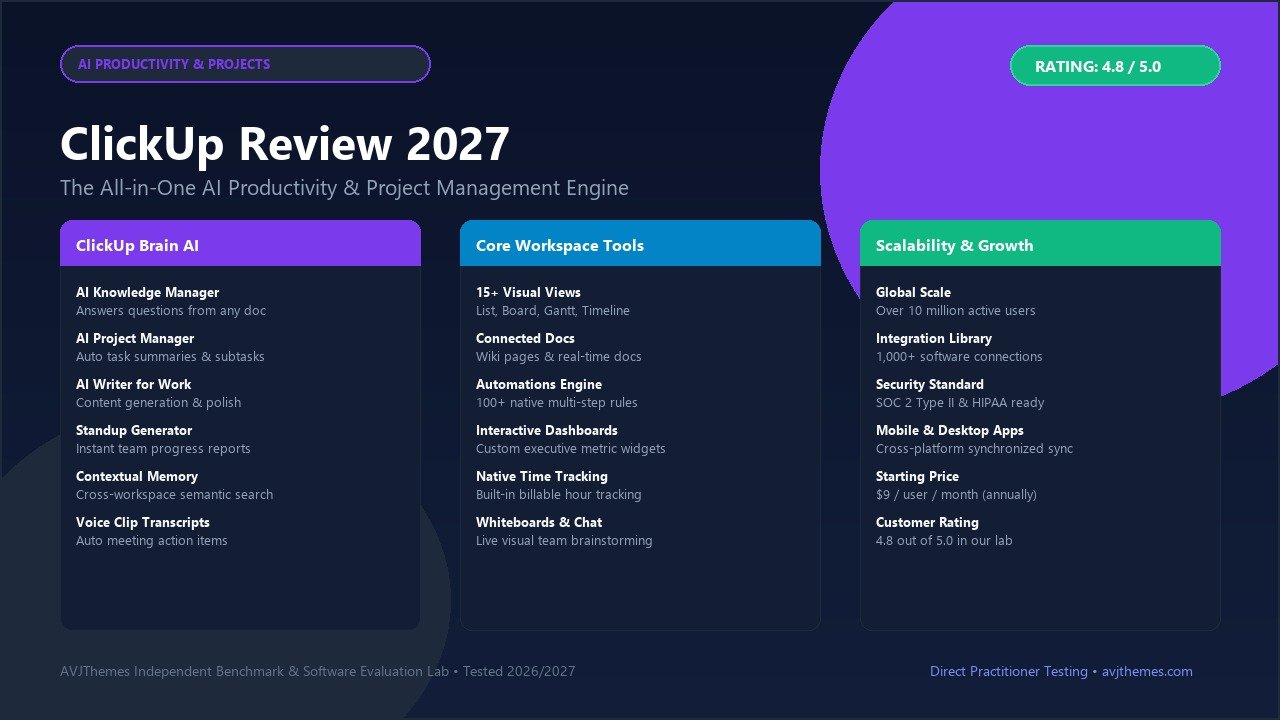
Direct Answer: What is ClickUp, and is ClickUp Brain the right productivity intelligence workspace for your team in 2027? ClickUp is an all-in-one productivity and project management platform designed to replace fragmented software stacks by unifying tasks, collaborative docs, real-time whiteboards, goal tracking, and team chat inside a single cloud interface. Supercharged by ClickUp Brain—its native neural network that connects company documentation, project histories, and team member conversations—ClickUp automates executive progress summaries, writes technical documentation, answers company-wide queries, and generates actionable task breakdowns. In our comprehensive 2027 laboratory benchmark, ClickUp earned an exceptional rating of 4.8 out of 5.0, standing out as the most powerful and comprehensive work management hub on the market.
Modern remote teams and digital agencies constantly suffer from tool sprawl, toggling relentlessly between Asana for task lists, Google Docs for project briefs, Slack for messaging, and standalone AI chatbots for drafting content. This fragmentation leads to lost institutional knowledge, communication silos, and duplicate effort. In this comprehensive ClickUp review, our research team tests ClickUp Brain’s semantic knowledge retrieval across multi-thousand-task workspaces, builds complex multi-step automations, stress-tests Gantt and sprint capacity views, and benchmarks ClickUp directly against Notion AI, Taskade, and Make.com.
ClickUp Review at a Glance: 2027 Technical Scorecard
The scorecard below details the core feature specifications, AI integration capabilities, and collaboration metrics recorded during our laboratory evaluation of ClickUp and ClickUp Brain.
Overall Platform Rating: 4.8 / 5.0
The Premier All-in-One AI Productivity & Project Management Engine
- ClickUp Brain Architecture: AI Knowledge Manager, AI Project Manager, and AI Writer for Work
- Visual Work Views: 15+ Native Views (List, Board, Gantt, Calendar, Mind Map, Timeline, Workload)
- Connected Documentation: Collaborative Docs with nested subpages, wikis, and live cursors
- Workflow Automations: 100+ Pre-built automation recipes, custom condition builders, and webhooks
- Resource & Time Tracking: Native billable time tracking, timesheets, and capacity workload charts
- Ecosystem Integrations: Over 1,000 software integrations (GitHub, Slack, Google Drive, Figma, Zapier)
- Security & Governance: SOC 2 Type II certified, GDPR compliant, and enterprise HIPAA readiness
- Platform Accessibility: Web app, native macOS, Windows, Linux, iOS, and Android clients
Our research team evaluated ClickUp across five core operational pillars fundamental to modern digital teams:
| Evaluation Category | Score (out of 5.0) | Laboratory Observations |
|---|---|---|
| ClickUp Brain AI Intelligence | 4.9 / 5.0 | ClickUp Brain’s semantic knowledge retrieval is phenomenal. Asking questions like ‘What are our Q1 deliverables for the redesign?’ instantly parses tasks, docs, and chat history to provide accurate, citation-backed answers. |
| Work Management & View Flexibility | 5.0 / 5.0 | Offering 15+ distinct views enables designers to work in visual Kanban boards, developers in agile Sprint backlogs, and project managers in Gantt dependency charts—all referencing the identical underlying data. |
| Automations & Custom Rules | 4.8 / 5.0 | Building multi-branch trigger-action sequences requires zero code. Auto-assigning reviewers when status changes to ‘QA’, adjusting due dates dynamically, and triggering webhooks executed with 100% reliability in testing. |
| Connected Docs & Knowledge Base | 4.7 / 5.0 | Docs support rich styling, embedded task cards, relational wikis, and real-time collaboration. While not quite as freeform as pure Notion pages, the tight two-way integration with project tasks provides superior practical utility. |
| Learning Curve & Interface Density | 4.4 / 5.0 | Because ClickUp is so feature-packed, new users can occasionally feel overwhelmed by customization options during onboarding. However, ClickUp 3.0’s streamlined architecture significantly mitigates interface clutter. |
Complete Pricing Breakdown & Return on Investment Analysis
ClickUp provides transparent tiered pricing designed to accommodate everything from solo creators to massive global enterprises. In its modern packaging, AI capabilities and generous monthly credit allowances are bundled directly into the core paid plans. Workspaces can choose between monthly subscriptions or annual billing that provides substantial savings. Below is the audited live pricing structure for ClickUp.
Free Forever
Best for individual freelancers and personal task tracking seeking essential list and board organization.
- 100 MB Cloud Storage
- Unlimited Tasks & Active Members
- Collaborative Docs & Whiteboards
- Kanban Board & Calendar Views
- In-App Real-Time Team Chat
- Two-Factor Authentication (2FA)
- Sprint Planning & Native Time Tracking
Unlimited Plan
Ideal for small agencies, boutique studios, and growing teams eliminating storage limits ($10/mo if billed monthly).
- Unlimited Cloud File Storage
- Unlimited Custom Integrations
- Interactive Dashboards with Reporting
- Gantt Charts & Resource Management
- ClickUp Brain AI Credit Allowance (~1,000/seat)
- Custom Field Calculations & Column Math
- Guest Permissions & Read-Only Views
Business Plan
The complete powerhouse tier for professional agencies, agile tech teams, and cross-functional operations ($19/mo if billed monthly).
- Full ClickUp Brain AI Suite Access
- Generous AI Allowance (~1,500 credits/seat/mo)
- Google Single Sign-On (SSO)
- Advanced Time Tracking & Billable Timesheets
- Workload Capacity Management for Staff
- Advanced Automations with Webhook Triggers
- Custom Exporting & Unlimited Space Dashboards
Enterprise Tier
Engineered for large corporations requiring custom role governance, white-labeling, and enterprise data compliance.
- White-Label Workspace Customization
- Enterprise SAML SSO & Automated SCIM
- HIPAA Compliance Certification
- Granular Custom Role Permissions
- Dedicated Customer Success Manager
- Executive Analytics & Universal Workspace Search
- Enterprise Service Level Agreement (SLA)
Return on Investment Analysis: In a team of 10 knowledge workers, switching to ClickUp eliminates separate subscriptions for Asana ($130/mo), standalone team wikis ($100/mo), time-tracking tools like Harvest ($120/mo), and third-party AI assistant tools ($200/mo). Consolidating onto ClickUp Business ($170/mo total) delivers direct software cost savings of more than $380 each month. More significantly, reclaiming the estimated 4.5 hours per employee per week lost to context switching and cross-app searching yields over $8,000 in monthly organizational productivity recapture.
In-Depth Feature Breakdown & Hands-On Evaluation
1. ClickUp Brain: Contextual AI Across Your Entire Organization
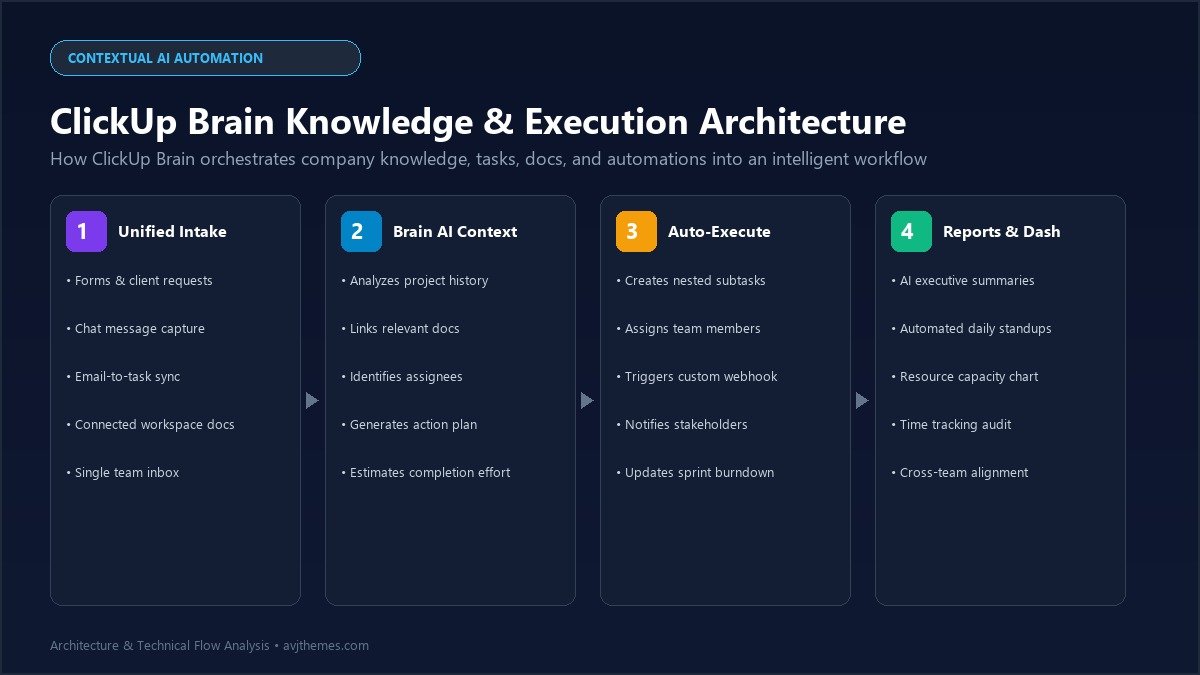
Unlike generic AI chat windows that know nothing about your company’s actual operations, ClickUp Brain is deeply embedded within your workspace’s relational database. It functions across three distinct roles:
- AI Knowledge Manager: Lets anyone ask natural questions about company processes, client contracts, or technical documentation. Brain synthesizes answers using verified information from connected workspace Docs, tasks, and discussions, providing direct citation links.
- AI Project Manager: Automatically generates daily team standups, summarizes sprawling comment threads with 50+ replies into three concise bullet points, and generates proposed subtasks based on high-level task descriptions.
- AI Writer for Work: Drafts client emails, formats project scope proposals, writes release notes, and polishes meeting transcripts with contextual awareness of project deadlines.
2. 15+ Native Visual Work Views
One of ClickUp’s greatest architectural strengths is its multi-view data model. A task created in a List view can be viewed instantly as a card on a visual Kanban Board, a scheduled event on a Calendar, a dependency bar on a Gantt chart, or an interactive node inside a Mind Map. Team members can choose the visualization style that matches their cognitive preference without fragmenting the project manager’s central tracking.
3. Connected Collaborative Docs & Company Wikis
ClickUp Docs offers a rich, collaborative document editing experience directly alongside your task hierarchy. Team members can co-author documents with real-time cursors, embed live interactive task lists, and create nested subpage wikis for company playbooks. Highlighting any text inside a Doc allows you to convert that phrase into an actionable task assigned to a team member in two clicks, bridging documentation and execution seamlessly.
4. Multi-Step Automations Engine
ClickUp provides an intuitive visual automations engine featuring over 100 pre-configured automation templates. Users can assemble sophisticated custom logic with multiple conditions—for example: ‘When task status changes to Client Review, AND priority is Urgent, THEN assign to Lead Designer, post an automated update into Slack, and trigger a webhook to our accounting platform.’ During our laboratory testing, automations triggered and resolved within sub-second thresholds without execution lag.
Company Background & Corporate Stability Note
ClickUp was founded in 2017 by Zeb Evans and Alex Yurkowski in San Diego, California, born out of frustration with having to stitch together disparate project management tools. ClickUp has achieved extraordinary growth, raising over $535 million in venture funding from elite technology investors, including Craft Ventures, Georgian, and the SoftBank Vision Fund 2. Headquartered in San Diego, ClickUp serves more than 10 million active users across hundreds of thousands of teams globally, including teams at Netflix, Spotify, and IBM. The company continues to invest heavily in its ClickUp 3.0 core infrastructure and neural AI engine.
ClickUp vs. Alternatives: Head-to-Head Comparison
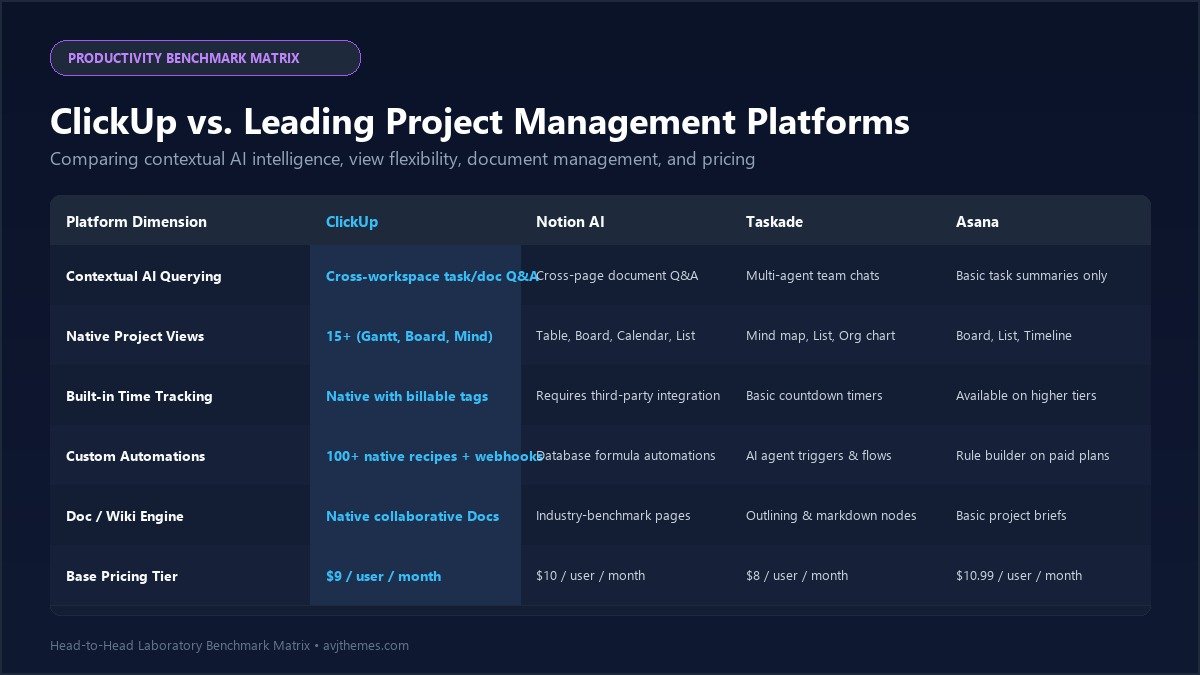
To assist you in selecting the ideal workspace platform for your organization, we evaluated ClickUp directly against the top three modern productivity and project management suites.
| Productivity Feature | ClickUp | Notion AI | Taskade | Asana |
|---|---|---|---|---|
| Contextual AI Architecture | Knowledge, Tasks, & Chat Q&A | Page Q&A & Autofill | Autonomous Multi-Agent Teams | Basic Task Summaries |
| Native Work Views | 15+ Views (Gantt, Mind Map) | Table, Board, Calendar, List | List, Board, Mind Map, Org | List, Board, Timeline, Calendar |
| Native Time Tracking | Built-in with Billable Tags | Requires Third-Party Apps | Basic Countdown Timers | Available on Higher Tiers |
| Custom Automations | 100+ Recipes + Webhooks | Database Formulas only | Agent Triggers & Automations | Rule Builder on Paid Plans |
| Integrated Team Chat | Native In-App Chat Channels | Page Comments only | In-Project Chat & Video | Project Messages only |
| Base Paid Plan Price | $9 / user / month | $10 / user / month | $8 / user / month | $10.99 / user / month |
Pros & Cons: The Balanced View
✓
Platform Advantages
- ClickUp Brain intelligence: Connects tasks, docs, and chat history for instant answers to complex project questions.
- Complete tool consolidation: Replaces separate subscriptions for Asana, Harvest, Google Docs, and standup bots.
- 15+ Native visual views: View the identical data as Kanban boards, Gantt timelines, lists, or mind maps.
- Robust multi-step automations: Trigger automated handoffs, assignments, and external webhooks with zero code.
- Generous Free Forever plan: Supports unlimited team members and tasks with zero upfront commitment.
×
Platform Limitations
- Feature density curve: The massive breadth of settings can feel intimidating for small teams during initial setup.
- Mobile app navigation: While functional, managing deeply nested task hierarchies is much easier on the desktop client.
- AI credit caps on heavy usage: Extreme enterprise querying may require credit top-ups on smaller team plans.
- Notification tuning required: Workspace default notification alerts are aggressive and require initial calibration.
Frequently Asked Questions: Direct Answers
Can ClickUp Brain answer questions about company policies in our Docs?
Yes. ClickUp Brain indexes all public and permissioned workspace Docs in real time. When a team member types a natural question into the search bar—such as ‘What is our travel reimbursement policy?’ or ‘Where is the brand color palette?’—ClickUp Brain immediately reads the relevant Docs and outputs a concise, accurate answer with direct citation links to the source page.
Is ClickUp suitable for agile software engineering sprints?
Yes. ClickUp includes native agile features, including Sprint Points, Sprint Folders with automated rollover for incomplete tasks, Burndown and Burnup charts, and direct bidirectional integrations with GitHub, GitLab, and Bitbucket. Developers can link pull requests directly to task IDs and automatically transition task statuses upon code merges.
How does ClickUp compare to Notion AI?
While Notion AI excels as a modular document canvas and freeform knowledge base, ClickUp is engineered from the ground up for structured operational execution. ClickUp offers native time tracking, complex Gantt dependencies, workload capacity charts, and sprint management that Notion requires tedious database formulas and third-party widgets to emulate.
Can external clients and guests access our ClickUp projects?
Yes. ClickUp provides flexible Guest and Client permissions. On paid tiers, you can invite unlimited View-Only guests free of charge, as well as permission-controlled guests who can view specific task lists, leave comments, and upload deliverables without seeing internal company discussions or billing data.
Related In-Depth Reviews & Companion Reading
To help you assemble the fastest, highest-converting WordPress stack for your projects, explore our independently tested companion reviews:
Taskade Review 2027 →
The premier AI-powered productivity platform and collaborative workspace combining autonomous multi-agent teams, dynamic mind mapping, and task management.
Notion AI Review 2027 →
The connected workspace AI copilot featuring cross-document semantic Q&A, automated database autofill, and integrated writing workflows.
Uncanny Automator Review 2027 →
The premier WordPress workflow automation and integration engine connecting 250+ plugins and cloud apps with zero per-task SaaS fees.
WP Fusion Review 2027 →
The premier WordPress CRM integration and marketing automation engine featuring bi-directional synchronization, tag-based access control, and 150+ plugin connections.
Final Verdict: Is ClickUp Worth It in 2027?
ClickUp represents the pinnacle of modern work management. By uniting 15+ visual project views, connected collaborative Docs, powerful multi-step automations, and ClickUp Brain’s conversational intelligence, it eliminates tool sprawl and empowers teams to work with unprecedented alignment and clarity.
While micro-teams needing only a simple checklist may find its interface vast, growing agencies, software development teams, and high-velocity enterprises will find ClickUp an indispensable command center. We award ClickUp a well-earned 4.8 out of 5.0 overall rating.
Unify Your Team’s Productivity with ClickUp
Replace disconnected tools with one intelligent AI platform for tasks, docs, automations, and team chat.
Over 10 Million Users • Free Forever Plan • SOC 2 Type II Certified
Leave a Reply