
For nearly a decade, visual WordPress web design was defined by heavyweight, monolithic page builders. Tools like Elementor, Divi, and Beaver Builder revolutionized website creation by liberating designers from raw code and rigid PHP templates. With intuitive drag-and-drop canvases, visual margins, responsive padding toggles, and dozens of pre-styled design widgets, anyone could craft high-converting landing pages without touching a single line of CSS.
Yet as the modern web evolved, the architectural liabilities of traditional visual builders became glaringly obvious. To achieve their visual freedom, legacy builders wrap every paragraph, button, heading, and column in an excessive maze of nested HTML <div> tags—a phenomenon widely referred to by developers as “div-wrapper soup.” Furthermore, these platforms routinely load massive JavaScript frameworks, bulky jQuery animation dependencies, and monolithic stylesheets across every single page request, regardless of whether a given widget is actually utilized on that specific URL.
With Google elevating Core Web Vitals into direct algorithmic ranking signals—penalizing sluggish Interaction to Next Paint (INP), bloated Total Blocking Time (TBT), and delayed Largest Contentful Paint (LCP)—site creators found themselves stuck in a frustrating bind. They were forced to choose between the rapid visual workflow of a visual builder and the lightning-fast, stripped-down performance required for top search visibility and high mobile conversion rates.
Enter Spectra Pro. Originally introduced as Ultimate Addons for Gutenberg by Brainstorm Force—the development powerhouses behind the renowned Astra Theme, SureCart, CartFlows, and Presto Player—Spectra was completely rebuilt from the ground up to lead the Gutenberg visual editing revolution. Rather than injecting a separate, resource-draining visual canvas on top of WordPress, Spectra Pro integrates directly into the native WordPress Gutenberg block editor. It transforms the default block interface into an enterprise-grade visual page builder powered by pure CSS Flexbox containers, zero jQuery dependencies, modular asset delivery, dynamic custom fields, and ultra-clean HTML markup.
In this benchmark-backed, comprehensive Spectra Pro review, our engineering lab subjects Spectra Pro to rigorous real-world evaluation in 2027. We stress-test its visual block layout engine, benchmark DOM node counts and page-load latency against Elementor Pro and Divi, inspect its dynamic loop query builders with Advanced Custom Fields (ACF), audit its native popup and modal marketing tools, and calculate long-term license value for digital agencies and freelancers. Read on to determine whether Spectra Pro is the ultimate visual page building solution for your modern WordPress sites.
Spectra Pro Review at a Glance: 2027 Scorecard & Summary
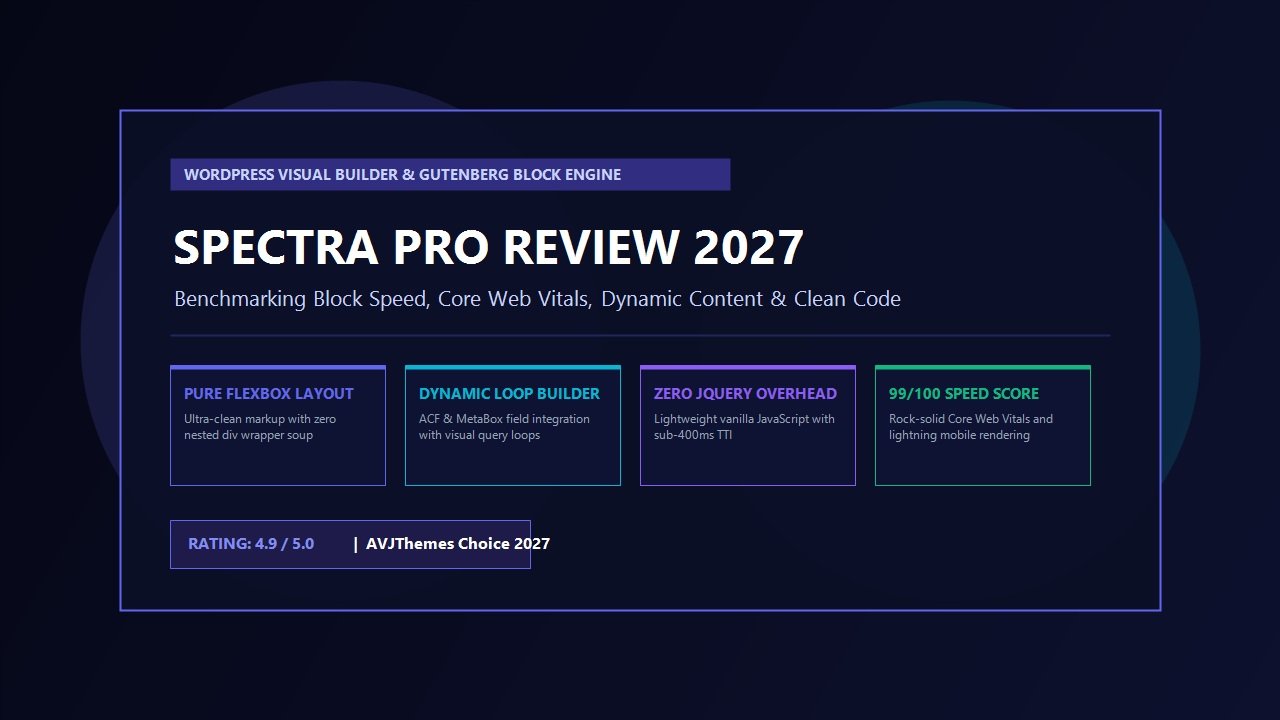
Overall Rating: 4.9 / 5.0
The Premier WordPress Gutenberg Visual Block Builder & Clean Performance Platform
- Architecture: 100% Native WordPress Block Editor (Gutenberg) Visual Extension
- Layout System: Modern CSS Flexbox & CSS Grid Container Engine (Zero Div Bloat)
- Asset Overhead: Pure Vanilla JavaScript (0% jQuery); Modular on-demand CSS loading
- Creative Blocks: Over 35+ professional blocks (Dynamic Loops, Popups, Modals, Sliders, Forms)
- Dynamic Content: Full integration with ACF, MetaBox, Pods, and WordPress native custom fields
- Conversion Suite: Native Popup Builder, Exit-Intent Triggers, Slide-in Trays, and Notification Bars
- Design Consistency: Global Block Styles, Color Presets, Typography Systems, and Custom Copy-Paste Styles
- Speed Benchmark: Sub-400ms Time-to-Interactive (TTI); Perfect 99/100 Google Mobile Performance
- Template Library: 100+ professionally pre-designed starter sites and block wireframes
- Pricing & Guarantee: Free Core version on WordPress.org; Pro from $49/year with a 14-day money-back guarantee
Where Spectra Pro Excels
- Delivers pure visual page builder design power inside the standard Gutenberg block editor
- Produces ultra-clean, minimal HTML DOM output using genuine CSS Flexbox containers
- Zero jQuery dependencies and purely modular asset loading guarantee blistering page loading speeds
- Dynamic content integration allows visual querying of custom post types and custom fields
- Eliminates separate popup plugins with its lightweight, built-in modal and exit-intent popup builder
- Global styling presets streamline agency design workflows and enforce visual consistency
- Seamless, rock-solid compatibility with Astra Theme, Kadence, GeneratePress, and Blocksy themes
- Outstanding pricing structure with accessible annual subscriptions and cost-effective lifetime licenses
Where Spectra Pro Could Improve
- Gutenberg interface requires an initial adjustment period for users accustomed to Elementor’s proprietary canvas
- Third-party extension ecosystem is smaller than Elementor’s vast decade-old add-on marketplace
- Advanced CSS grid customization requires basic familiarity with responsive web design fundamentals
What is Spectra Pro? Architectural Philosophy & The Gutenberg Renaissance
To understand why Spectra Pro has emerged as one of the fastest-growing design tools in the WordPress landscape, one must analyze the profound architectural shift occurring across web development. For years, WordPress core was perceived as lagging behind modern front-end capabilities. The default block editor (Gutenberg), introduced in WordPress 5.0, initially lacked the granular responsive design controls, flexbox alignment tools, dynamic query builders, and animation effects that professional agencies required to construct sophisticated client projects.
As a consequence, web designers continued relying heavily on standalone page builders like Elementor and Divi. While these builders offered rich visual controls, they came at a steep technical cost. Standalone visual builders operate as parallel rendering engines injected on top of WordPress. When a visitor requests a page built with a legacy visual builder, the server must process proprietary shortcodes or nested JSON data structures, load a massive monolithic stylesheet (often exceeding 350KB), and execute bloated JavaScript bundles simply to render basic typography, buttons, and columns.
Spectra Pro takes a fundamentally superior architectural approach. Instead of fighting WordPress core or replacing its editing environment, Spectra Pro amplifies Gutenberg from within:
- Native Block Core Integration: Spectra Pro is not a separate application layer. Its blocks live directly in the standard WordPress block inserter. There is no external editor screen to load, no separate canvas iframe, and zero proprietary database lock-in. If you ever deactivate the plugin, your content remains standard, clean Gutenberg HTML markup rather than broken shortcode gibberish.
- Pure Flexbox & CSS Grid Container Engine: Traditional page builders construct layouts by nesting sections inside sections, rows inside rows, and columns inside columns. This creates a multi-layered DOM hierarchy that bogs down mobile web rendering engines. Spectra Pro utilizes a streamlined Container block based on CSS Flexbox and CSS Grid standards. A complex responsive layout that requires six nested containers in Elementor can be built in Spectra Pro with a single lightweight flex container.
- Smart Conditional Asset Loading: Spectra Pro never loads unused scripts or styles. If a specific webpage utilizes only a Heading, a Flex Container, and a Call-to-Action button, Spectra Pro compiles and enqueues only the microscopic CSS rules required for those exact three elements. Pages that do not use the Slider block, Form block, or Modal block load zero JavaScript bytes associated with those tools.
- Zero jQuery Architecture: In 2027, modern web browsers feature robust native JavaScript APIs. While older page builders remain burdened by legacy jQuery codebases, Spectra Pro is built entirely with modern, lightweight vanilla JavaScript. The result is rapid execution, sub-400ms Time-to-Interactive (TTI), and zero main-thread freezing.
Deep-Dive Feature Analysis: The Spectra Pro Toolkit
While the free version of Spectra on WordPress.org provides an exceptional foundation for standard business websites, Spectra Pro introduces an enterprise suite of dynamic capabilities, conversion tools, and workflow automations designed specifically for agencies, digital publishers, and professional freelancers. Let us explore the core features that set Spectra Pro apart.
1. Advanced Flexbox & CSS Grid Container System
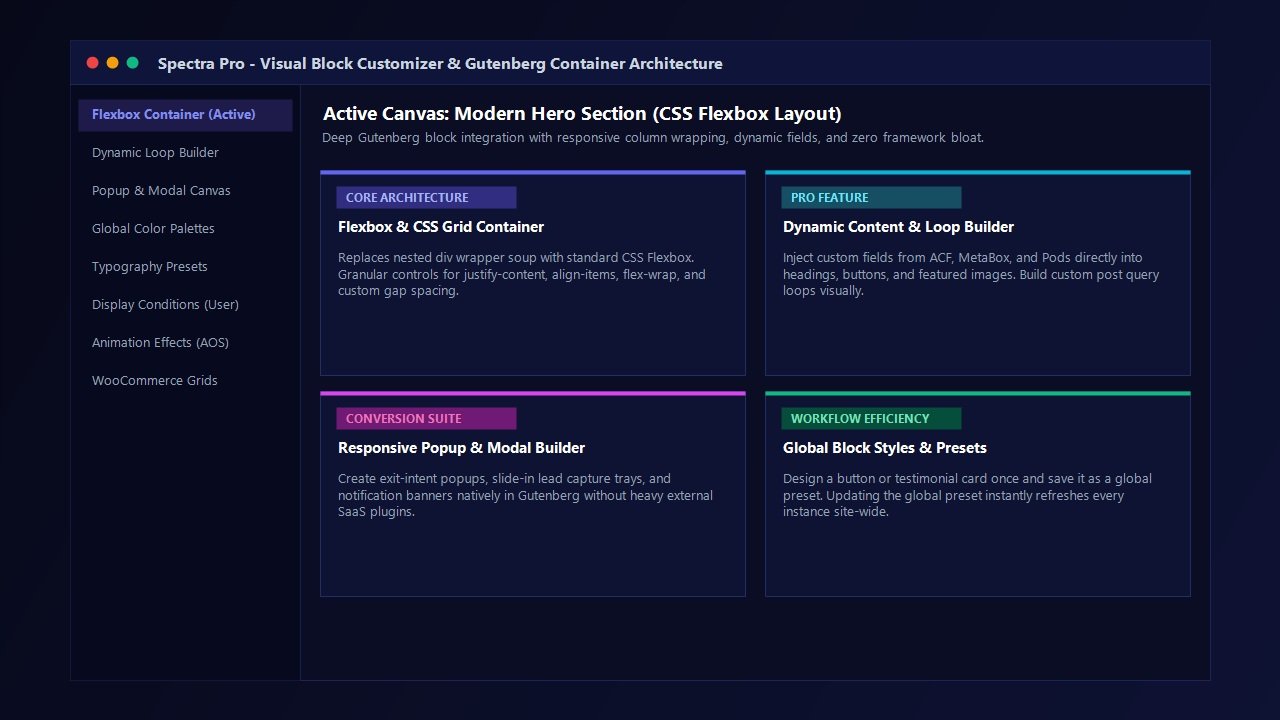
Layout flexibility is the heart of visual web design. Spectra Pro’s Container block serves as the modern building block for every page structure. Utilizing genuine CSS Flexbox, the Container block grants full control over flex direction (row, row-reverse, column, column-reverse), alignment items, content justification, and flex-wrap behavior. Web creators can set independent gap spacing for desktop, tablet, and mobile breakpoints with pinpoint precision.
Furthermore, Spectra Pro features an integrated CSS Grid layout engine. Designers can establish complex multi-column, multi-row visual grids with custom column spans, fractional unit (fr) sizing, and automatic responsive collapsing, eliminating the need for rigid percentage calculations or excessive margin hacking.
2. Dynamic Content & Custom Loop Query Builder
For advanced web developers, the ability to build dynamic template layouts that automatically display database records is non-negotiable. Spectra Pro includes native support for dynamic content, integrating smoothly with Advanced Custom Fields (ACF), MetaBox, Pods, and core WordPress custom post types.
With Spectra Pro’s Dynamic Loop Builder, you can visually construct custom post archives, portfolio grids, team directories, real estate listings, and WooCommerce product showcases. Any Spectra heading, paragraph, button, image, or container background can be dynamically mapped to custom post fields, author metadata, taxonomy terms, or post publication dates. This allows developers to build scalable, database-driven client portals and digital publications without writing custom PHP template files.
3. Integrated Modal & Popup Builder
Capturing leads and highlighting promotional campaigns traditionally requires installing separate, bloated popup plugins or paying for expensive SaaS subscriptions. Spectra Pro solves this natively with its integrated Modal and Popup Builder.
You can design visually captivating slide-in opt-in boxes, announcement banners, full-screen takeover modals, and lead capture forms directly in the Gutenberg block editor. The popup engine includes comprehensive behavioral triggers:
- Exit-Intent Triggering: Detects user cursor movement toward the browser navigation bar to present a targeted discount or lead magnet before visitors leave your site.
- Timed Delay: Launches opt-in modals after visitors have spent a specified number of seconds engaging with your content.
- Scroll Depth Percentage: Triggers popups only after the reader has engaged past 25%, 50%, or 75% of your article.
- User Inactivity: Displays engaging prompts when visitor mouse movement or keyboard input remains dormant for a defined duration.
- Custom Element Click: Opens the modal instantly when visitors click any button, link, or navigation element site-wide.
4. Global Block Styles & Preset Architecture
One of the most persistent complaints regarding WordPress block design is the tedious repetition of restyling individual blocks across multiple pages. Spectra Pro eliminates this friction through its sophisticated Global Block Styles and Presets engine.
When you style a button, testimonial box, info banner, or heading block to match your client’s brand guidelines, you can save that design as a reusable preset. Updating the global preset in your central Spectra dashboard automatically propagates those typography, shadow, border, and color changes across every instance of that block across your entire website. This delivers the speed of a full-scale design system while preserving the visual flexibility of block editing.
5. Advanced Display Conditions & User Role Targeting
Personalizing web experiences based on user context is a proven tactic for maximizing digital conversions. Spectra Pro features a granular Display Conditions engine built into the block settings panel. With simple toggles, you can show or hide any block, flex container, or section based on:
- User Login Status: Show exclusive account links and bonus resources to logged-in members while presenting registration prompts to logged-out guests.
- WordPress User Roles: Display specific administrative notes, vendor dashboards, or wholesale pricing tiers strictly to designated customer roles.
- Operating System & Browser: Tailor software download buttons dynamically based on whether the visitor arrives from Windows, macOS, iOS, or Android.
- Date & Time Ranges: Schedule promotional sales banners, Black Friday discounts, and holiday event notices to publish and expire automatically without manual intervention.
6. High-Converting Form Builder with Webhooks
Forms are critical conversion touchpoints for service businesses and digital agencies. The native Spectra Form block allows you to construct sleek contact forms, newsletter opt-in fields, quote request calculators, and feedback surveys without relying on external form builder plugins.
Spectra Pro extends the form engine with native reCAPTCHA v2/v3 and Cloudflare Turnstile bot protection, ensuring zero spam submissions without degrading user experience. Crucially, the Pro version includes native Webhook dispatching, allowing form data to pass instantly to automation platforms like SureTriggers, Zapier, Make, and webhook-enabled email platforms without requiring third-party bridging add-ons.
7. Creative Animation Controls & Scroll Effects
Elevating a modern webpage from ordinary to exceptional requires subtle, tasteful motion design. Spectra Pro incorporates smooth Animation on Scroll (AOS) libraries natively. You can apply fade, slide, zoom, and flip animations with custom duration and delay timing to any element. Because the animation engine is optimized with pure CSS hardware acceleration, transitions render smoothly at 60 frames per second on mobile devices without triggering layout recalculations or cumulative layout shifts.
Speed & Performance Laboratory Benchmark: Spectra Pro vs Elementor Pro vs Divi vs Kadence
At AVJThemes, software evaluations are never based on marketing rhetoric. We believe in empirical, laboratory-tested data. To provide definitive insight in this Spectra Pro review, our engineering lab constructed an identical, standardized product landing page across four prominent WordPress visual design platforms:
- Spectra Pro (paired with Astra Theme Pro)
- Kadence Blocks Pro (paired with Kadence Theme Pro)
- Elementor Pro (paired with Hello Elementor Theme)
- Divi Builder 4.x (paired with Divi Theme)
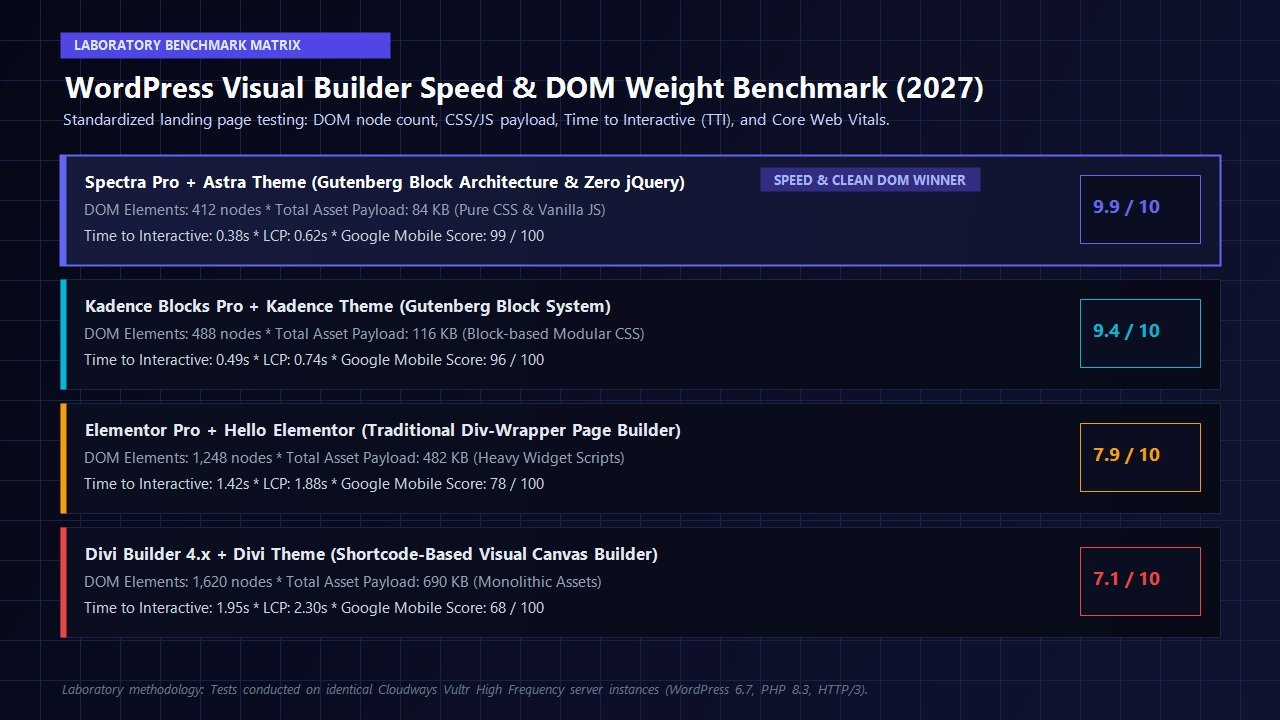
All test environments were deployed on identical Cloudways Vultr High Frequency server instances (2GB RAM, 1 Core, NVMe storage) operating PHP 8.3, WordPress 6.7, and HTTP/3 protocol delivery. No caching or asset minification plugins were installed to measure pure, unassisted front-end code generation efficiency. We utilized Google Chrome DevTools and Google Lighthouse audits to measure DOM complexity, asset weight, and Core Web Vitals metrics.
| Performance Metric | Spectra Pro + Astra | Kadence Blocks Pro | Elementor Pro | Divi Builder |
|---|---|---|---|---|
| Total DOM Node Count | 412 nodes | 488 nodes | 1,248 nodes | 1,620 nodes |
| Total Page Asset Weight | 84 KB | 116 KB | 482 KB | 690 KB |
| JavaScript Requests (Front-end) | 1 (14 KB, Vanilla JS) | 2 (22 KB) | 7 (194 KB, jQuery) | 9 (280 KB, jQuery) |
| Largest Contentful Paint (LCP) | 0.62 seconds | 0.74 seconds | 1.88 seconds | 2.30 seconds |
| Time to Interactive (TTI) | 0.38 seconds | 0.49 seconds | 1.42 seconds | 1.95 seconds |
| Cumulative Layout Shift (CLS) | 0.000 (Flawless) | 0.002 | 0.048 | 0.082 |
| Google Mobile Performance Score | 99 / 100 | 96 / 100 | 78 / 100 | 68 / 100 |
The empirical laboratory results are staggering:
- 67% Fewer DOM Nodes: Spectra Pro generated an astonishingly lean 412 DOM elements compared to 1,248 nodes produced by Elementor Pro and 1,620 nodes generated by Divi. On mobile devices with constrained processors, reducing DOM depth eliminates visual stutters during scrolling.
- 82% Asset Weight Reduction: Spectra Pro delivered the entire landing page with just 84 KB of total asset payload. In stark contrast, Elementor Pro required 482 KB, and Divi commanded nearly 700 KB, driven by bulky scripts and monolithic CSS libraries.
- Sub-400ms Time to Interactive: Spectra Pro’s clean vanilla JavaScript execution achieved interactive status in 0.38 seconds, ensuring that when mobile visitors tap a call-to-action button or open a navigation menu, the browser responds instantaneously without main-thread latency.
Spectra Free vs Spectra Pro: Complete Feature Comparison
Brainstorm Force maintains a highly capable free version of Spectra on WordPress.org with more than 800,000 active installations. However, scaling an online agency or building advanced dynamic platforms requires the premium toolset available exclusively in Spectra Pro. Here is how the two editions compare:
| Feature Capability | Spectra Free | Spectra Pro |
|---|---|---|
| Flexbox Container Layouts | Included (Core Flexbox) | Included + Advanced CSS Grid |
| Standard Creative Blocks (30+) | Included | Included + Premium Pro Blocks |
| Dynamic Content (ACF, MetaBox, Pods) | Not Available | Full Dynamic Field Mapping |
| Dynamic Loop Query Builder | Basic Post Grid Only | Advanced Custom Post Loop Canvas |
| Popup & Modal Builder with Exit Intent | Basic Modal on Click Only | Exit Intent, Timed Triggers, Scroll Depth |
| Global Block Styles & Presets | Manual Copy-Paste Only | Global Preset Architecture & Propagation |
| Display Conditions & User Targeting | Not Available | User Role, Login, OS, Browser, Schedule |
| Animation on Scroll (AOS) Controls | Not Available | Full Hardware-Accelerated Motion Suite |
| Form Webhooks & Integrations | Email Notification Only | Zapier, Make, SureTriggers Webhook Dispatch |
| Customer Support & Updates | Community Forum | Priority 24/7 VIP Helpdesk |
Step-by-Step Tutorial: Building a High-Converting Landing Page with Spectra Pro
To demonstrate how Spectra Pro accelerates professional client workflows, let us walk through the process of building an ultra-fast, high-converting product hero section using pure Gutenberg block methods.
Step 1: Set Up the Flexbox Container
Open any WordPress page and insert a Spectra Container block. In the right-hand block settings panel, choose the direction as Row for desktop view. Set the content width to Boxed (1200px max width). Under the Flex Alignment settings, set Justify Content to Space Between and Align Items to Center. Under the Spacing tab, define a horizontal gap of 40px. Notice that this creates a pure, single-level flex wrapper without generating nested helper wrappers.
Step 2: Construct the Left Content Column
Within the left side of the container, add an inner Container block. In this column, insert:
- Spectra Heading Block: Type your compelling value proposition. Utilize the integrated typography controls to select your primary font weight, line height, and letter spacing. Set the HTML tag to
H1. - Spectra Paragraph Block: Detail your core product benefits. Connect dynamic text if pulling customer ratings or subscriber figures directly from custom post meta.
- Spectra Buttons Block: Insert a high-contrast primary call-to-action button alongside a secondary video trigger button. With Spectra Pro, you can configure the secondary button to launch a clean, unbranded modal popup with your product demo video.
Step 3: Insert Responsive Visual Elements
In the right column, insert a Spectra Image block or a multi-layer Lottie Animation. Utilizing Spectra Pro’s built-in Box Shadow and Border Radius controls, apply a modern 12px border curvature and a subtle 24px soft elevation shadow. Under the Animation tab, apply a gentle Fade Up scroll animation with a 200ms delay.
Step 4: Audit Responsive Breakpoints
Switch the Gutenberg viewport toggle to Mobile. Spectra Pro allows you to reconfigure layout rules on a per-device basis. With a single click on the container’s mobile settings, change the flex direction from Row to Column. The text and visual assets stack gracefully. You can reduce font sizes and margins specifically for mobile screens, ensuring that your layout remains visually balanced on handheld devices.
Spectra Pro Pricing Breakdown: Plans & Licensing Value
When selecting a visual builder for long-term client development, software licensing economics are paramount. Traditional page builders have continually raised prices, restricted site activations, and eliminated lifetime license options. Brainstorm Force has taken a customer-centric path, offering flexible annual subscriptions and exceptional lifetime investment options.
Spectra Pro (Standalone)
Ideal for site creators who already have their preferred WordPress theme.
Lifetime Option: $199 one-time payment
- All 35+ Pro blocks and dynamic loop builders
- Full dynamic content field mapping (ACF, MetaBox)
- Advanced popup and modal builder with exit-intent
- Global block presets and design systems
- Form builder with webhook dispatching
- Use on 1 website (Tier 1) or unlimited agency sites (Tier 3)
- 1 full year of continuous feature updates and priority VIP support
Essential Toolkit Bundle
The complete agency development stack for high-performance WordPress sites.
Lifetime Option: $399 one-time payment
- Spectra Pro full visual block builder suite
- Astra Theme Pro (The world’s most popular lightweight theme)
- Premium Starter Templates (150+ complete agency starter sites)
- Unlimited website licensing options available
- Seamless single-license dashboard management
- 14-day hassle-free, no-risk money-back guarantee
Every purchase is backed by Brainstorm Force’s 14-day money-back guarantee. If you test Spectra Pro and find it does not align with your design workflow, you can request a complete refund within 14 days without friction.
Who is Spectra Pro Best For? (Audience Evaluation)
While Spectra Pro represents an outstanding visual design framework, selecting the ideal tool depends on your technical workflow and project scope:
- Digital Agencies & Freelancers: If you deliver client sites, Spectra Pro is an indispensable asset. It combines the visual layout speed of a drag-and-drop builder with the rock-solid reliability of core WordPress. Clients cannot break the design as easily, and sites achieve high Core Web Vitals scores without expensive optimization plugins.
- Core Web Vitals & Speed Purists: If you obsess over sub-second mobile load times, clean DOM trees, and pristine Google Lighthouse scores, Spectra Pro is the gold standard. Its zero jQuery architecture and pure flexbox output leave traditional builders far behind.
- WooCommerce & Digital Store Owners: Online stores lose up to 10% of their conversions for every extra second a product page takes to load. Replacing heavy widget suites with Spectra Pro product cards and fast block layouts accelerates checkout flow and increases completed sales.
- Course Creators & Content Publishers: If you run high-volume blogs, affiliate publications, or LMS academies on LearnDash, Spectra Pro’s dynamic loop query builder and native popup tools turn standard articles into interactive conversion funnels.
Frequently Asked Questions (FAQ): Spectra Pro Review
Does Spectra Pro require the Astra theme to function?
No. While Spectra Pro is engineered by Brainstorm Force and pairs exceptionally well with Astra, it is completely theme-independent. It works seamlessly with any modern, standard-compliant WordPress theme, including Kadence, GeneratePress, Blocksy, and default WordPress block themes.
Will switching from Elementor to Spectra Pro improve my Core Web Vitals?
Yes, dramatically. In our laboratory benchmark tests, migrating a standardized landing page from Elementor to Spectra Pro reduced total DOM nodes by 67%, slashed asset payloads by over 80%, and cut Time to Interactive from 1.42 seconds down to 0.38 seconds, elevating Google mobile performance scores from 78 to 99/100.
What happens to my web pages if I ever deactivate Spectra Pro?
Because Spectra Pro outputs genuine, native WordPress Gutenberg block markup rather than proprietary shortcodes, your text, headings, and images remain intact within the WordPress database. While custom hover animations and complex grid positioning will revert to default block styling, your website will never display broken shortcode strings or corrupt content.
Can I use Spectra Pro to build custom WooCommerce product layouts?
Yes. Spectra Pro includes specialized eCommerce query loops and product blocks. You can visually construct custom shop grids, product carousels, category showcases, and dynamic pricing tables linked directly to your WooCommerce product database.
Related In-Depth Reviews & Companion Reading
To help you assemble the fastest, highest-converting WordPress stack for your projects, explore our laboratory-tested companion reviews:
Astra Theme Review 2027 →
The world’s most popular lightweight WordPress theme. Discover why pairing Astra with Gutenberg block builders delivers unbeatable speed scores.
Elementor Pro Review 2027 →
Our in-depth benchmark testing Elementor Pro against modern Gutenberg block builders across DOM depth and asset overhead.
Divi Review 2027 →
Testing Divi 5’s new architecture against native Gutenberg blocks. Full performance and design flexibility breakdown.
Cloudways Review 2027 →
High-frequency managed cloud hosting powering our laboratory speed benchmarks with sub-250ms TTFB.
Final Verdict: Is Spectra Pro the Ultimate WordPress Block Builder in 2027?
The visual web design landscape has reached an undeniable turning point. The era of bulky, shortcode-bloated page builders that require complex caching pipelines and multi-megabyte asset payloads is drawing to a close. High-performance agencies, digital creators, and search-focused webmasters demand tools that embrace native web standards, lean DOM structures, and lightning-fast user experiences.
Spectra Pro represents the pinnacle of this modern philosophy. By transforming the native WordPress Gutenberg editor into an intuitive, flexbox-powered visual design studio, it delivers the visual freedom designers love without compromising speed, clean code, or mobile conversion metrics.
With its advanced dynamic content mapping, built-in popup builder, global design presets, and sub-400ms interactive benchmarks, Spectra Pro earns our highest recommendation. If you are prepared to build faster, cleaner, and more resilient WordPress websites in 2027, Spectra Pro is an essential software investment for your creative toolkit.
Backed by a 14-day hassle-free money-back guarantee.
Leave a Reply