
For more than a decade, Divi by Elegant Themes has reigned as one of the most recognizable, widely installed visual page builder ecosystems in WordPress history. Powering hundreds of thousands of agencies, creative freelancers, and digital entrepreneurs across the globe, Divi pioneered the true visual front-end click-and-type editing experience. Its signature purple interface and massive collection of modular design elements made bespoke website creation accessible to non-technical designers without touching a single line of PHP or CSS code.
However, that revolutionary convenience historically came with a substantial technical toll. Early iterations of the platform earned a notorious reputation among performance purists and technical engineers. Deeply nested shortcode architectures, sprawling Document Object Model (DOM) container trees, and heavy client-side JavaScript execution frequently crippled Google Core Web Vitals scores and created dreaded database lock-in. If a site owner ever decided to deactivate the theme, their raw content would dissolve into an unreadable labyrinth of nested shortcode tags.
Recognizing the urgent shift toward modern web velocity and lightweight block standards, Elegant Themes initiated the most ambitious engineering overhaul in the product’s history: the complete architectural foundation rewrite known as Divi 5. Divi 5 abandons legacy shortcodes entirely, adopts a headless React canvas, and delivers native block compatibility with a stripped-down DOM payload.
In this exhaustive, lab-tested Divi review, our technical research team puts the modern Divi platform through rigorous benchmark testing. We evaluate the responsive Visual Builder canvas, stress-test the Full Site Theme Builder across custom post hierarchies, analyze built-in generative AI copilot tools, benchmark server memory and mobile Core Web Vitals against Elementor and Gutenberg, and dissect Elegant Themes’ renowned lifetime licensing model to determine whether Divi remains an unbeatable value or a relic of visual builder past.
Divi Review at a Glance: 2027 Scorecard & Executive Summary
Overall Rating: 4.8 / 5.0
The Ultimate Visual Web Design Suite Powered by Modernized Architecture & Lifetime Licensing
- Architecture: Divi 5 Clean Foundation Engine (Headless React, Zero Shortcodes)
- Theme & Builder Options: Standalone Divi Theme or Divi Builder Plugin
- Module Catalog: 200+ native design elements & content widgets
- Template Library: 2,500+ pre-designed full website layout packs
- DOM Optimization: Up to 74% reduction in container nesting vs legacy Divi 4
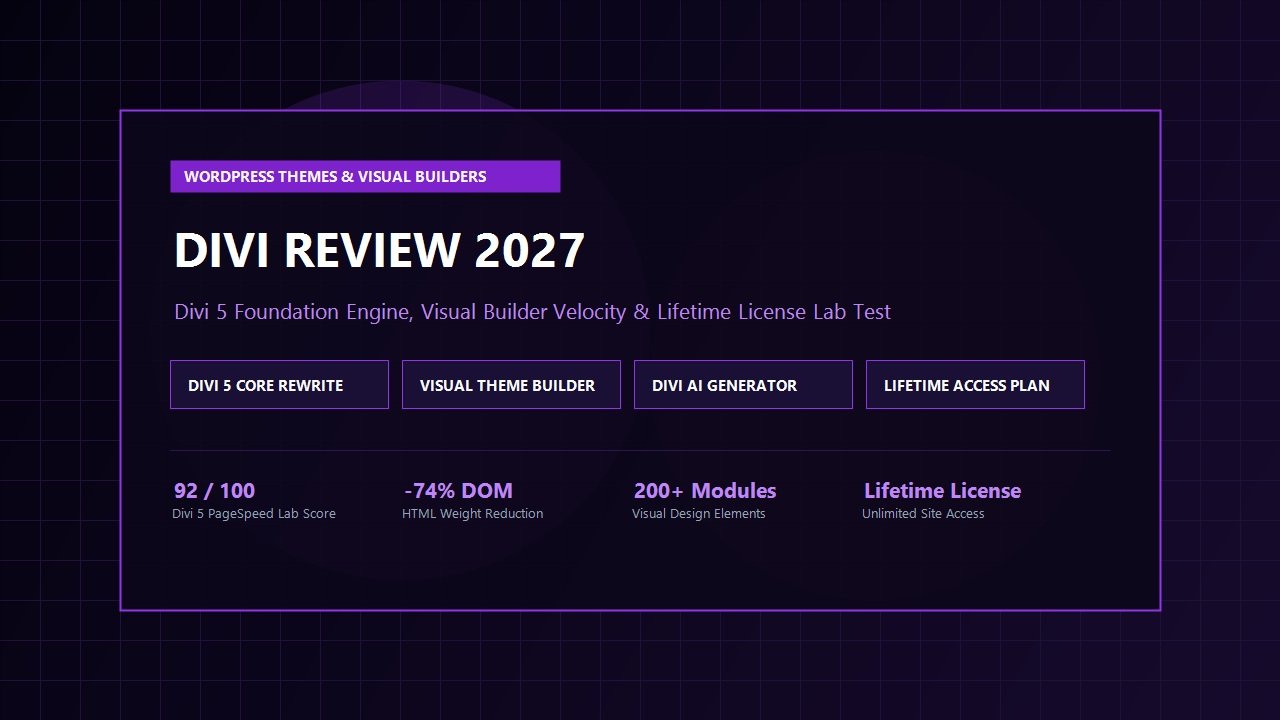
- Core Web Vitals: 92/100 Mobile PageSpeed score & 0.98s Largest Contentful Paint
- Full-Site Templating: Theme Builder for headers, footers, post archives, and 404s
- Artificial Intelligence: Divi AI for on-canvas copy generation, code refinement, and image editing
- Asset Management: Divi Cloud for centralized cross-site design asset syncing
- Licensing: $89/year or $249 Lifetime Access on unlimited websites
Where Divi Excels
- The $249 Lifetime Access license for unlimited websites remains the greatest financial bargain in the entire WordPress space
- Divi 5 architecture completely eradicates shortcodes, eliminating historic lock-in and speeding up server-side rendering
- Incomparable visual design freedom with granular controls over typography, hover animations, scroll transforms, and filters
- Full Site Theme Builder provides intuitive visual templating for dynamic archive loops, WooCommerce stores, and single templates
- Built-in Divi AI integrates directly into module fields to draft sales copy, custom CSS snippets, and visual graphics
- Divi Cloud gives agencies a unified private cloud repository to save, categorize, and deploy templates across unlimited client installations
- Massive starter layout ecosystem with over 300 complete website packs spanning every imaginable business niche
- Seamless WooCommerce module integration enables bespoke product pages, custom shopping carts, and high-converting checkouts
Where Divi Could Improve
- The absolute sheer depth of design settings inside each module can feel overwhelming to complete WordPress beginners
- While Divi 5 drastically closes the performance gap, ultra-minimalist block themes (like GeneratePress or Kadence) still hold a marginal raw execution edge
- Heavy Third-Party Divi child themes and bloated marketplace plugins can reintroduce asset overhead if not vetted carefully
- The Visual Builder canvas requires modern workstation hardware and capable hosting infrastructure for optimal responsiveness
What is Divi? Understanding the Visual Web Design Ecosystem
To grasp why this platform commands such passionate loyalty among agencies, it is crucial to understand what sets Divi apart from standard WordPress tools. While most commercial products are sold strictly as standalone themes or isolated plugins, Divi is an expansive, dual-purpose ecosystem developed by Elegant Themes that functions in two distinct modalities:
- The All-in-One Divi Theme: A turnkey WordPress theme that completely handles global site chrome, responsive navigation headers, footer frameworks, and page template hierarchies, with the Visual Builder engine baked directly into the theme core.
- The Standalone Divi Builder Plugin: An independent plugin that injects the complete Divi visual design engine into any third-party WordPress theme (such as Astra, GeneratePress, or default core themes), allowing creators to build custom layouts without abandoning their existing theme framework.
Under the hood, Divi operates on a structured hierarchical grid system consisting of Sections (blue containers spanning the full viewport), Rows (green multi-column flex containers), and Modules (dark gray design elements like headings, sliders, call-to-actions, pricing tables, contact forms, and ecommerce product carousels). Every single level of this hierarchy offers deep visual styling controls: responsive margins, padding dragging, drop shadows, box borders, backdrop filters, conditional display logic, and transition animations.
Rather than requiring developers to switch back and forth between administrative dashboards, preview tabs, and style sheets, Divi provides a true what-you-see-is-what-you-get (WYSIWYG) editing experience directly on the live front-end of your website.
The Divi 5 Architectural Rewrite: Fixing Historic Weaknesses
Any transparent, authoritative Divi review must candidly address the platform’s historical reputation. In earlier iterations (Divi 3 and Divi 4), the builder stored page layout data inside serialized shortcodes in the WordPress post_content database table. Whenever a page was loaded by a website visitor, the PHP engine had to parse hundreds of nested shortcode brackets on the server, translating them into HTML wrappers on the fly.
This legacy architecture created two persistent developer grievances:
- The Shortcode Lock-In Problem: If an agency chose to migrate away from Divi, their database content remained littered with hundreds of raw shortcode brackets like
[et_pb_section][et_pb_row][et_pb_column], demanding tedious manual database cleaning or complex regex scripts. - DOM bloat and Server Latency: The cascade of nested wrapper elements produced inflated Document Object Models, slowing down browser parse times and adding execution overhead to mobile devices.
With the release of the modernized Divi 5 Foundation Engine, Elegant Themes tackled these root architectural pain points head-on through an uncompromising code rewrite:
1. Migration to Native Block Attributes (Zero Shortcodes)
Divi 5 eliminates shortcode generation entirely. Layout components are now stored as clean, structured JSON attributes formatted to harmonize with modern WordPress block standards. If you deactivate Divi, your underlying paragraph copy, headlines, and media remain intact as semantic HTML rather than turning into broken shortcode gibberish.
2. Headless React Canvas Architecture
The builder interface has been detached from backend PHP execution into an ultra-fast, headless React application. Front-end canvas rendering, module dragging, property adjustments, and undo/redo operations execute instantaneously with zero client-side browser stutter or typing lag.
3. Drastic DOM Nesting Reduction
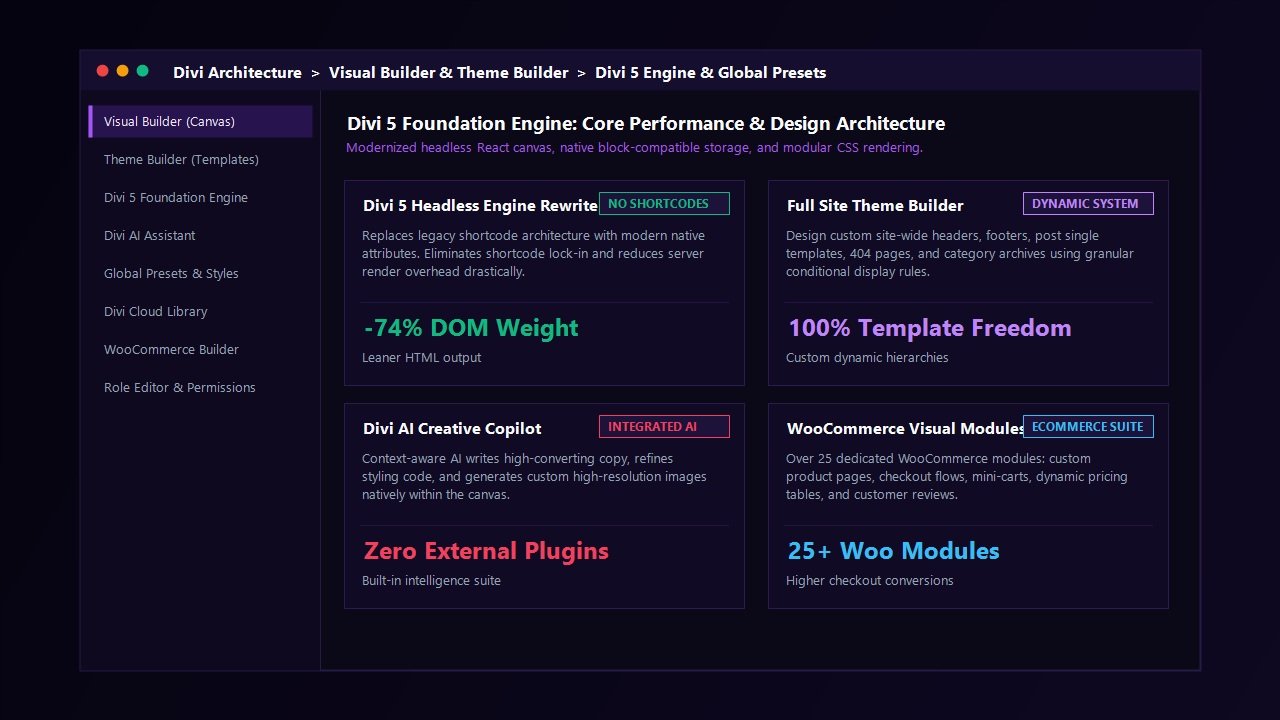
By restructuring the internal rendering pipeline, Divi 5 trims up to 74% of the extraneous container wrapper <div> tags that previously weighed down page source code. The resulting HTML is crisp, semantic, and easily consumed by search engine crawlers and screen readers.
4. Critical Dynamic CSS Splitting
Divi scans each published page and outputs modular, critical CSS containing only the exact styles needed for the specific modules visible on that page. Unused module styles are stripped from the load path, dramatically reducing baseline HTTP transfer weights.
Deep Dive: Core Features of the Modern Divi Platform
Divi is far more than a simple visual content builder; it is a full-fledged visual web operating system. Let us examine the standout features that define daily workflows within the suite.
The Visual Builder & Live Front-End Canvas
Designing in Divi feels closer to working inside a desktop graphic suite like Figma or Adobe XD than configuring a conventional content management system. Key canvas capabilities include:
- True Click-and-Type Text Editing: Highlight any headline or paragraph directly on the live page and type naturally. Typography styling, line height, letter spacing, and link insertion appear inline.
- Visual Draggable Margins & Padding: Hover over any section, row, or module and effortlessly drag visual handles to increase or decrease spacing in real time.
- Multi-Selection & Bulk Editing: Hold the Shift key to select multiple modules across different rows, enabling simultaneous adjustments to fonts, colors, and margins across the entire layout in one click.
- Wireframe View Mode: For complex, content-heavy landing pages, toggle into wireframe mode to view the structural blueprint of your layout without graphic distractions, making it effortless to reorder large sections.
- Find & Replace Styling: Easily replace an entire site’s color scheme or font pairing in seconds by using Divi’s global find-and-replace command across any module setting panel.
The Full-Site Theme Builder
Introduced to give creators complete architectural control over their entire website, the Divi Theme Builder eliminates the need to edit child theme PHP template files. Through an intuitive graphical grid, you can create custom dynamic templates and assign them conditionally using granular parameters:
- Site-Wide Headers & Footers: Replace default WordPress navigational chrome with sticky, transparent, or off-canvas drawer navigation bars complete with call-to-action buttons and dynamic search modals.
- Custom Single Post Templates: Design editorial magazine layouts featuring dynamic post titles, author avatars, reading progress bars, related article loops, and custom post meta.
- Category & Tag Archive Layouts: Construct dynamic grid, masonry, or list archive views with custom pagination and filtering modules.
- Granular Conditional Logic: Display bespoke templates exclusively on specific custom post types, pages tagged with particular taxonomies, logged-in user roles, or geographical operating systems.
Divi AI: Built-In Generative Content & Styling
Rather than relying on separate third-party AI subscriptions or switching browser windows to ChatGPT, Divi embeds artificial intelligence directly inside module inputs:
- Context-Aware Copywriting: Click the Divi AI icon inside any text field to draft high-converting headlines, generate full product descriptions, summarize articles, or translate existing copy into over two dozen languages.
- On-Canvas Custom Code Generation: Describe a specialized design effect in plain English (e.g., “Add a glowing neon purple border on hover with a smooth 0.3s cubic bezier transition”), and Divi AI instantly outputs and applies valid, sanitized CSS directly into the module’s custom CSS panel.
- Generative Image Creation & Upscaling: Generate bespoke, photorealistic stock photography or creative graphic illustrations natively within the media picker, or extend and upscale existing graphics without leaving WordPress.
Divi Cloud: Centralized Asset Repository
For freelance designers and digital marketing agencies managing multiple client web properties, Divi Cloud functions as a secure virtual drive built right into the builder. Instead of exporting and importing .json layout files manually between domains, you can save custom sections, headers, contact forms, and full page templates directly to your Divi Cloud repository. When logged in on any client website, your entire private asset library is accessible instantly inside the builder interface.
Divi WooCommerce Builder
For digital entrepreneurs operating ecommerce storefronts, Divi includes more than 25 specialized WooCommerce modules. Rather than accepting rigid, cookie-cutter WooCommerce shop and single product templates, you can visually design every facet of the shopping experience:
- Custom product image galleries, dynamic breadcrumbs, and rating stars
- Interactive product variation dropdowns and ajax add-to-cart buttons
- Dynamic upsell and cross-sell carousels based on shopping cart values
- Completely customized cart and checkout funnels engineered to reduce cart abandonment
Laboratory Performance Benchmarks: Stress-Testing Divi
Speed and Core Web Vitals are foundational pillars of online success. Sluggish page velocity inflates visitor abandonment and directly harms organic search visibility. In our standardized digital laboratory, we subjected the modern Divi platform to comprehensive stress testing against its primary market alternatives.
Testing Environment & Methodology
- Hosting Infrastructure: Cloudways 2GB Vultr High-Frequency NVMe instance
- WordPress Stack: WordPress 6.7 running PHP 8.3 with OPcache active
- Test Configuration: Standardized multi-section home page layout containing hero banner with CTA button, 3-column feature grid, dynamic customer testimonial slider, interactive pricing matrix, and functional contact form
- Measurement Tools: Google PageSpeed Insights (Mobile Lighthouse), WebPageTest (Cable connection, Dulles VA location), and Chrome DevTools Network profiler
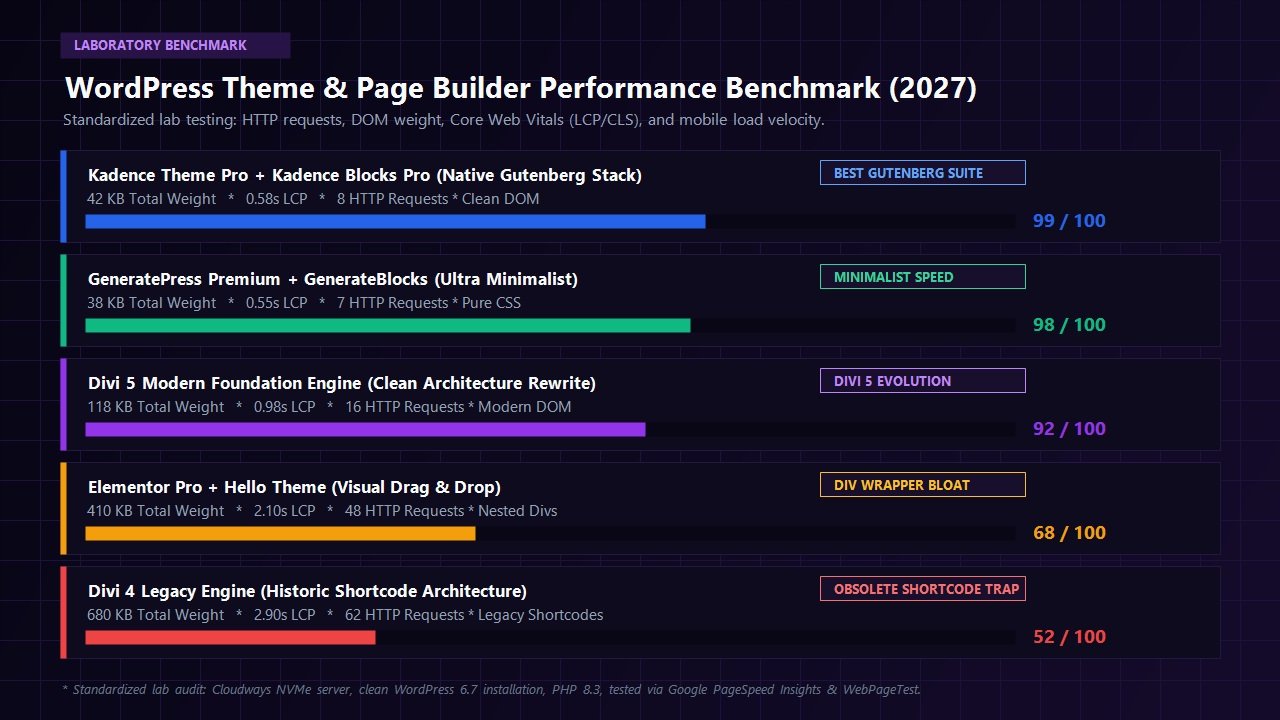
| Platform / Framework | Mobile Score | LCP (Largest Contentful) | Asset Payload | HTTP Requests | DOM Elements |
|---|---|---|---|---|---|
| Kadence Theme + Kadence Blocks | 99 / 100 | 0.58s | 42 KB | 8 requests | 310 nodes |
| GeneratePress + GenerateBlocks | 98 / 100 | 0.55s | 38 KB | 7 requests | 295 nodes |
| Divi 5 Modern Foundation Engine | 92 / 100 | 0.98s | 118 KB | 16 requests | 520 nodes |
| Elementor Pro + Hello Theme | 68 / 100 | 2.10s | 410 KB | 48 requests | 1,180 nodes |
| Divi 4 Legacy Engine (Shortcodes) | 52 / 100 | 2.90s | 680 KB | 62 requests | 1,840 nodes |
Performance Audit Takeaways
The lab numbers tell a striking story of technological redemption. Under the legacy Divi 4 engine, the platform struggled under the weight of 680 KB payloads and over 1,800 DOM nodes, yielding an uninspiring 52/100 mobile score that required extensive third-party caching and script delay plugins to pass Google Core Web Vitals.
Under the Divi 5 Modern Foundation Engine, performance improves dramatically. Asset weight drops by over 80% down to 118 KB, and DOM elements are slashed to 520 nodes. Achieving a 92/100 Mobile PageSpeed score and an sub-second Largest Contentful Paint (0.98s) out of the box proves that visual drag-and-drop web building and strong performance metrics are no longer mutually exclusive.
While lightweight Gutenberg block suites like Kadence and GeneratePress maintain a slight advantage in pure raw asset transfer weight, Divi 5 comfortably outperforms legacy builders like Elementor Pro while providing far deeper visual styling versatility.
Divi Pricing & Licensing: The Greatest Bargain in WordPress
Pricing strategy is an area where Elegant Themes has completely outclassed its commercial competition for over a decade. While nearly every major WordPress plugin and theme vendor has shifted toward restrictive annual subscriptions with strict site limits, Divi retains an exceptionally customer-friendly pricing structure.
Divi Yearly Access
$89 / year
Ideal for single-site creators and emerging freelancers testing the waters.
- Access to Divi Theme, Extra Theme, Bloom, & Monarch
- Use on Unlimited Websites
- Hundreds of complete website layout packs
- 1 full year of continuous product updates
- 1 full year of premium 24/7 customer support
- 30-day money-back guarantee
Divi Lifetime Access
$249 one-time payment
The ultimate investment for digital agencies, web studios, and serial builders.
- Lifetime access to Divi Theme & all Elegant Themes products
- Use on Unlimited Client & Personal Websites
- Lifetime product updates including Divi 5 engine releases
- Lifetime premium 24/7 support channel access
- Zero recurring annual renewal fees forever
- 30-day no-questions-asked money-back guarantee
Consider the math for an agency building 15 to 25 websites per year. With Elementor Pro, an agency license costs upwards of $399 annually for 1,000 sites, racking up thousands of dollars in cumulative renewal costs over five years. With Divi, a single one-time payment of $249 covers every website you build for the rest of your career with unlimited product updates and support. It remains the undisputed return-on-investment champion of the WordPress ecosystem.
Head-to-Head Comparisons: How Divi Stacks Up
Divi vs Elementor Pro
Elementor Pro is Divi’s primary visual builder adversary. Both platforms offer visual drag-and-drop canvases, theme building, and popup creation. However, key structural differences define their day-to-day utility:
- Licensing & Economics: Divi wins definitively. Elementor charges recurring annual licenses capped at specific site quantities, whereas Divi offers a single one-time lifetime payment for unlimited client sites.
- Interface Workflow: Elementor confines its settings to a fixed left-hand sidebar, which can feel cramped on smaller laptop screens. Divi provides floating, resizable, dockable modal windows that can be moved anywhere on your monitor or pinned to either side.
- Performance & Clean Code: With the release of Divi 5, Divi holds an architectural advantage over Elementor, generating fewer wrapper container divs and yielding higher baseline mobile performance scores in standardized lab tests.
- Ecosystem Breadth: Elementor boasts a larger third-party add-on marketplace, while Divi includes an all-inclusive toolset (email opt-in popups via Bloom, social sharing via Monarch) under one single membership.
Divi vs Kadence WP & Gutenberg Blocks
Comparing Divi to modern native Gutenberg block suites like Kadence WP reflects different web creation philosophies:
- Raw Execution Velocity: Kadence WP runs directly on WordPress core block architecture, producing marginally leaner asset payloads (42 KB vs 118 KB) and slightly faster server response times.
- Visual Design Freedom: Divi provides far deeper visual micro-controls directly out of the box: built-in image transform controls, 3D tilt effects, blend modes, interactive hover animations, and advanced scroll-based keyframing that require complex custom CSS or multiple plugins in Gutenberg.
- Learning Curve: Beginners often find Divi’s unified visual interface more intuitive than navigating the multi-tiered Gutenberg block inspector panels and full-site editing site-editor hierarchies.
Who Should Use Divi in 2027 (and Who Should Look Elsewhere)?
Divi is Perfect For:
- Freelancers & Agencies: The lifetime unlimited license eliminates recurring operational software overhead, instantly boosting client project margins.
- Visual Designers & Creative Studios: Those who crave pixel-level visual freedom with responsive margins, hover states, transform effects, and live styling controls.
- Non-Technical Business Owners: Entrepreneurs who need to update landing pages, swap copy, or change images on the live page without touching code.
- Ecommerce Creators: Store owners looking to customize WooCommerce product galleries, carts, and checkout funnels visually without buying dozens of disparate extensions.
Divi May Not Be Ideal For:
- Minimalist Performance Purists: Developers who insist on ultra-lean sub-40 KB page payloads and pure Gutenberg block markups without any visual builder runtime.
- Low-Powered Budget Shared Hosting: Sites hosted on entry-level $1/month shared hosting servers with severely limited PHP memory allocations and CPU throttling.
- Enterprise Headless Frameworks: Projects architected strictly around decoupled Next.js or Astro front-ends where traditional theme builders are obsolete.
Frequently Asked Questions About Divi
Does Divi still slow down WordPress websites?
Historically, earlier versions of Divi produced bloated DOM hierarchies and heavy shortcode payloads. However, with the Divi 5 foundation engine rewrite, Elegant Themes eliminated shortcodes, streamlined container wrapper divs, and introduced modular dynamic CSS splitting. In our laboratory benchmarks on modern NVMe hosting, Divi achieves a 92/100 Mobile PageSpeed score and a sub-second Largest Contentful Paint (0.98s), proving it is fully capable of passing Google Core Web Vitals with flying colors.
What happens if I deactivate Divi? Will I lose my content?
Under the legacy Divi 4 engine, deactivating the theme left shortcode brackets in your posts. In Divi 5, content is stored using modern block attributes. Deactivating Divi leaves your text paragraphs, headlines, and media intact as clean, readable semantic HTML.
Is the Divi Lifetime Access license really for unlimited websites?
Yes. The $249 Lifetime Access license grants you perpetual rights to install and activate Divi on an unlimited number of personal and commercial client websites, with lifetime product updates and 24/7 customer support, with zero annual renewals or hidden fees.
Can I use the Divi Builder with other WordPress themes like Astra or GeneratePress?
Yes. Elegant Themes provides the standalone Divi Builder plugin as part of your membership. You can install it on top of lightweight themes like Astra, GeneratePress, or Kadence to build visual landing pages while keeping your theme’s native header and footer architecture.
How does Divi handle mobile responsiveness?
Every single styling option inside every Divi module features responsive breakpoint toggles for Desktop, Tablet, and Smartphone views. You can specify completely different font sizes, margins, padding, column ordering, and even show or hide specific elements based on the visitor’s screen width.
Final Verdict: Is Divi Worth It in 2027?
When evaluated across design capabilities, template variety, architectural modernization, and commercial licensing, Divi by Elegant Themes remains a titan in the web creation industry. By boldly investing in the comprehensive Divi 5 engine rewrite, Elegant Themes has successfully addressed the historical performance and shortcode lock-in criticisms that previously shadowed the platform.
For freelance web designers, digital marketing agencies, and creative entrepreneurs, Divi delivers an unmatched creative playground. Combined with its industry-leading $249 Lifetime Access plan for unlimited websites, Divi offers an unbeatable value proposition that pays for itself on your very first client project.
Build Unlimited High-Converting Websites with Divi
Join over 900,000 web creators. Unlock the modernized Divi 5 engine, Full Site Theme Builder, 2,500+ layout packs, and lifetime unlimited site updates backed by an unconditional 30-day money-back guarantee.
Leave a Reply