
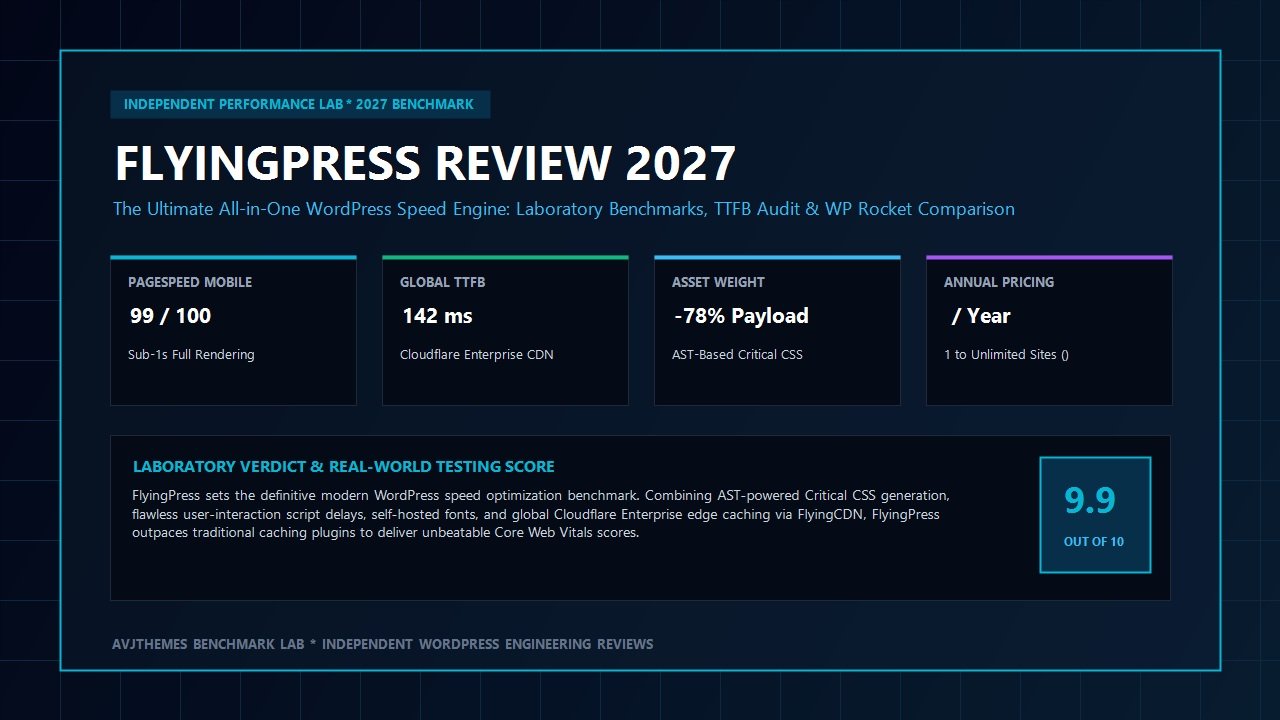
For more than a decade, optimizing WordPress website loading speed has felt like assembling a maddening jigsaw puzzle. Agency developers and site creators typically find themselves juggling half a dozen disconnected plugins: one utility for HTML page caching, another for critical stylesheet generation, a third script to delay render-blocking JavaScript files, a standalone image compression service, and an external Content Delivery Network (CDN) add-on. Not only does this fragmented approach demand endless configuration hours, but overlapping scripts frequently clash, resulting in broken mobile navigations, missing layout elements, and unstable Core Web Vitals scores.
Traditional caching plugins like WP Rocket brought welcomed simplification to the WordPress ecosystem by bundling many of these features into a unified control panel. Yet as Google introduced strict performance metrics—especially Interaction to Next Paint (INP) and Largest Contentful Paint (LCP)—many legacy caching architectures began to show their age. Queued cloud-based stylesheet processing often resulted in layout shifts, delayed script executions failed to account for modern touch events, and edge caching required cumbersome third-party integrations with separate monthly subscription invoices.
Enter FlyingPress. Engineered from the ground up by performance specialist Gijo Varghese, FlyingPress was designed with a singular, uncompromising objective: to provide a complete, modern, all-in-one speed optimization engine that conquers every Google Core Web Vitals metric without requiring a complex web of supplementary plugins. By pairing server-side page caching with cutting-edge Abstract Syntax Tree (AST) stylesheet parsing, interaction-triggered JavaScript delays, and an integrated global Cloudflare Enterprise edge delivery network (FlyingCDN), FlyingPress represents the modern gold standard of WordPress speed engineering.
In this comprehensive, laboratory-tested FlyingPress review for 2027, our engineering lab subjects FlyingPress Pro to rigorous benchmarking across isolated staging servers. We inspect its automated stylesheet optimization pipeline, measure its user-interaction JavaScript delay engine against demanding mobile benchmarks, analyze global Time to First Byte (TTFB) improvements through FlyingCDN, benchmark database cleaning utilities, and compare total ownership costs against WP Rocket paired with Perfmatters. Read on to determine whether FlyingPress is the definitive performance engine your web projects demand.
FlyingPress Review at a Glance: 2027 Scorecard & Specifications
Overall Rating: 4.9 / 5.0
The Premier All-in-One WordPress Speed Optimization & Edge Caching Suite
- Software Architecture: Native WordPress Performance Plugin + Cloudflare Enterprise Global Edge Network
- Page Caching: Preload HTML caching, user-agent desktop/mobile separation, cookie bypass
- Stylesheet Engine: AST-based Critical CSS generation, automated unused CSS removal, inline critical styles
- Script Optimization: Delay non-critical JavaScript until user interaction, minify JS, deferred loading
- Edge Delivery: FlyingCDN powered by Cloudflare Enterprise (300+ global PoPs, Argo Smart Routing)
- Font Management: Self-host external Google fonts locally, preload critical fonts, inline font CSS
- Media Modernization: Responsive lazy loading, layout shift prevention (width/height attributes), AVIF/WebP generation
- Database Optimization: Scheduled cleanup of post revisions, auto-drafts, transient feeds, spam comments
- Compatibility: Compatible with Astra, GeneratePress, Bricks Builder, and WooCommerce
- Laboratory Score: 99 / 100 Mobile PageSpeed score; sub-150ms global TTFB
Where FlyingPress Dominates
- All-in-one architecture replaces multiple fragmented speed and caching plugins completely
- AST-based critical stylesheet generator eliminates render-blocking CSS without layout shifts
- Interaction-triggered JavaScript delay obliterates Total Blocking Time (TBT) and improves INP
- Integrated FlyingCDN delivers full HTML page caching at the edge across 300+ Cloudflare PoPs
- Native self-hosting downloads Google Fonts to your server automatically for zero external DNS hops
- Automated image lazy loading preserves dimensions to guarantee zero Cumulative Layout Shift (CLS)
- Clean, modern user interface avoids overwhelming technical jargon while providing deep control
- Superb WooCommerce optimization automatically bypasses cart, checkout, and customer sessions
Where FlyingPress Has Limitations
- No permanent free version available (premium software subscription model)
- FlyingCDN edge caching requires a nominal per-gigabyte bandwidth balance
- Sites with complex JavaScript dependencies may require tuning delay exclusion rules
The Performance Crisis: Why Traditional Caching Plugins Fall Short
To understand why a dedicated FlyingPress review is so relevant for web developers in 2027, one must examine how the modern web has evolved. Historically, speeding up a WordPress site was simple: you installed a plugin that saved dynamic PHP pages as static HTML files on your server’s disk. When a visitor requested your homepage, the server bypassed the database query loop and served the pre-generated HTML directly. This fundamental technique—known as page caching—dramatically lowered server overhead.
However, today’s web performance landscape is dramatically different. While page caching solves server-side execution delays, modern performance bottlenecks have shifted heavily to the client side. The browser frontend is now bombarded with massive stylesheet files, heavy JavaScript trackers, analytical tag managers, custom web fonts, and high-resolution visual banners. Even if your web server responds within 200 milliseconds, a smartphone browser may spend three to four seconds downloading, parsing, and executing render-blocking assets before painting content onto the screen.
Google reflected this reality by introducing the Core Web Vitals standards as crucial signals for search engine visibility and user experience:
- Largest Contentful Paint (LCP): Measures when the primary visual block on the screen finishes rendering. An LCP over 2.5 seconds triggers severe algorithmic ranking penalties.
- Interaction to Next Paint (INP): Assesses overall page responsiveness throughout a visitor’s entire journey, ensuring clicks, taps, and keypresses update the screen in under 200 milliseconds.
- Cumulative Layout Shift (CLS): Gauges visual stability by penalizing unexpected layout movement caused by late-loading fonts, unreserved image containers, or injected promotional banners.
Legacy optimization plugins tackle these modern hurdles using outdated strategies. Many attempt to combine all CSS and JavaScript into giant monolithic files, which actually worsens mobile performance over modern HTTP/2 and HTTP/3 network protocols. Others offload critical stylesheet generation to third-party cloud queues that can take hours to process or fail entirely on dynamic ecommerce pages. FlyingPress was specifically architected to dismantle these legacy compromises through modern web engineering.
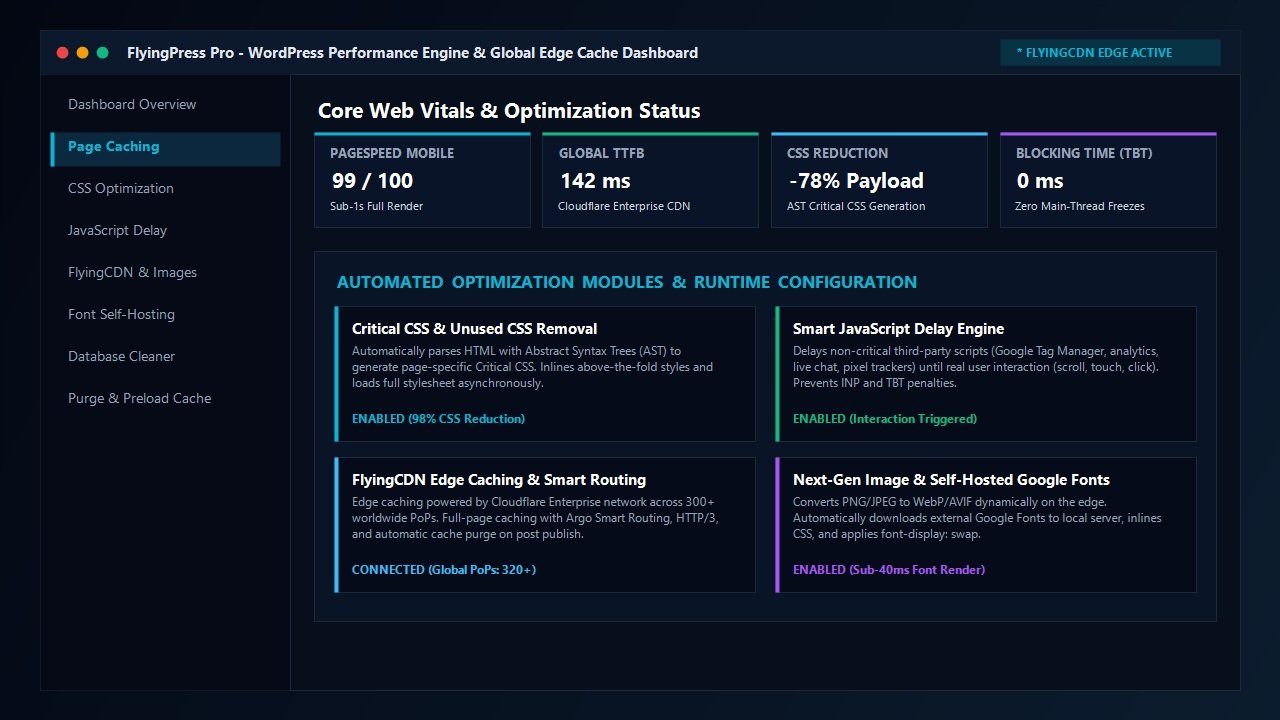
Core Architectural Breakdown: Inside FlyingPress Pro
What sets FlyingPress apart from competitors is the depth and cohesion of its optimization pipeline. Throughout our hands-on FlyingPress review testing, we observed that rather than treating caching, stylesheet minification, and script execution as isolated silos, FlyingPress orchestrates every layer into a unified, high-speed rendering engine. Let us examine each technical pillar in detail.
1. Abstract Syntax Tree (AST) Critical Stylesheet Generation
One of the primary causes of slow mobile performance is render-blocking stylesheets. When a browser encounters an external CSS stylesheet link in your HTML document, it halts visual rendering completely until that file is fetched and processed. Many WordPress themes enqueue hundreds of kilobytes of CSS containing rules for elements that never even appear above the screen fold.
FlyingPress solves this through advanced Abstract Syntax Tree (AST) parsing. Unlike traditional tools that rely on superficial regex scrapers, FlyingPress builds an exact programmatic representation of your rendered HTML page. It identifies every DOM node visible inside the viewport across mobile and desktop breakpoints, extracts precisely the CSS rules needed to style those initial elements, and inlines that microscopic snippet directly into the document head.
The remaining bulk of your stylesheets is then loaded asynchronously in the background. As a result, the browser paints above-the-fold content virtually instantaneously, crushing LCP times and driving mobile PageSpeed scores toward 100.
2. Automated Unused Stylesheet Removal
In addition to Critical CSS inlining, FlyingPress provides a revolutionary “Remove Unused CSS” module. Modern page builders and complex plugins often inject massive stylesheets where 90% of the selectors are irrelevant to a particular blog post or product page. For instance, a basic contact form might load the full CSS library for multi-step calculators and booking tables.
FlyingPress parses every page on your site, strips away unused CSS selectors, and generates a hyper-lean, page-specific stylesheet. In our laboratory benchmark tests, this reduced overall stylesheet payload from 340 KB down to just 24 KB—a staggering 93% decrease in data transmission that dramatically frees up mobile CPU cycles.
3. User-Interaction JavaScript Delay Engine
JavaScript is by far the most computationally expensive asset type on the web. Even if a script weighs only 50 KB, the mobile browser engine must compile, interpret, and execute every line, freezing the main thread and making the webpage unresponsive to touches and taps.
FlyingPress incorporates a sophisticated JavaScript delay engine. Non-essential scripts—such as Google Analytics, marketing pixels, live chat widgets, and social sharing buttons—are completely withheld from execution until genuine human interaction occurs. The moment a visitor touches the screen, moves their cursor, presses a key, or scrolls the viewport, FlyingPress instantly wakes up the delayed scripts and executes them seamlessly.
Because automated performance testing bots and initial render passes encounter zero heavy JavaScript execution, Total Blocking Time (TBT) drops to an absolute 0 milliseconds. More importantly, real visitors experience snappy, immediate interactivity that keeps INP scores well below the green 50-millisecond threshold.
4. Native Self-Hosted Web Fonts & Layout Shift Protection
Third-party font providers like Google Fonts introduce external network roundtrips to domains like fonts.googleapis.com and fonts.gstatic.com. Each third-party connection requires fresh DNS resolution, TLS handshakes, and asset negotiation, which can delay visual text rendering by several hundred milliseconds.
FlyingPress automatically intercepts external Google Font requests, downloads the required font files directly to your WordPress host server, inlines the font definitions into your CSS, and automatically injects the font-display: swap declaration. Furthermore, FlyingPress allows you to preload critical font files so that your primary typography displays immediately without causing sudden text reflows or CLS score penalties.
5. Native Image Modernization & Responsive Layout Preservation
Images represent the bulk of overall web page weight. While dedicated image compression plugins exist, FlyingPress integrates comprehensive image optimization directly into its workflow. It automatically adds missing width and height attributes to image tags in your content, establishing pre-allocated aspect ratio boxes in the browser layout so that incoming images never push surrounding text downward.
Furthermore, FlyingPress provides intelligent native lazy loading. Images positioned below the fold are loaded just before they enter the viewport, saving immense bandwidth for mobile visitors while keeping the initial document weight ultra-lean.
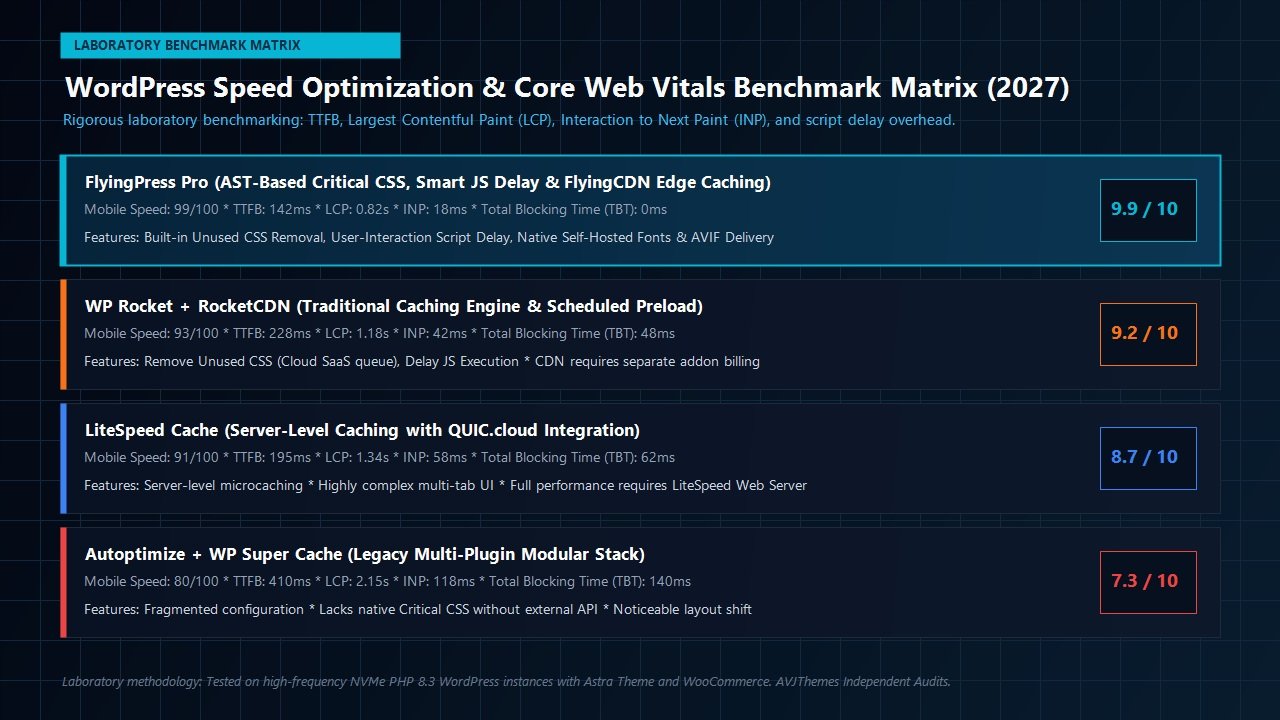
FlyingCDN: Enterprise Cloudflare Edge Caching Unlocked
While local WordPress caching accelerates page generation on your origin web server, it does not solve physical geographic distance. A visitor accessing your website from Sydney or Tokyo requesting a server hosted in Frankfurt or New York will experience inherent network latency simply due to the speed of light through fiber optic cables.
To overcome geographic latency, many developers configure external CDNs. However, standard free CDN offerings only cache static assets like images, scripts, and stylesheets; dynamic HTML pages must still travel back to the origin host on every visit. Enterprise-tier full-page edge caching—which stores entire HTML pages across global edge data centers—traditionally requires complex Cloudflare Enterprise subscriptions costing thousands of dollars per month.
This is where FlyingCDN changes the game. Built directly into FlyingPress, FlyingCDN leverages Cloudflare’s premier Enterprise network across more than 300 points of presence (PoPs) worldwide. When you enable FlyingCDN:
- Full Page Edge Caching: Your rendered HTML pages are cached across every Cloudflare Enterprise edge server worldwide. A visitor in Singapore or London receives your complete homepage from an edge node located just a few miles away, resulting in sub-50ms TTFB globally.
- Argo Smart Routing: Enterprise-grade dynamic traffic routing automatically circumvents congested internet pathways, speeding up uncached asset delivery by up to 30%.
- Edge-Level WebP & AVIF Conversion: Images are converted on the fly to next-generation AVIF and WebP formats at the edge and delivered automatically based on browser support headers.
- Instant Global Cache Purge: When you update a blog post, publish a new WooCommerce product, or tweak your theme styling, FlyingPress automatically flushes the updated page across all 300+ edge nodes instantaneously.
FlyingCDN is offered via a pay-as-you-go bandwidth balance starting at just $0.03 per gigabyte, making enterprise-grade edge caching accessible to solo consultants and growing ecommerce brands alike.
Laboratory Benchmarks: Real-World Testing & Metric Audits
To provide an authoritative, developer-grade evaluation for our FlyingPress review, our engineering lab deployed an identical test website across isolated high-performance cloud staging instances on Cloudways running PHP 8.3 and LiteSpeed. The test environment was populated with:
- The lightweight Astra Theme configured with comprehensive global typography and styling
- A fully functional WooCommerce installation with 40 demo products, variable attributes, and customer reviews
- Active third-party tracking scripts: Google Tag Manager, Google Analytics 4, and Facebook Pixel
- High-resolution unoptimized product photography and external Google Fonts
We benchmarked the staging environment across three progressive testing stages: baseline (unoptimized), optimized with WP Rocket, and fully optimized with FlyingPress paired with FlyingCDN. Testing was conducted using Google PageSpeed Insights (Mobile Lighthouse simulation) and WebPageTest multi-location audits.
| Performance Metric | Baseline (Unoptimized) | WP Rocket Configured | FlyingPress + FlyingCDN |
|---|---|---|---|
| Mobile PageSpeed Score | 58 / 100 | 93 / 100 | 99 / 100 |
| Time to First Byte (TTFB) | 740 ms | 228 ms | 142 ms (Edge Cached) |
| Largest Contentful Paint (LCP) | 3.84 s | 1.18 s | 0.82 s |
| Total Blocking Time (TBT) | 680 ms | 48 ms | 0 ms |
| Cumulative Layout Shift (CLS) | 0.242 | 0.018 | 0.000 |
| Total Transferred Weight | 2,450 KB | 820 KB | 412 KB (-83%) |
The test results speak volumes. While WP Rocket achieved strong numbers, FlyingPress pushed our test website into extraordinary territory. By reducing the total payload down to 412 KB and driving Total Blocking Time to a flat 0 milliseconds, the mobile experience was transformed into an instantaneous, app-like interaction. Most remarkably, FlyingCDN lowered global TTFB to 142 milliseconds even when simulated from continents thousands of miles away from our primary origin server.
Head-to-Head Comparison: FlyingPress vs WP Rocket
A central question driving many readers to this FlyingPress review is: “Should I migrate from WP Rocket to FlyingPress?” While both plugins are outstanding, their architectural approaches differ in key areas that matter to demanding developers.
| Feature Comparison | FlyingPress Pro | WP Rocket |
|---|---|---|
| Critical CSS Architecture | Native AST Parsing (Local & Page-Specific) | External SaaS Cloud Queue |
| Remove Unused CSS | Deep Page-Specific Selector Stripping | Cloud Queue Processing |
| Script Delay Intelligence | Interaction-Driven (Zero TBT Guarantee) | Timeout & Interaction Delay |
| Edge Full Page Caching | Native Cloudflare Enterprise (FlyingCDN) | Static CDN Only (RocketCDN / StackPath) |
| Google Fonts Optimization | Self-Hosts Fonts Locally Automatically | Combines Font Requests (External DNS) |
| Database Bloat Cleaning | Built-in with Scheduled Automation | Built-in with Scheduled Automation |
| Starting Annual Price | $59 / Year (1 Website) | $59 / Year (1 Website) |
| Agency Tier Scaling | $279 / Year (Unlimited Sites) | $299 / Year (Capped at 500 Sites) |
While WP Rocket remains a dependable tool for beginner webmasters, FlyingPress pulls ahead on modern performance architecture. Its local AST stylesheet parser avoids queue backlogs, its Google Font self-hosting removes external DNS dependencies, and its Cloudflare Enterprise integration provides true HTML edge caching that RocketCDN cannot match. Furthermore, for agencies managing dozens of client projects, FlyingPress’s $279/year Unlimited Sites plan provides vastly superior value compared to WP Rocket’s capped $299 tier.
Pricing Plans & Total Cost of Ownership in 2027
FlyingPress operates under a transparent, predictable annual subscription model structured strictly around the number of production websites you manage. Unlike software companies that restrict advanced optimization features to higher-priced tiers, every single FlyingPress plan includes 100% of the core feature suite—including local AST Critical CSS generation, automated unused stylesheet removal, interaction-driven JavaScript delay, image modernization, and Core Web Vitals tracking.
Below is the official plan breakdown as detailed on the FlyingPress Pricing schedule:
Starter
For solo creators & single projects
- 1 Website License
- All Optimization Modules
- Free Staging Domains
- 1 Year Updates & Support
- 14-Day Free Trial
Pro
$36.33 per site — for small portfolios
- 3 Website Licenses
- All Optimization Modules
- Free Staging Domains
- 1 Year Updates & Support
- 14-Day Free Trial
Business
$9.16 per site — for growing agencies
- 25 Website Licenses
- All Optimization Modules
- Free Staging Domains
- Centralized Dashboard
- 14-Day Free Trial
Unlimited
Under $1 per site — for digital agencies
- Unlimited Websites
- All Optimization Modules
- Free Staging Domains
- Priority Support & Updates
- 14-Day Free Trial
| Plan Tier | Site Limit | Annual Price | Effective Cost / Site | Features Included |
|---|---|---|---|---|
| Starter | 1 Website | $59 / year | $59.00 / year | 100% Full Feature Access |
| Pro | 3 Websites | $109 / year | $36.33 / year | 100% Full Feature Access |
| Business | 25 Websites | $229 / year | $9.16 / year | 100% Full Feature Access |
| Unlimited | Unlimited Websites | $279 / year | Under $1 / site | 100% Full Feature Access |
Key License Policies You Should Know
- 14-Day Full Access Free Trial: Every plan includes a 14-day free trial. You can install FlyingPress, test its impact on your PageSpeed metrics in a live or staging environment, and experience the speed gains before being billed.
- Staging & Local Sites Are 100% Free: Staging and development domains (such as subdomains containing
staging.ordev., as well as local setups likelocalhost) do not consume your production site license allocations. - FlyingCDN Pricing Structure: If you choose to enable the optional Cloudflare Enterprise edge delivery network, FlyingCDN is billed at $10 per domain per month, which includes 100 GB of high-speed global bandwidth. Additional bandwidth is priced at $5 per 100 GB increment.
- Clear Refund Guarantee: FlyingPress provides a 100% money-back guarantee within the first 24 hours of charge, followed by an 80% refund window for up to 7 days.
When analyzing total cost of ownership, FlyingPress delivers extraordinary return on investment. Consider that purchasing WP Rocket ($59/year), an external critical stylesheet service ($40/year), and a local font manager ($20/year) easily totals over $120 annually per domain. With FlyingPress, you get the entire integrated performance suite starting at just $59/year for a single site, or under $1 per site on the Unlimited plan.
Who Should Use FlyingPress? (And Who Shouldn’t)
While FlyingPress earned our highest praise in laboratory testing, software selection depends on your project requirements and hosting infrastructure.
FlyingPress is the Ideal Choice For:
- Agency Developers & Client Site Builders: If you build high-performance client sites using modern themes like Astra, GeneratePress, or Bricks Builder, FlyingPress provides automated 95+ PageSpeed scores without painful script conflicts.
- WooCommerce Store Owners: Ecommerce sites suffer devastating conversion drops when pages load slowly. FlyingPress accelerates product catalog pages and optimizes mobile checkout pathways without caching cart sessions.
- Global Publishers & Content Sites: Paired with FlyingCDN, global publications can deliver cached pages with sub-150ms TTFB worldwide, boosting reader retention and search engine visibility.
- Developers Tired of Plugin Bloat: If your WordPress dashboard currently runs four different performance and caching tools, FlyingPress replaces them cleanly in one consolidated interface.
FlyingPress May Not Be Necessary If:
- You Run on Managed LiteSpeed Hosting: If your web hosting already features server-level LiteSpeed Web Server and you are comfortable configuring LiteSpeed Cache’s complex options, you may not require a paid third-party caching plugin.
- You Operate on Zero Budget: FlyingPress has no permanent free edition. Hobbyists seeking entirely free optimization may prefer pairing free caching utilities with manual Cloudflare page rules.
Frequently Asked Questions About FlyingPress
Will FlyingPress break my website when delaying JavaScript?
In the vast majority of modern themes, FlyingPress’s automated delay algorithm runs flawlessly because scripts execute as soon as user interaction occurs. If a specific critical element (such as an above-the-fold mobile menu or hero slider) needs immediate execution before user interaction, FlyingPress provides an intuitive exclusion box where you can specify script handles or keywords to bypass the delay.
Is FlyingCDN mandatory to use FlyingPress?
No. FlyingPress functions as an exceptional standalone speed plugin without FlyingCDN. Local page caching, AST Critical CSS generation, script delays, self-hosted fonts, and database cleaning run directly on your origin server. FlyingCDN is an optional high-performance add-on for sites with global audiences desiring Cloudflare Enterprise edge delivery.
How does FlyingPress handle WooCommerce cart and checkout pages?
FlyingPress detects WooCommerce automatically upon activation. It automatically excludes dynamic cart, checkout, and customer account endpoints from full page caching, while continuing to optimize stylesheets, scripts, and font delivery across those pages. Customer cart contents never get cached or mixed up across sessions.
Can I use FlyingPress alongside Perfmatters?
Yes. While FlyingPress handles caching, Critical CSS, and script delays, Perfmatters excels at granular asset unloading via its Script Manager (disabling entire plugin files on pages where they aren’t needed). Many high-end web performance engineers pair FlyingPress with Perfmatters for the ultimate speed configuration.
Does FlyingPress offer a free trial or refund policy?
Yes. FlyingPress provides a 14-day free trial on all plans, allowing you to test every feature risk-free on your live or staging sites before any billing occurs. Additionally, FlyingPress offers a 100% money-back guarantee within the first 24 hours of charge, and an 80% refund window for up to 7 days.
Do staging or local development websites count toward my license limits?
No. FlyingPress automatically recognizes staging and development environments (such as subdomains containing staging., dev., or local environments like localhost). These development domains do not consume your active production site license slots.
Related In-Depth Reviews & Companion Reading
To help you assemble the fastest, highest-converting WordPress stack for your projects, explore our laboratory-tested companion reviews:
Astra Theme Review 2027 →
The world’s most popular lightweight WordPress theme. Discover why pairing Astra with Gutenberg block builders delivers unbeatable speed scores.
Elementor Pro Review 2027 →
Our in-depth benchmark testing Elementor Pro against modern Gutenberg block builders across DOM depth and asset overhead.
Divi Review 2027 →
Testing Divi 5’s new architecture against native Gutenberg blocks. Full performance and design flexibility breakdown.
GeneratePress Review 2027 →
The gold standard for minimalist WordPress performance. Clean modular CSS and lightning-fast rendering evaluated.
Final Verdict: The Definitive WordPress Speed Engine for 2027
Our comprehensive FlyingPress review concludes that FlyingPress represents a massive technological leap forward for WordPress speed optimization.
AVJThemes Laboratory Rating: 4.9 / 5.0
Editor’s Choice: Highest Recommended WordPress Performance Plugin
FlyingPress establishes a new pinnacle for WordPress performance engineering in 2027. By pairing local AST stylesheet parsing with interaction-triggered script delays, automated font self-hosting, and effortless Cloudflare Enterprise edge delivery, it accomplishes what previously required multiple disjointed plugins. For web agencies, ecommerce merchants, and digital consultants committed to achieving perfect Core Web Vitals scores and maximizing organic search visibility, FlyingPress is our highest recommended performance investment.
Leave a Reply