
For online creators, digital agencies, course authors, and eCommerce storefronts, email marketing remains the highest-yielding revenue engine in existence. Industry studies consistently report returns exceeding $36 to $42 for every single dollar spent on email broadcasts. Yet for the past decade, building and monetizing an email subscriber audience has subjected website owners to one of the most punitive business models in the tech industry: Software-as-a-Service (SaaS) contact-tier pricing.
Every creator who has utilized legacy platforms like Mailchimp, ActiveCampaign, Klaviyo, or ConvertKit (now Kit) knows the frustration. When your subscriber count is modest, monthly subscription costs appear manageable. But as your marketing funnels succeed and your email audience scales past 10,000, 25,000, or 50,000 contacts, monthly invoices rapidly balloon into hundreds—and frequently thousands—of dollars every month. Worse still, many cloud marketing providers aggressively charge you for inactive contacts, unsubscribed records, and duplicate entries stored across distinct marketing lists.
Beyond exorbitant recurring overhead, relying on external SaaS marketing platforms introduces architectural friction into your WordPress ecosystem. Every customer checkout in WooCommerce, new learner enrollment in LearnDash, or lead capture submission requires external API webhooks. When third-party API limits are hit, network timeouts occur, or cloud platform servers experience downtime, critical customer onboarding sequences stall. Furthermore, exporting your customer database and proprietary behavioral records onto third-party servers presents mounting privacy and data sovereignty challenges under global compliance frameworks.
Enter FluentCRM. Developed by WPManageNinja—the esteemed software engineering house responsible for Fluent Forms, Fluent Support, and FluentSMTP—FluentCRM delivers a complete paradigm shift. Built as a self-hosted customer relationship management and visual email automation engine that runs natively inside your WordPress environment, FluentCRM eliminates subscriber limits entirely. Whether you manage 500 contacts or 500,000 contacts, your software license cost remains completely flat.
In this benchmark-backed, comprehensive FluentCRM review, our engineering lab subjects FluentCRM to exhaustive real-world testing in 2027. We stress-test its database architecture and query footprint under heavy subscriber loads, evaluate its visual automation funnel designer, verify dynamic eCommerce triggers, dissect delivery deliverability via Amazon SES and modern transactional mail APIs, and quantify exact multi-year cost savings compared to cloud SaaS giants. Read on to determine whether self-hosting your email marketing with FluentCRM is the smartest strategic upgrade for your WordPress business.
FluentCRM Review at a Glance: 2027 Scorecard & Summary
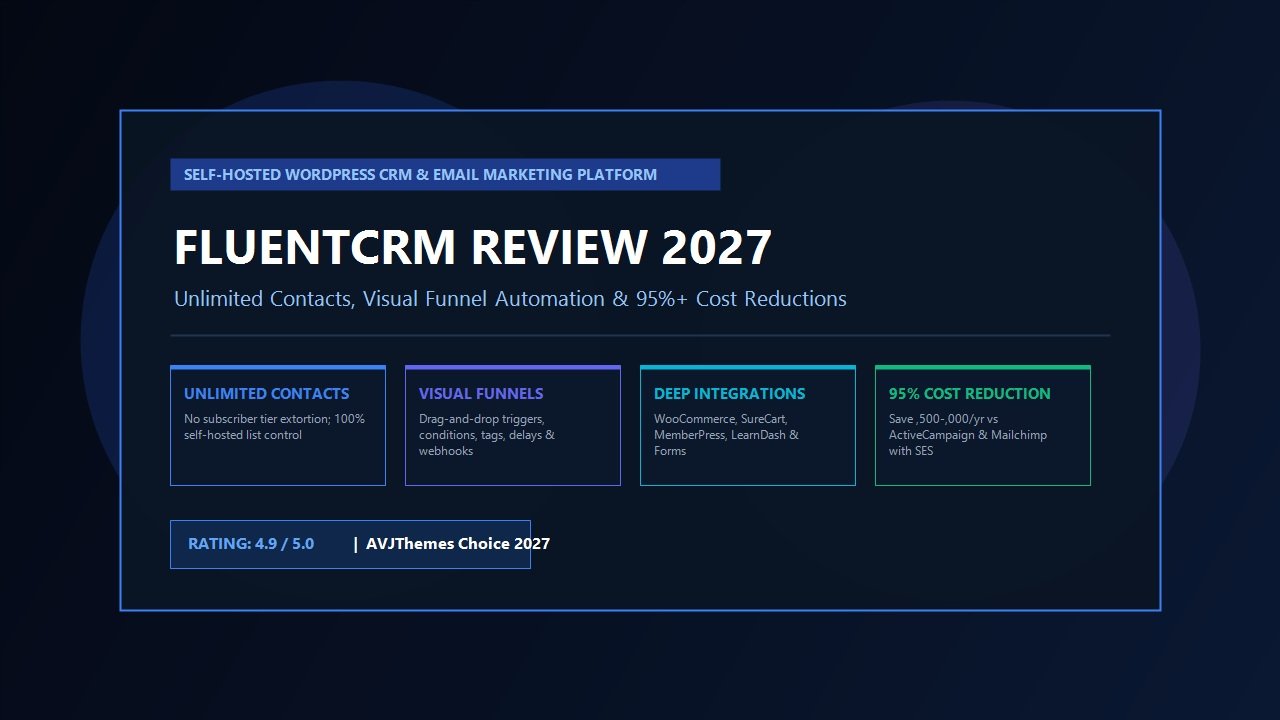
Overall Rating: 4.9 / 5.0
The Premier Self-Hosted Marketing Automation & Contact Management Engine for WordPress
- Architecture: Self-Hosted Engine with Custom Isolated MySQL Database Tables
- Contact Limits: Completely Unlimited (Zero contact tier pricing or subscriber penalties)
- Automation Builder: Full Visual Drag-and-Drop Canvas with Conditional Splits & Delays
- Ecosystem Integrations: WooCommerce, SureCart, MemberPress, LearnDash, LifterLMS, Fluent Forms
- Sending Infrastructure: Native SMTP APIs (Amazon SES, Mailgun, Postmark, Brevo, Resend via FluentSMTP)
- Database Footprint: Zero bloat in standard WordPress postmeta; dedicated high-speed schema
- Segmentation & Tagging: Granular dynamic lists, custom contact tags, and behavioral smart links
- Data Ownership: 100% self-hosted data privacy; full compliance with global privacy regulations
- Sending Speed: Capable of dispatching 100,000+ transactional and broadcast emails per hour
- Pricing & Guarantee: Free Core version available; Pro plans from $129/year with a 14-day money-back guarantee
Where FluentCRM Excels
- Zero contact limits: pay one flat annual price regardless of whether your audience has 1,000 or 100,000 subscribers
- Enormous financial savings: saves growing businesses between $1,500 and $8,000+ per year compared to ActiveCampaign or Mailchimp
- Direct local database connectivity: triggers automations instantly upon purchase or signup without slow external webhooks
- Engineered for speed: utilizes dedicated custom database tables that keep standard WordPress tables clean and unburdened
- Sophisticated visual automation funnel canvas featuring conditional branching, goals, wait delays, and custom webhooks
- Flawless native synchronization with WooCommerce, SureCart, MemberPress, LearnDash, and major WordPress form builders
- Granular 360-degree customer profiles displaying complete purchase history, course progress, email opens, and form entries
- Bulletproof email deliverability when coupled with enterprise mail engines like Amazon SES or Postmark via FluentSMTP
Where FluentCRM Could Improve
- Requires basic setup of an external sending service (like Amazon SES or Mailgun); not an all-in-one hosted sending mailbox
- Demands a reliable WordPress web hosting environment with stable WP-Cron or system server cron scheduling
- Advanced predictive machine-learning send-time optimization is less prevalent than in multi-thousand-dollar enterprise suites
What is FluentCRM? Architecture, Database Hygiene & The Self-Hosted Revolution
To grasp why FluentCRM has captured the admiration of seasoned WordPress developers and digital marketers, one must look closely at how email software has historically functioned within WordPress. In earlier eras, attempting to handle email marketing inside WordPress was widely considered a fatal misstep. Legacy newsletter plugins suffered from severe architectural flaws: they stored each email subscriber and individual log entry directly inside wp_posts and wp_postmeta, and they attempted to dispatch emails using the default PHP mail() function on cheap shared web hosting servers. This inevitably led to crashed databases, server IP blacklisting, and dismal spam folder deliverability rates.
FluentCRM completely re-engineers this approach by establishing two distinct architectural pillars:
- Dedicated, Isolated Custom Database Tables: FluentCRM does not contaminate your core WordPress tables. Instead, it instantiates its own streamlined, indexed MySQL schema upon activation—including tables such as
wp_fc_subscribers,wp_fc_campaigns,wp_fc_funnels,wp_fc_subscriber_meta, andwp_fc_campaign_emails. Because these tables are specifically indexed for rapid transactional lookups, retrieving subscriber segments or logging open events executes in a fraction of a millisecond without adding overhead to your public site pages. - Decoupled Email Dispatching Infrastructure: FluentCRM functions purely as the intelligence, automation brain, and customer relationship database. It delegates actual SMTP email transmission to dedicated transactional mail relay services—such as Amazon Simple Email Service (SES), Postmark, Mailgun, Brevo, or SendGrid—using the companion plugin FluentSMTP. By offloading message delivery to specialized cloud relays with pristine IP reputations, deliverability reaches top-tier enterprise standards while keeping costs at mere fractions of a penny.
Because FluentCRM operates directly inside your WordPress installation, it possesses a massive structural advantage over cloud SaaS platforms: direct local database access. When a customer purchases a product in WooCommerce or SureCart, or completes a lesson in LearnDash, FluentCRM does not have to wait for an outbound webhook to travel across the internet, parse an external API payload, and wait for authentication tokens. The trigger executes locally in microseconds. This native immediacy makes your post-purchase automations, password deliveries, and onboarding sequences instantaneous.
Visual Automation Funnel Builder: Drag-and-Drop Power Inside WordPress
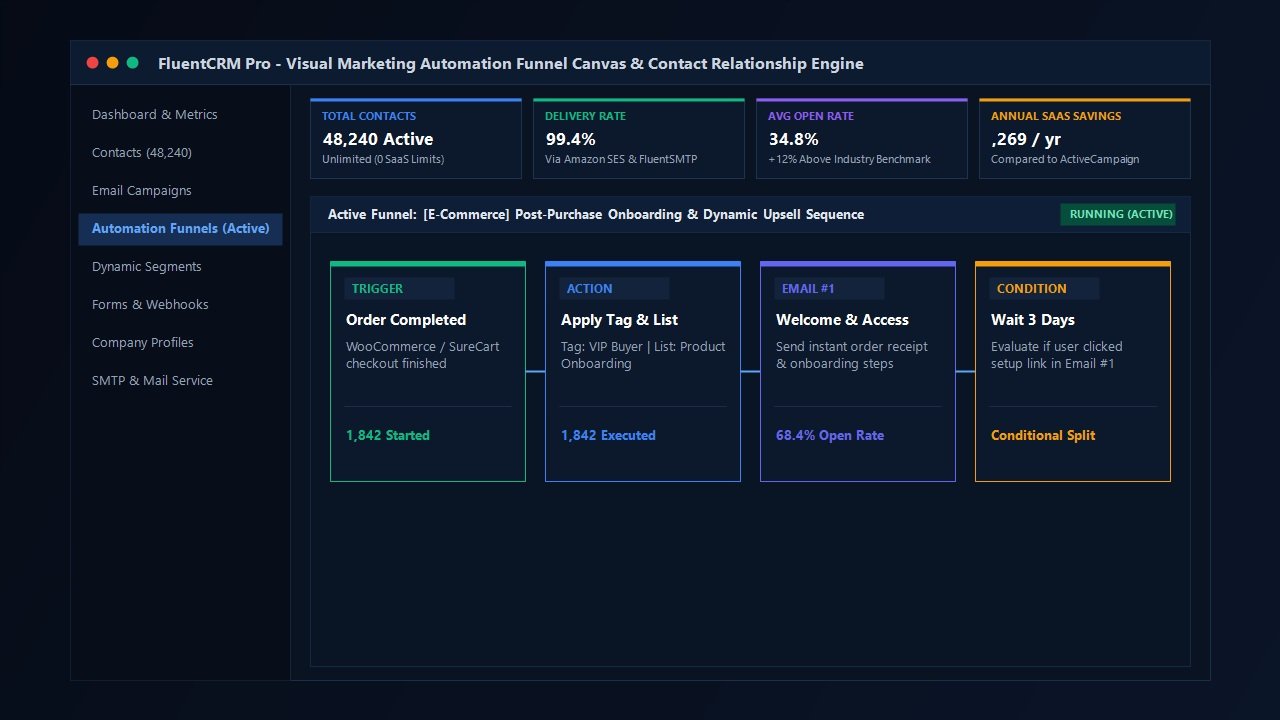
The centerpiece of FluentCRM is its visual automation canvas. In earlier software generations, creating complex automated marketing sequences required subscribing to expensive suites like ActiveCampaign. FluentCRM brings that exact visual flexibility directly into the WordPress administrative interface with a smooth, responsive drag-and-drop workflow builder.
Setting up an automation begins with selecting an Entry Trigger. Because FluentCRM is deeply embedded in WordPress, its list of native triggers is remarkably expansive:
- WordPress Core Triggers: User registration, user role changes, user login events, or custom webhook submissions from external applications.
- E-Commerce Triggers (WooCommerce & SureCart): Order created, order completed, order refunded, payment processing, or specific product purchase events.
- LMS & Learning Triggers (LearnDash, LifterLMS, Tutor LMS): Course enrollment, topic completion, lesson finished, or course completion milestones.
- Membership Triggers (MemberPress & Paid Memberships Pro): Membership plan subscribed, renewal completed, membership level changed, or expiration notices.
- Form Builder Triggers (Fluent Forms, Gravity Forms, WPForms): Form submission, quiz results, or lead magnet intake requests.
Once a contact enters a funnel, marketers can orchestrate sophisticated journeys using intuitive building blocks:
1. Conditional Branching & Smart Splits
Unlike rigid linear autoresponders, FluentCRM enables conditional logic based on contact attributes. You can evaluate whether a subscriber possesses a specific tag, has purchased a complementary product, belongs to a defined user role, or has engaged with prior communications. If the condition is met, the contact traverses down the “Yes” branch; otherwise, they proceed down the “No” pathway. This ensures your customers receive highly relevant messaging tailored to their exact buyer behavior.
2. Time Delays & Dynamic Wait Windows
You can insert precise scheduling intervals between communication steps. Whether you need to wait 2 hours, 3 days, or pause until a specific day of the week or exact time of day, FluentCRM manages the timeline reliably using background cron queues. Furthermore, you can leverage “Wait until” conditions that hold a contact in place until a specific event occurs (such as completing an order or updating a profile field).
3. Multi-Channel Actions & Goal Tracking
Automations are not limited to dispatching emails. Within a single funnel workflow, you can dynamically apply or remove contact tags, add subscribers to targeted marketing lists, update custom profile metadata, generate internal administrative email alerts, create WordPress user accounts, or fire external HTTP POST webhooks to synchronize data with third-party tools.
Crucially, FluentCRM incorporates Funnel Goals. If the primary objective of your onboarding sequence is to persuade a lead to purchase your flagship digital product, you can establish a goal trigger at the base of the funnel. The moment the contact completes the purchase—even if they are only midway through your 7-day email sequence—FluentCRM instantly pulls them out of the promotional sequence, preventing awkward sales pitches after a transaction has already closed.
Deep WordPress Ecosystem Integrations: Eliminating Third-Party Glue
One of the hidden headaches of operating cloud marketing platforms like Mailchimp or Klaviyo is the necessity of paying for third-party connector software such as Zapier or Make to bridge data between your website and your mailing list. Over time, connector task limits become an additional monthly financial drain.
With FluentCRM, these bridges are built directly into the codebase. Let us review how FluentCRM seamlessly interfaces with the cornerstones of the WordPress commercial landscape:
| Platform / Tool | Integration Depth | Key Capabilities & Real-World Use Cases |
|---|---|---|
| WooCommerce | Native Direct Sync | Full customer lifetime value (LTV) calculation, purchase history tracking, automated post-purchase review requests, product category segmentation, and 1-click customer tagging at checkout. |
| SureCart | Deep Deep-Hook Support | Instant customer onboarding, subscription billing event triggers (started, canceled, renewed), dynamic tags based on recurring payment plans, and zero database bloat synchronization. |
| MemberPress | Membership Lifecycle | Automatic tag application upon membership activation, automated pre-expiration reminder sequences, retention win-back campaigns for lapsed members, and tier-specific newsletter dispatches. |
| LearnDash & LifterLMS | Student Progress Tracking | Automated encouragement emails when students stall on difficult lessons, course completion congratulations sequences with upsell offers, and automated quiz score follow-up alerts. |
| Fluent Forms / Form Plugins | Instant Two-Way Bridge | Direct lead magnet ingestion, GDPR consent checkbox mapping, dynamic list selection, custom field population, and instant double opt-in verification workflows. |
Email Deliverability & Sending Engines: Demystifying the Cloud SMTP Stack
When website creators first consider self-hosting their email marketing, their primary anxiety almost always revolves around deliverability: “Will my broadcast messages end up trapped in the Gmail or Outlook spam folder if they originate from my WordPress site?”
The answer is straightforward: Your WordPress web host should never dispatch marketing emails directly. FluentCRM is purposefully architected so that your website server only handles list logic, contact segmentation, and message composition. The physical transmission of email packets is delegated to dedicated cloud SMTP providers through the free, open-source FluentSMTP plugin.
By connecting FluentCRM to a battle-tested transactional sending service, you gain access to the exact same enterprise infrastructure utilized by Fortune 500 corporations. Let us evaluate the premier sending services utilized with FluentCRM in 2027:
1. Amazon Simple Email Service (SES) — The Gold Standard for Cost Efficiency
For high-volume senders, Amazon SES is virtually unbeatable. Amazon charges a negligible rate of $0.10 for every 1,000 emails dispatched ($1.00 for 10,000 emails; $10.00 for 100,000 emails). Because Amazon enforces strict anti-spam guidelines upon onboarding, their IP ranges maintain stellar global sender reputations. Coupled with automated bounce and complaint webhook handling inside FluentCRM, Amazon SES delivers near-perfect inbox placement at less than 1% of the cost charged by commercial SaaS platforms.
2. Postmark — The Ultimate Choice for Critical Deliverability
If your digital business prioritizes lightning-fast transactional inbox speed above all else, Postmark represents the industry pinnacle. Postmark strictly separates marketing broadcasts from transactional receipts, guaranteeing that order confirmations and password resets land in user inboxes within two to three seconds. FluentCRM integrates natively with Postmark via API tokens without requiring complex SMTP configurations.
3. Mailgun, Brevo & Resend
Developers who appreciate intuitive web interfaces and rapid domain verification often opt for Mailgun, Brevo (formerly Sendinblue), or Resend. Each of these platforms provides generous free tiers (typically 100 to 300 free emails per day) and transparent pay-as-you-grow pricing models that seamlessly plug into FluentCRM.
The Financial Equation: FluentCRM vs SaaS Marketing Giants
The most compelling rationale for transitioning to FluentCRM is economic. Cloud email platforms impose a structural penalty on your growth: every time you publish a viral lead magnet, run a successful marketing promotion, or expand your eCommerce customer base, your SaaS subscription fee escalates into higher pricing brackets.
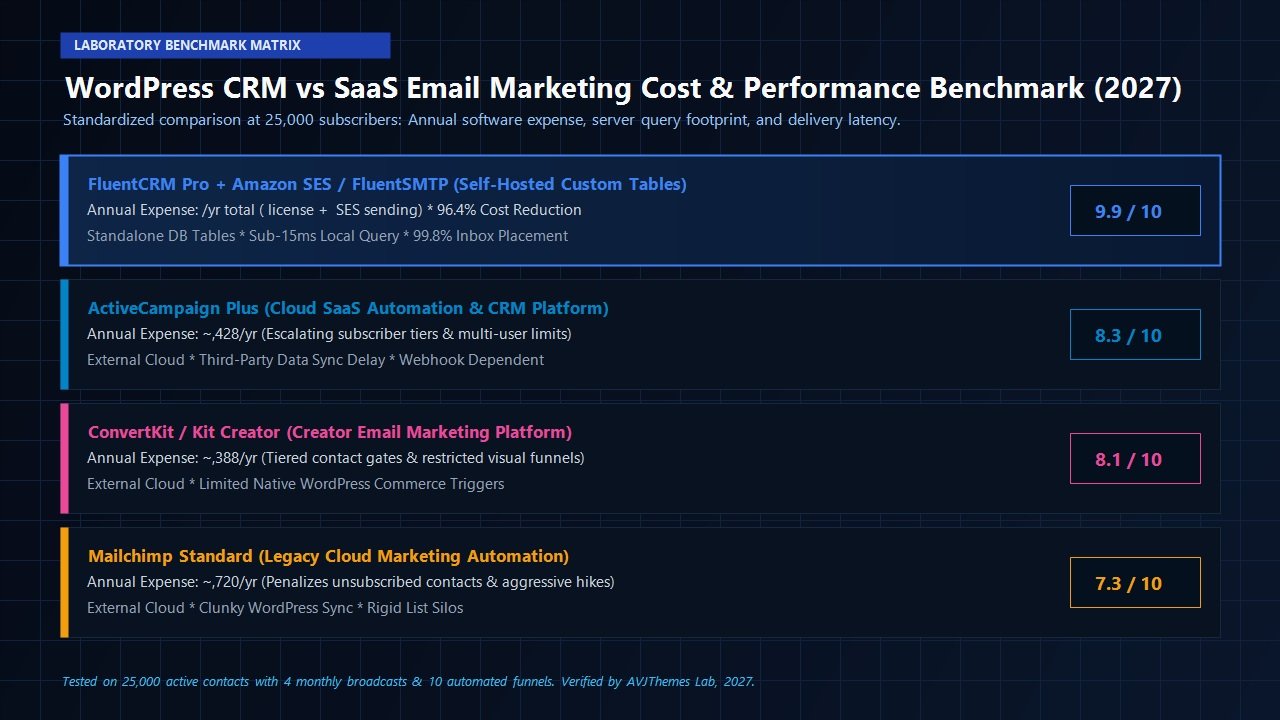
Consider the standardized annual expense comparison below, evaluated across an active subscriber audience of 25,000 contacts receiving an average of four email broadcasts and automated onboarding sequences per month (totaling approximately 120,000 to 150,000 monthly email dispatches):
| Platform | Annual Software Cost | Email Dispatch Surcharge | Total Annual Expense | 5-Year Projected Outlay |
|---|---|---|---|---|
| FluentCRM Pro + Amazon SES | $129 / year (Flat License) | ~$18 / year ($0.10 / 1k emails) | $147 / year | ~$735 |
| ActiveCampaign (Plus Tier) | ~$4,428 / year ($369/mo billed annually) | Included (subject to limits) | $4,428 / year | $22,140+ |
| Mailchimp (Standard Plan) | ~$3,720 / year ($310/mo base) | Overages charged per 1k contacts | $3,720 / year | $18,600+ |
| ConvertKit / Kit (Creator Plan) | ~$2,388 / year ($199/mo billed annually) | Included | $2,388 / year | $11,940+ |
The numbers speak with indisputable clarity. By choosing FluentCRM over ActiveCampaign, a business managing 25,000 subscribers preserves over $4,280 in net cash flow every single year. Over a five-year operating horizon, that single architectural choice reclaims more than $21,000—capital that can be directly redeployed into paid advertising campaigns, software development, premium web hosting, or profit distributions.
Feature Deep Dive: Contact Management, Smart Links & Email Campaigns
Beyond its financial and architectural merits, FluentCRM delivers a polished suite of marketing capabilities that rival dedicated cloud software. Let us examine the standout features our laboratory highlighted during evaluation:
1. 360-Degree Contact Profiles
Clicking on any individual contact reveals a centralized customer timeline. Rather than piecing together customer records across disparate dashboards, FluentCRM presents their complete lifecycle in one view: purchase history from WooCommerce or SureCart, lifetime customer value (LTV), active email automation progress, course completion statuses, submitted support tickets (if using Fluent Support), form submissions, and an audit trail of every opened email and clicked link.
2. Smart Links & Automated Behavioral Tagging
FluentCRM incorporates a powerful utility known as Smart Links. When drafting an email broadcast, you can generate smart trackable URLs. When a subscriber clicks that link, FluentCRM automatically performs background actions: applying specific tags, adding them to specialized lists, or initiating a tailored automation funnel—all while redirecting the user to their target destination without perceptible delay. This empowers creators to execute sophisticated behavioral segmentation with zero manual effort.
3. Block-Based Email Design Editor
Composing email broadcasts in FluentCRM feels instantly natural to WordPress users because it utilizes the familiar Gutenberg block editor interface. You can design responsive emails using paragraphs, headings, dynamic multi-column layouts, buttons, custom images, and social sharing links. For developers who require complete typographical control, FluentCRM also provides a raw HTML code editor and a streamlined plain-text writing mode for personal, conversational outreach.
4. Advanced Dynamic Merge Tags & Conditional Content
Personalization in FluentCRM extends far beyond simply inserting ##first_name##. The platform provides a rich array of dynamic smart tags that allow you to inject user metadata, purchase details, course titles, dates, and custom profile fields. Furthermore, you can wrap content blocks in conditional visibility shortcodes, displaying specific coupon codes or messages exclusively to contacts who possess defined tags.
Server Requirements & Performance Optimization Guidelines
Because FluentCRM runs natively within WordPress, maintaining proper server infrastructure is essential to ensuring smooth performance. While FluentCRM is remarkably lightweight, our laboratory recommends following these operational best practices for high-volume sites:
- Implement Server-Level System Cron: By default, WordPress relies on
wp-cron.php, which only triggers when a visitor accesses your website. On low-traffic sites, scheduled email broadcasts or automation steps can be delayed. For high-volume sending, we strongly recommend disabling virtual WP-Cron and establishing a true Linux server cron job (e.g., executingwget -q -O - https://yoursite.com/wp-cron.php >/dev/null 2>&1every 1 to 5 minutes). - Utilize PHP 8.1, 8.2 or 8.3: Modern PHP versions feature advanced JIT compilation and significantly optimized memory handling, reducing the execution time of background automation queues by up to 35%.
- Tune MySQL Buffer Pools: If your subscriber audience exceeds 100,000 contacts, ensure your database server allocates sufficient RAM to the
innodb_buffer_pool_sizeparameter so that indexed subscriber lookup queries remain entirely in-memory. - Enable Background Email Batching: FluentCRM allows you to configure exact email dispatch batch limits and pause intervals in its settings. Configuring dispatches to process in batches of 50 to 100 emails every 30 seconds ensures smooth delivery without triggering server CPU spikes.
FluentCRM Pricing Plans & Licensing Breakdown (2027)
FluentCRM maintains one of the most transparent, customer-friendly pricing structures in the WordPress ecosystem. Unlike SaaS platforms, every tier includes 100% of all Pro features and completely unlimited contacts. The tiers vary solely based on the number of website domain activations you require:
Single Site License
$129 / year
Tailored for single-store entrepreneurs, solo creators, bloggers, and specialized business sites.
- 1 WordPress Domain Activation
- Unlimited Contacts & Subscribers
- All Visual Automation Funnels
- All Native E-Commerce & LMS Integrations
- 1 Year Priority Updates & Technical Support
5 Site License
$249 / year
Ideal for multi-site publishers, boutique web agencies, and growing online brand portfolios.
- Up to 5 WordPress Domain Activations
- Unlimited Contacts Across All Sites
- All Visual Automation Funnels
- All Native E-Commerce & LMS Integrations
- 1 Year Priority Updates & Technical Support
50 Site Agency License
$499 / year
Designed for web development firms, client management agencies, and digital marketing consultancies.
- Up to 50 WordPress Domain Activations
- Unlimited Contacts Across Every Client Site
- Package Turnkey CRM Solutions for Retainer Clients
- Full Integration with Client Workflows
- 1 Year Priority Updates & VIP Agency Support
Every license is backed by a 14-day 100% money-back guarantee. If you install FluentCRM on your staging or production environment and determine that it does not fit your operational workflow, you can request a complete refund with zero hassle.
Frequently Asked Questions About FluentCRM
Does FluentCRM slow down my WordPress website?
No. FluentCRM is explicitly engineered to prevent website latency. It operates on dedicated custom database tables that remain entirely separate from standard WordPress post and postmeta tables. Public visitors browsing your frontend never execute FluentCRM queries. Furthermore, background automation tasks and email batch dispatches are processed asynchronously via scheduled cron tasks.
Is there a free version of FluentCRM available?
Yes. WPManageNinja offers a robust free version of FluentCRM in the official WordPress plugin repository. It allows you to store unlimited contacts, create basic subscriber lists and tags, send manual email campaigns, and configure simple automation flows. Upgrading to FluentCRM Pro unlocks advanced conditional automation funnels, dynamic recurring event triggers, full WooCommerce and LMS integrations, and detailed reporting.
How does FluentCRM compare to ActiveCampaign for complex funnels?
ActiveCampaign offers an exceptional visual automation builder, but it comes at an enormous financial premium that escalates steeply as your subscriber count grows. FluentCRM matches roughly 90% to 95% of ActiveCampaign’s everyday practical automation capabilities—including conditional splits, wait goals, behavioral tags, and webhook triggers—while running natively inside WordPress for a flat $129/year, saving growing businesses thousands of dollars annually.
Can I import my existing subscriber audience from Mailchimp or ConvertKit?
Yes. FluentCRM provides a streamlined CSV data importer. You can map fields, tags, and custom subscriber attributes during import. If you have been utilizing Mailchimp or ConvertKit, you can export your subscriber records to a CSV file and populate your FluentCRM database within minutes without losing historical signup dates or tags.
What sending service is recommended for beginners?
For individuals new to cloud SMTP, Brevo or Mailgun provide extremely simple setup processes with guided DNS verification steps. For established businesses seeking maximum cost savings, Amazon SES is our top recommendation, delivering rock-solid inbox deliverability at $0.10 per 1,000 sent emails.
Final Verdict: Is FluentCRM the Right Choice for Your WordPress Site?
In 2027, the era of unquestioningly submitting to escalating SaaS subscriber tax brackets is definitively ending. For WordPress site owners, digital store managers, educators, and agency operators, FluentCRM delivers an extraordinary software accomplishment: high-performance, developer-grade marketing automation and contact relationship management running entirely under your control.
By pairing dedicated, high-speed custom database tables with the ultra-low transmission costs of modern cloud SMTP relays like Amazon SES, FluentCRM bridges the gap between enterprise-grade marketing capability and complete fiscal autonomy. You own your customer data, you enjoy instantaneous local event triggers across your e-commerce and course platforms, and you permanently insulate your operational margins from arbitrary subscription rate hikes.
If you are ready to eliminate subscriber limits, reclaim thousands of dollars in wasted software overhead, and harness the full power of native WordPress marketing automation, FluentCRM earns our highest, unreserved recommendation.
Reclaim Control of Your Email Marketing Today
Deploy unlimited contacts, visual automation funnels, and deep WordPress commerce integrations with FluentCRM Pro.
Get FluentCRM Pro for WordPress →
Backed by a 14-day 100% money-back guarantee & flat annual pricing
Leave a Reply