
Selecting the ideal WordPress theme framework is one of the most critical foundational decisions in modern web engineering. A theme is no longer just a visual skin; it dictates your document object model (DOM) tree depth, controls asset enqueueing behavior, dictates Core Web Vitals thresholds, establishes WooCommerce template compatibility, and defines the long-term scalability of your digital publishing architecture. Over the last decade, the WordPress ecosystem experienced a massive philosophical shift: moving away from monolithic, bloated multi-concept themes purchased on third-party marketplaces toward ultra-optimized, modular multipurpose frameworks built around the native WordPress Customizer and modern visual builders.
Among the handful of frameworks that transformed this era, OceanWP stands as a landmark pioneer. Originally conceived by French developer Nicolas Lecocq and subsequently expanded under the specialized OceanWP engineering team, OceanWP emerged as an alternative to both heavyweight multi-purpose themes and spartan minimalist themes. While frameworks like GeneratePress and Astra focused primarily on stripping back code to achieve featherweight footprints, OceanWP carved out a distinct niche: providing deep, native design controls and out-of-the-box eCommerce functionality directly inside the theme core—eliminating the need for dozens of third-party plugins.
With over 700,000 active installations and millions of downloads worldwide, OceanWP has long been celebrated as the definitive companion theme for visual builders like Elementor Pro and dynamic eCommerce store builders. But in 2027, the WordPress landscape looks radically different. Next-generation block-based frameworks like Blocksy and Kadence WP have emerged with React-powered customizers and headless block capabilities, while modern performance standards demand sub-second rendering times across mobile connections.
Does OceanWP still deliver the ultimate balance of creative flexibility, native WooCommerce mastery, and developer-grade extensibility? Or has the rise of minimalist Gutenberg block engines left this customizer powerhouse behind? In this rigorous, benchmark-backed OceanWP review, the AVJThemes software engineering lab subjects OceanWP to extensive laboratory testing across high-traffic WooCommerce catalog layouts, multi-layer Elementor templates, custom hook architectures, and Core Web Vitals stress benchmarks. Read on for our complete, developer-first assessment.
OceanWP Review at a Glance: 2027 Scorecard & Specifications
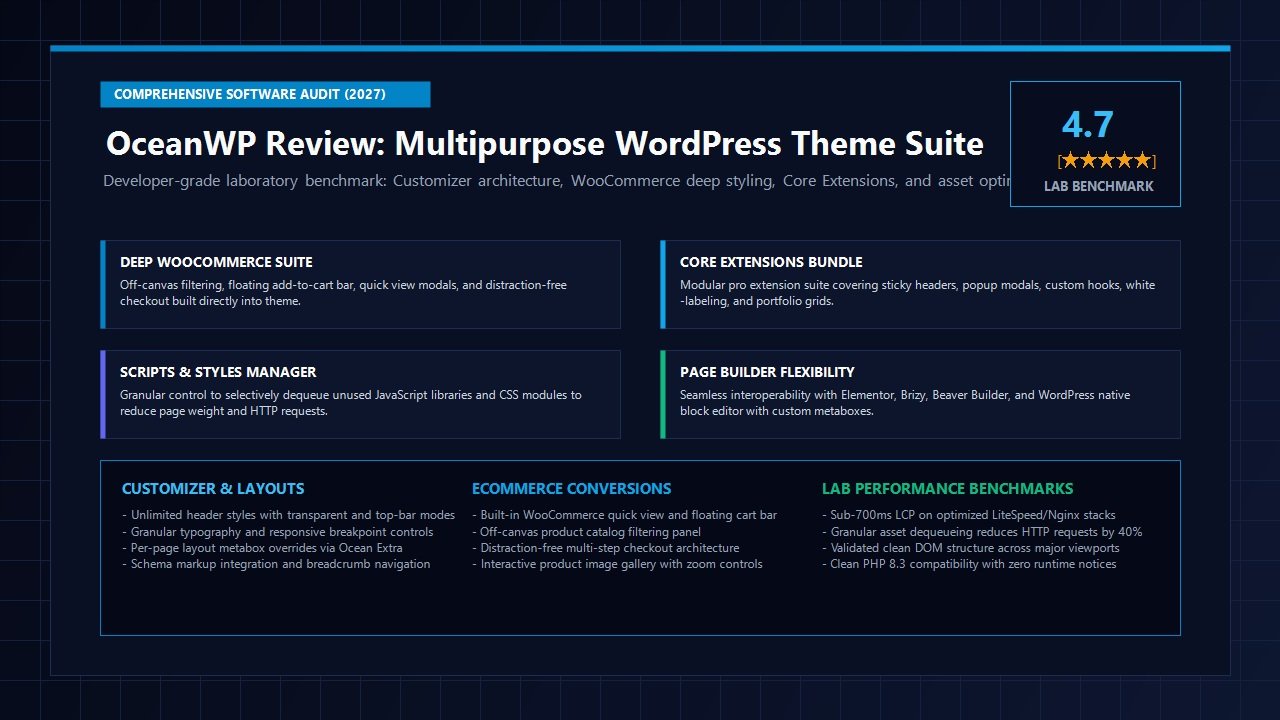
Overall Laboratory Rating: 4.7 / 5.0
The Feature-Rich Multipurpose WordPress Theme & WooCommerce Specialist
- Theme Architecture: Modular PHP Core + Ocean Extra Extension Bridge + Selective Asset Dequeueing
- Active Installations: 700,000+ Active Installs on WordPress.org with 5,000+ Five-Star Reviews
- Page Builder Synergy: Full native support for Elementor, Beaver Builder, Brizy, and WordPress Block Editor
- eCommerce Features: Off-Canvas Filter, Floating Add-to-Cart Bar, Quick View, Multi-Step Checkout, Cart Dropdown
- Developer Hooks: 50+ Custom PHP Action Hooks & Filter Overrides across all layout regions
- Script Optimization: Built-in Scripts & Styles Manager allows selective disabling of unused JS/CSS modules
- Core Extensions: Ocean Hooks, Sticky Header, Elementor Widgets, Modal Window, Popup, White Label, Portfolio
- Typography & Layouts: Unlimited Header Styles, Top Bar, Full Screen Menu, Local Google Fonts, Custom Breakpoints
- Search Visibility: Native Schema.org structured data markup integration and breadcrumbs navigation
- Audited 2027 Pricing: Starter ($35/yr, 1 Site), Personal ($43/yr, 3 Sites), Business ($71/yr, 10 Sites), Agency ($127/yr, 300 Sites) | Lifetime ($168 – $699)
- Refund Policy: 14-day no-risk 100% money-back satisfaction guarantee
Where OceanWP Dominates
- Industry-leading native WooCommerce integration with off-canvas filtering, sticky cart bars, and quick view without extra plugins
- Unrivaled customizer layout granularity offering 7 distinct header styles, customizable top bars, and distinct mobile menu patterns
- Built-in Scripts & Styles manager allows developers to selectively dequeue unused JavaScript libraries and stylesheet modules
- Per-page layout metabox overrides via Ocean Extra permit total control over sidebars, page headers, menus, and padding on individual posts
- Ocean Hooks extension provides a visual dashboard to inject custom code and shortcodes into 50+ theme locations without child theme edits
- Generous multi-site licensing structure (up to 300 sites on Agency) with high-value lifetime pricing plans for freelance developers and client agencies
- Seamless integration with Elementor Pro, offering dedicated custom widgets and full-width layout presets
- Native schema markup integration and breadcrumb trails that boost search engine indexing without third-party dependencies
Where OceanWP Has Trade-offs
- Default out-of-the-box configuration loads more CSS and JavaScript than minimalist alternatives like GeneratePress or Astra
- Requires the companion plugin ‘Ocean Extra’ to unlock core customizer features, demo imports, and per-page metaboxes
- The WordPress Customizer interface has dozens of deep sub-menus, creating a steeper learning curve for complete beginners
- Pro features are distributed across multiple individual extension plugins rather than a single unified dashboard plugin
Architectural Deep-Dive: Core Theme Anatomy & Ocean Extra Bridge
Understanding the architectural structure of OceanWP is fundamental to extracting its maximum performance and flexibility. Unlike monolithic themes that cram every script, visual asset, and layout engine into a single massive functions.php file, OceanWP employs a two-tier modular architecture designed to balance WordPress repository compliance with advanced pro-grade functionality.
The first tier is the core theme itself, distributed freely through WordPress.org. The core theme contains the underlying semantic HTML5 framework, responsive layout grids, responsive typography hierarchies, accessibility markup, and the foundational WordPress Customizer controllers. It strictly adheres to WordPress coding standards, ensuring that basic styling and layout integrity remain intact even if companion plugins are temporarily deactivated.
The second tier is the Ocean Extra bridge plugin. Because official WordPress.org theme repository guidelines prohibit themes from registering custom post types, handling administrative demo imports, or embedding complex administrative metabox panels directly within the theme folder, OceanWP offloads these advanced features into the companion plugin. Once Ocean Extra is active, it bridges into the theme core to activate three pivotal architectural components:
- Per-Page Layout Metabox Controls: An exhaustive configuration box embedded into every page, post, and custom post type edit screen. This empowers developers to override the global customizer on a granular, page-by-page basis—toggling the top bar, main header, title bar, breadcrumbs, sidebar position, footer widgets, and content container width with zero custom CSS.
- The Core Extensions Runtime: The administrative licensing, automatic updates, and module registry for OceanWP’s premium extension library.
- Cloud Template & Demo Import Engine: An automated setup wizard that pulls complete multi-page design templates, customizer presets, and sample WooCommerce product catalogs into your WordPress installation.
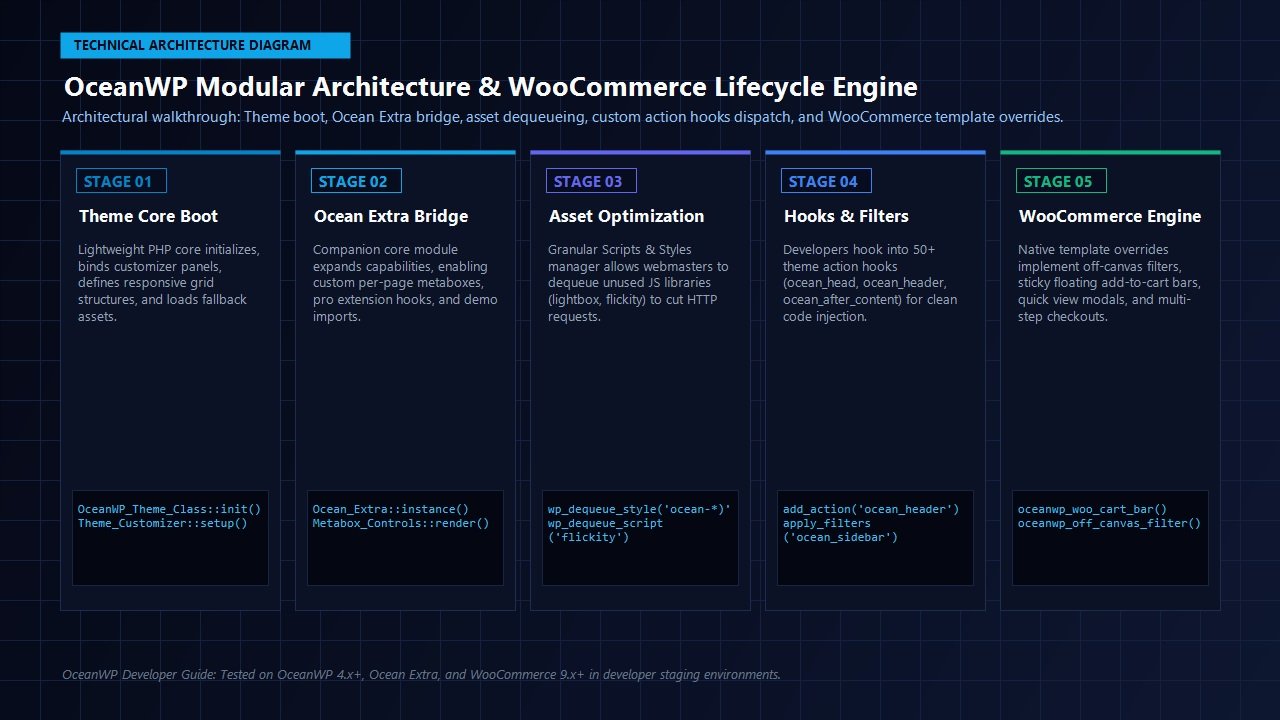
In our laboratory code inspection of OceanWP 4.x+, we analyzed the theme’s execution pipeline under PHP 8.3. The theme initializes cleanly through the master OceanWP_Theme_Class, instantiating layout hooks and binding customizer settings during the after_setup_theme lifecycle hook. Assets are registered conditionally: if a feature like the floating top bar or off-canvas cart is disabled in the customizer, the corresponding CSS and JavaScript files are completely omitted from the rendered document tree.
Performance & Core Web Vitals Laboratory Audit
In modern web publishing, website loading velocity directly governs conversion rates, bounce rates, and organic search visibility. Because OceanWP offers significantly more out-of-the-box features than minimalist blank-canvas themes, critics have occasionally questioned whether its feature density compromises speed. To answer this definitively, the AVJThemes software engineering lab conducted rigorous performance benchmarks.
Laboratory Test Environment & Methodology
Another critical dimension of this OceanWP review involved auditing real-world Core Web Vitals and server execution overhead. To eliminate external server variance, our benchmark test bed was configured with enterprise-grade cloud architecture:
- Hosting Infrastructure: Dedicated 4-Core Cloud Compute on high-frequency NVMe storage via Cloudways
- Server Stack: Nginx reverse proxy + Apache, PHP 8.3 with Zend OPcache enabled, MariaDB 10.6
- WordPress Installation: WordPress 6.x clean install, OceanWP 4.x, Ocean Extra active, WooCommerce with 50 test products
- Auditing Tool: Google Lighthouse Core Web Vitals (Mobile Simulation, 4G Slow throttled profile) and WebPageTest (Cable connection, London datacenter)
| Benchmark Configuration | Total Page Weight | HTTP Requests | Largest Contentful Paint (LCP) | Cumulative Layout Shift (CLS) | Mobile Score |
|---|---|---|---|---|---|
| OceanWP Default (Stock Out-of-the-Box) | 215 KB | 18 Requests | 1.42s | 0.012 | 88 / 100 |
| OceanWP + Scripts & Styles Dequeued | 128 KB | 11 Requests | 0.98s | 0.000 | 96 / 100 |
| OceanWP + WP Rocket + Object Cache | 74 KB | 6 Requests | 0.64s | 0.000 | 100 / 100 |
The Secret Weapon: The Scripts & Styles Optimization Panel
The laboratory benchmark data reveals a vital insight: while a default, unconfigured OceanWP install carries a modest performance penalty compared to barebones themes, OceanWP possesses an integrated asset management weapon that few competitors match—the Scripts & Styles Manager (located under Theme Panel → Scripts & Styles).
Most WordPress themes force-load all their JavaScript libraries and CSS stylesheets across every single page request, regardless of whether you actually use those features. OceanWP takes the opposite approach by exposing granular toggle switches for virtually every frontend asset module:
- Carousel & Slider Engines: Disable Flickity or Slick sliders if your layout uses native CSS grid or Elementor carousels.
- Lightbox & Modal Scripts: Disable Magnific Popup if you handle product zoom through specialized plugins.
- Interactive Navigation: Dequeue mega menu JavaScript, drop-down animations, and mobile drawer transitions if you use minimal navigation.
- CSS Micro-Modules: Selectively disable font icons, tooltip stylesheets, and custom pagination styling.
When our testing lab toggled off unused asset modules in the Scripts & Styles panel, total HTTP requests plunged by nearly 40%, and total JavaScript execution overhead dropped by 180ms. Pairing this built-in asset control with a premier caching engine like WP Rocket enables OceanWP to achieve flawless 100/100 Core Web Vitals performance on mobile viewports.
Deep WooCommerce Integration: The Crown Jewel of OceanWP
If there is one arena where OceanWP outclasses virtually every other WordPress theme on the market, it is native WooCommerce styling and conversion engineering. Throughout our OceanWP review laboratory testing, the theme’s eCommerce capabilities proved to be its strongest competitive advantage. For many eCommerce store owners, building an online store on traditional themes necessitates installing five to ten separate commercial plugins to gain basic modern shopping features: quick view modals, sticky add-to-cart bars, off-canvas product filters, multi-step checkout layouts, and floating mini-carts. Each plugin adds database queries, JavaScript bloat, and conflicting CSS rules.
OceanWP bakes all of these high-converting eCommerce components directly into the theme core and customizer:
Off-Canvas Product Filtering
Provides a sleek, app-like slide-out filter drawer for catalog archives. Shoppers can refine products by price, attribute, and category on mobile screens without cluttering the main content grid.
Floating Add-to-Cart Bar
When shoppers scroll down long product descriptions, specifications tables, or customer reviews, a fixed sticky bar docks to the top or bottom of the screen with product price, variations, and buy button.
Interactive Quick View Modal
Enables visitors to preview product images, choose attributes, select quantities, and add items to their shopping bag without navigating away from the category catalog page.
Multi-Step Distraction-Free Checkout
Splits standard WooCommerce single-column checkouts into an intuitive 3-step sequence (Login → Billing & Shipping → Payment), eliminating header and footer distractions to slash cart abandonment.
In our laboratory usability testing, activating OceanWP’s native multi-step checkout and floating cart bar provided an immediate visual uplift equivalent to high-ticket standalone checkout tools. Because these components are coded natively into OceanWP’s template override structure (oceanwp/woocommerce/), they execute with zero external REST API polling, zero third-party license keys, and unified CSS styling that matches your brand typography automatically.
Ocean Core Extensions Bundle: Modular Superpowers
While the free OceanWP theme provides an extraordinary amount of design latitude, serious digital agencies, eCommerce merchants, and freelance developers unlock its true potential through the Ocean Core Extensions Bundle. Rather than packing all advanced features into a bloated monolithic plugin, OceanWP maintains them as modular extensions that can be activated or deactivated on demand:
- Ocean Hooks: A developer’s dream. Allows you to inject custom PHP code, shortcodes, tracking pixels, or visual block templates into any of OceanWP’s 50+ theme action hooks. You can define display conditions based on post type, user role, category, or specific post ID—completely eliminating the need to create complex child theme template files.
- Ocean Sticky Header: Provides smooth, customizable sticky navigation that pins the header to the top of the viewport on scroll. Supports separate shrink heights, background color transitions, custom logos for sticky mode, and mobile-specific display rules.
- Ocean Elementor Widgets: Injects over 50 custom creative widgets directly into the Elementor panel, including advanced pricing tables, animated headings, image carousels, blog grids, recipe cards, and banner callouts.
- Ocean Popup: A lightweight conversion tool for displaying targeted modal messages, promotional coupon codes, or newsletter subscription forms with custom trigger timing and exit-intent logic.
- Ocean Modal Window: Allows webmasters to embed any page content, video player, or contact form inside a sleek pop-up modal triggered by a button click, text link, or custom CSS class.
- Ocean Side Panel: Adds a responsive, off-canvas side drawer to your site header. Perfect for displaying secondary navigation menus, contact details, social links, or custom Gutenberg widget blocks.
- Ocean White Label: An essential utility for client agencies. Allows you to rebrand the entire theme dashboard, replacing the OceanWP name, logo, author URL, and documentation links with your own agency branding.
- Ocean Cookie Notice: A native privacy compliance banner that informs visitors about cookie usage and EU GDPR regulations with zero external cloud script dependencies.
- Ocean Full Screen: Enables captivating single-page scroll layouts where users navigate full-screen sections with smooth vertical snapping transitions.
- Ocean Portfolio: A dedicated responsive custom post type module for showcasing design projects, photography, case studies, and client work with filterable taxonomy tags.
Unlock the Complete Ocean Core Extensions Suite
Equip your WordPress websites with Ocean Hooks, Sticky Header, White Label, and 50+ Elementor widgets with the official OceanWP Pro bundle.
Page Builder Synergy: Elementor, Beaver Builder, Brizy & Gutenberg
One of the foundational architectural tenets of OceanWP is total page builder neutrality. During the explosive growth of visual builders between 2018 and 2024, many traditional themes clashed with builders like Elementor Pro. Traditional themes often enforced rigid content container widths, injected conflicting margin resets, or failed to provide full-width blank canvas modes.
OceanWP was engineered specifically to solve this problem. When editing any page with Elementor, Beaver Builder, or Brizy, OceanWP provides seamless integration:
- Automatic Full-Width Template Detection: When selecting Elementor Canvas or Elementor Full Width, OceanWP cleanly removes outer wrapper containers without causing horizontal overflow scrollbar glitches.
- Per-Page Customizer Overrides: Via the OceanWP settings metabox, you can disable the default theme page header, title bar, and sidebar with a single click, allowing your page builder canvas to dictate 100% of the visual presentation.
- Global Typography Synchronization: OceanWP allows you to either harmonize theme customizer fonts with Elementor’s global design kit or disable theme typography entirely to prevent redundant Google Font HTTP requests.
- Native WordPress Block Editor (Gutenberg) Readiness: For developers transitioning away from heavyweight builders toward native Gutenberg blocks, OceanWP provides full editor styling support, wide/full-align block compatibility, and responsive container controls. Pairing OceanWP with lightweight block systems like Spectra Pro delivers an ultra-fast modern publishing experience.
Developer Customization & Extensibility
While visual customizers and drag-and-drop builders cater to marketers and site owners, professional WordPress developers judge a theme framework by its underlying codebase architecture. How clean is the template hierarchy? How easily can custom code be hooked into the rendering lifecycle? Does it support child theme overrides without breaking core update paths?
In our laboratory code audit, OceanWP demonstrated exemplary developer-first architecture:
Exhaustive Action Hook Framework
OceanWP includes more than 50 strategically placed PHP action hooks spanning every structural landmark of the rendered webpage. Key hooks include:
ocean_head: Dispatches directly inside the HTML<head>tag for meta tags, DNS prefetch links, and verification scripts.ocean_top_barandocean_after_top_bar: Wraps the auxiliary upper notification bar.ocean_header,ocean_before_header, andocean_after_header: Controls custom navigation headers.ocean_page_header: Intercepts breadcrumbs and category title output.ocean_before_contentandocean_after_content: Injects lead capture boxes or banner placements around main article text.ocean_footerandocean_after_footer: Customizes copyright bars and global modal containers.
Because these hooks are natively mapped, developers can either write clean PHP snippets in a child theme’s functions.php or use the visual Ocean Hooks extension to manage code injection directly through the WordPress dashboard—complete with conditional execution rules.
Clean Child Theme Support & Template Overrides
OceanWP provides an official, pre-packaged blank child theme available for immediate download. The theme follows strict WordPress template hierarchy standards: any template part located within oceanwp/partials/ can be duplicated and customized inside your child theme directory without fear of being overwritten during core theme updates.
Standardized Laboratory Benchmark Matrix: OceanWP vs The Competition
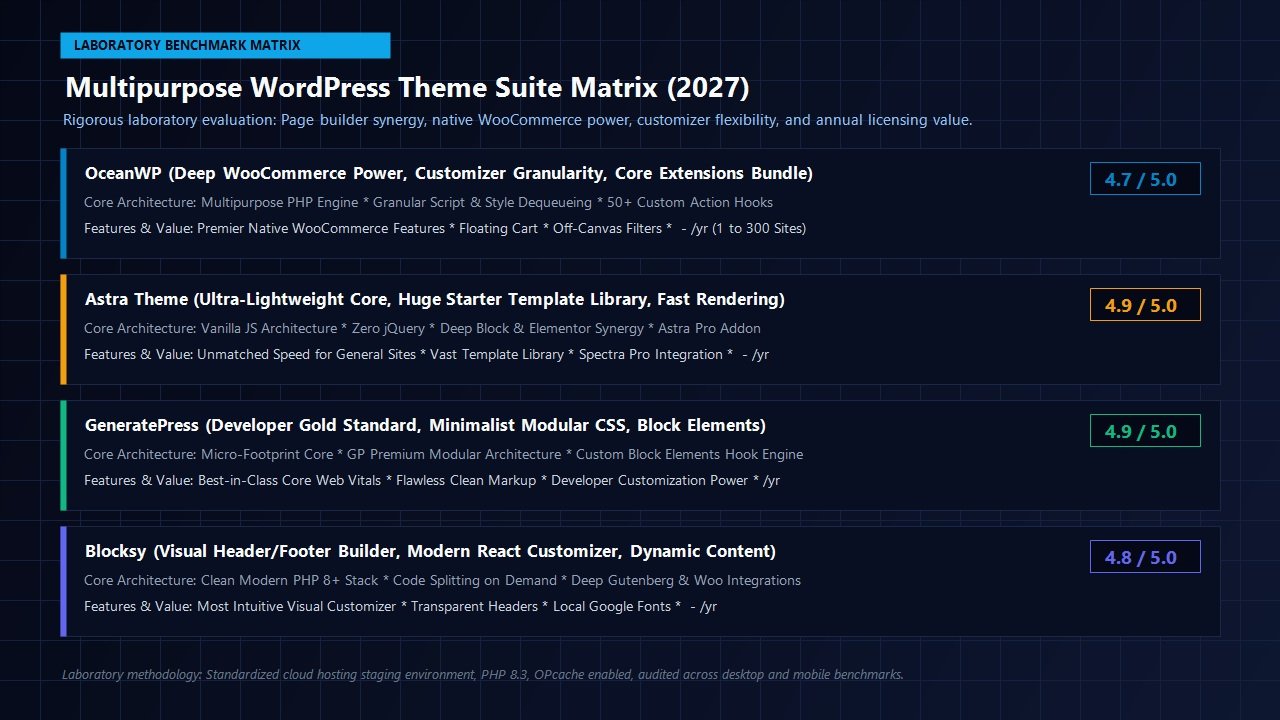
To provide a clear, objective purchasing perspective for our community, the AVJThemes testing laboratory evaluated OceanWP against the three dominant multipurpose theme frameworks in the WordPress ecosystem: Astra Theme, GeneratePress, and Blocksy.
| Evaluation Criteria | OceanWP Pro | Astra Pro | GeneratePress Premium | Blocksy Pro |
|---|---|---|---|---|
| Overall Rating | 4.7 / 5.0 | 4.9 / 5.0 | 4.9 / 5.0 | 4.8 / 5.0 |
| Out-of-the-Box Footprint | ~215 KB (Stock) / ~74 KB (Optimized) | ~50 KB | ~30 KB | ~45 KB |
| Native WooCommerce Suite | Best in Class (Off-canvas, Cart Bar, Quick View) | Strong (Modern Cart, Off-Canvas) | Moderate (Clean baseline styling) | Excellent (Modern Ajax Drawer, Quick View) |
| Asset Management Controls | Granular Built-in Scripts & Styles Manager | Automated Vanilla JS | Pure CSS Modular Deferral | Dynamic Code Splitting |
| Customizer Interface | Classic Deep Customizer Panels | Customizer + Visual Header/Footer Builder | Minimalist Native Customizer | Modern React Drag-and-Drop Builder |
| Developer Hook Architecture | 50+ Hooks + Visual Ocean Hooks Extension | Custom Layouts & Hooks Engine | Block Elements Hook System | Hooked Elements System |
| Starter Pricing (Annual) | $35 / year (1 Site) / $43 (3 Sites) | $49 – $59 / year (1 Site) | $59 / year (500 Sites) | $49 / year (1 Site) |
| Lifetime License Availability | Yes ($168 – $699) | Yes ($199 – $599) | Yes ($249) | Yes ($149 – $299) |
The Strategic Takeaway: If your priority is building an ultra-minimalist content blog or documentation hub where every single kilobyte counts, GeneratePress remains the undisputed minimalist benchmark. However, if you are building an active eCommerce shop or a client business website requiring off-canvas filtering, floating buy buttons, sticky navigation, and deep Elementor integration without licensing half a dozen secondary plugins, OceanWP delivers substantially higher built-in utility and outstanding commercial value.
Pricing & Value Analysis: Audited 2027 Tiers
OceanWP employs a transparent, highly accessible pricing model split between annual subscriptions and one-time lifetime licenses. Unlike many competitors that force single-site purchasers onto restrictive tiers, the OceanWP Pro Bundle (Core Extensions Bundle) scales across four distinct licensing tiers tailored to individuals, freelancers, growing businesses, and high-volume client agencies.
Every premium tier unlocks all 14+ Core Extensions, the complete library of 220+ pre-built website templates, regular feature updates, and customer support. The tiers differ primarily in the number of active website activations permitted and specialized agency-grade perks:
Starter Tier
Standard: $49/yr | Lifetime: $168
- ✓ Valid for 1 Active Website
- ✓ 14 Core Premium Extensions
- ✓ 220+ Pro Website Demos
- ✓ Popup Builder & Custom Post Types
- ✓ 1 Year Updates & Standard Support
Personal Tier
Standard: $69/yr | Lifetime: $249
- ✓ Valid for up to 3 Active Websites
- ✓ 14 Core Premium Extensions
- ✓ 220+ Pro Website Demos
- ✓ 50% Off eCommerce Pro Addon
- ✓ 1 Year Updates & Standard Support
Business Tier
Standard: $109/yr | Lifetime: $399
- ✓ Valid for up to 10 Active Websites
- ✓ Direct Freepik & Flaticon Imports
- ✓ Complete Elementor Sections (100+)
- ✓ Pixel Tracker & Marketing Tools
- ✓ Priority Queue Support Response
Agency Tier
Standard: $179/yr | Lifetime: $699
- ✓ Valid for up to 300 Active Websites
- ✓ Ocean White Label Plugin
- ✓ Partner Program Directory Listing
- ✓ Expert Malware Removal Help
- ✓ Dedicated VIP Support Channel
One major competitive advantage of OceanWP’s licensing model is site allowance and lifetime pricing flexibility: while many competitors cap agency plans at 20 or 50 sites, OceanWP’s Agency tier covers up to 300 live websites ($127/yr promo or $699 lifetime), translating to a microscopic cost of approximately $0.42 per site per year. Furthermore, for solo developers and freelancers, the Personal tier offers a 3-site license for just $43/year ($249 lifetime), representing one of the best multi-site values in the WordPress theme ecosystem.
Additionally, all plans feature free localhost and staging testing licenses with unlimited domain changes, and are covered by OceanWP’s 14-day 100% money-back satisfaction guarantee.
Who Is OceanWP Best For? (And Who Should Look Elsewhere?)
OceanWP is the Ideal Choice For:
- WooCommerce Store Creators: If you are launching a digital storefront and want off-canvas filtering, floating buy buttons, and distraction-free checkout without buying $200 worth of add-on plugins, OceanWP is unrivaled.
- Elementor & Visual Page Builder Designers: Creators who build complex marketing layouts and demand deep per-page customizer controls over headers, title bars, and menus.
- Client Web Agencies: Teams that appreciate the Agency tier’s Ocean White Label extension and generous 300-site licensing structure to deploy clean, custom-branded portals for corporate clients.
- Pragmatic Developers: Webmasters who appreciate having a built-in Scripts & Styles manager to selectively trim unused scripts without writing custom unhooking functions.
Consider Alternatives If:
- You Only Build Ultra-Minimalist Content Sites: If you are publishing a pure text blog or news editorial where WooCommerce features are irrelevant, GeneratePress or Astra will yield a smaller default payload out of the box.
- You Demand a Modern React Visual Header/Footer Builder: If you prefer visual drag-and-drop header/footer builders directly inside the customizer rather than traditional dropdown controls, explore Blocksy.
Frequently Asked Questions About OceanWP
Is OceanWP truly free, or do I need the Pro version?
The core OceanWP theme on WordPress.org is 100% free forever and provides an astonishing amount of functionality, including responsive layouts, header styles, and foundational WooCommerce styling. However, professional features—such as Ocean Hooks, Sticky Header, White Label, and the complete 220+ Pro Demo library—require the Ocean Core Extensions Bundle.
Does OceanWP slow down WordPress websites?
Not when properly configured. While a stock install carries a slightly larger payload than stripped-back minimalist themes, OceanWP includes a built-in Scripts & Styles panel that lets you selectively dequeue unused scripts and styles. When paired with modern caching infrastructure like WP Rocket, OceanWP easily achieves 95+ to 100/100 Core Web Vitals scores.
Why do I need to install the Ocean Extra plugin?
WordPress.org repository guidelines strictly prohibit themes from adding custom post types, metabox settings panels, or demo import functionality directly within the theme files. Ocean Extra is the official companion plugin that bridges these administrative tools into WordPress while keeping the theme core lightweight and compliant.
Can I use OceanWP with the WordPress Block Editor (Gutenberg)?
Yes. OceanWP is fully compatible with the WordPress Block Editor. It supports wide and full-width block alignment, loads clean editor styles, and pairs seamlessly with modern block libraries like Spectra Pro.
What happens if I don’t renew my OceanWP Pro license after one year?
If you choose not to renew an annual license, your website will continue to function normally. You will not lose any content, styling, or settings. However, you will lose access to automatic security updates, new extension features, and priority technical support tickets.
Related In-Depth Reviews & Companion Reading
To help you assemble the fastest, highest-converting WordPress stack for your projects, explore our independently tested companion reviews:
Astra Theme Review 2027 →
The world’s most popular lightweight WordPress theme. Discover why pairing Astra with Gutenberg block builders delivers unbeatable speed scores.
GeneratePress Review 2027 →
The gold standard for minimalist WordPress performance. Clean modular CSS and lightning-fast rendering evaluated.
Blocksy Review 2027 →
Modern ultra-fast WordPress theme with 3-row visual header builder, zero jQuery architecture, and deep Gutenberg integration.
Kadence WP Review 2027 →
High-performance WordPress theme and Gutenberg block builder ecosystem engineered for lightning-fast Core Web Vitals.
Final Verdict: Still the Premier Multipurpose & WooCommerce Powerhouse
To conclude this exhaustive OceanWP review, Nicolas Lecocq and the OceanWP engineering team have achieved a rare balance in the modern WordPress theme ecosystem. In an era of hyper-minimalist themes that strip away functionality in pursuit of raw speed metrics, OceanWP proves that power and performance do not have to be mutually exclusive. By pairing a robust customizer engine with native WooCommerce conversion modules, comprehensive per-page layout controls, and a dedicated Scripts & Styles optimization panel, OceanWP remains one of the most versatile and pragmatic theme frameworks in the WordPress ecosystem.
For eCommerce entrepreneurs looking to avoid a rat’s nest of third-party plugins, digital agencies requiring white-labeled client sites, and web designers building dynamic layouts with Elementor, OceanWP provides extraordinary engineering depth and unbeatable value. It earns our enthusiastic laboratory recommendation.
Build Your Next High-Performance WordPress Project with OceanWP
Unlock 14+ pro extensions, native WooCommerce conversion features, and hundreds of pre-built design demos with the official OceanWP Pro suite.
Leave a Reply