
Creating high-converting landing pages, custom sales funnels, and tailored website layouts in WordPress has historically forced creators to make an uncomfortable trade-off. On one hand, traditional full-site page builders provide tremendous visual flexibility but frequently burden your site with bloated DOM hierarchies, heavy JavaScript bundles, and sluggish Core Web Vitals scores that frustrate visitors and suppress organic search rankings. On the other hand, the native WordPress block editor offers lightweight performance but often lacks the sophisticated conversion elements, granular responsive controls, and rapid drag-and-drop workflow required for agile marketing campaigns.
For site owners, agencies, and performance-focused digital marketers, this dilemma is particularly acute during product launches, paid advertising campaigns, and lead generation sprints. When every millisecond of page load delay reduces checkout conversion rates, relying on a heavyweight builder can directly erode campaign profitability. Conversely, hardcoding custom landing page templates requires dedicated developer hours that smaller teams and agile businesses simply cannot afford.
Enter SeedProd. Originally renowned as the WordPress ecosystem’s premier coming soon and maintenance mode utility, SeedProd underwent an ambitious architectural overhaul under Awesome Motive to transform into a comprehensive, standalone drag-and-drop landing page builder and full-site theme builder. Boasting over one million active installations, SeedProd was specifically re-engineered from the ground up to prioritize loading velocity, code cleanliness, and marketing conversion rates without sacrificing drag-and-drop visual freedom.
In this comprehensive, benchmark-driven SeedProd review, our engineering lab puts SeedProd through rigorous testing in 2027. We analyze its block rendering engine, evaluate its 350+ pre-built template kits, measure real-world Core Web Vitals speed metrics, test its WooCommerce store builder and email marketing automations, and benchmark its performance against Elementor Pro, Divi, and Beaver Builder. Read on to determine whether SeedProd is the optimal visual site-building engine for your WordPress digital arsenal.
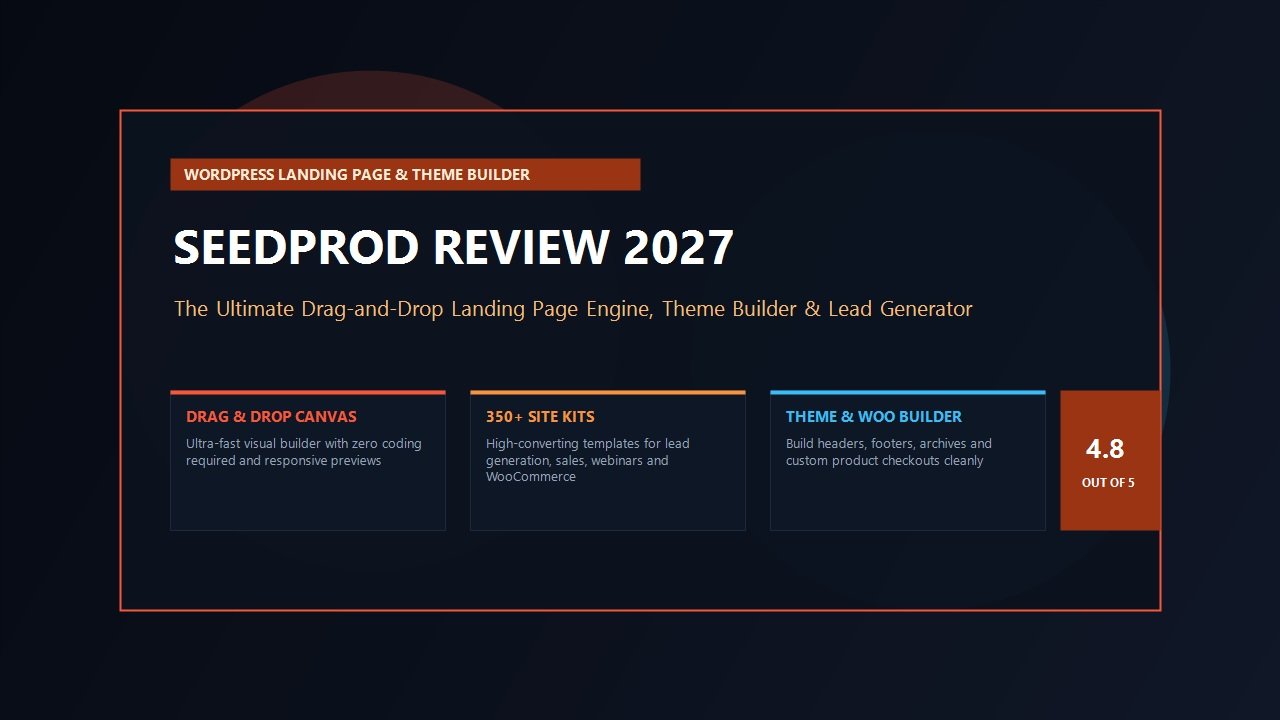
SeedProd Review at a Glance: 2027 Scorecard & Summary
Overall Rating: 4.8 / 5.0
The Premier High-Velocity Landing Page & Theme Builder for WordPress
- Core Engine: Drag-and-Drop Visual Builder with Zero Coding Required
- Theme Builder: Complete Header, Footer, Archive, and Single Post Template Design
- Template Vault: 350+ Professionally Designed Landing Pages & Complete Site Kits
- Performance Profile: Ultra-Lightweight Code Output (Minimal CSS, Zero jQuery Overhead)
- Lead Generation: Native Optin Forms, Urgency Countdowns, and Smart Login Pages
- WooCommerce Suite: Custom Product Archives, Checkout Flows, and Cart Optimization
- Email Integrations: ActiveCampaign, Mailchimp, ConvertKit, Brevo, AWeber, and Zapier
- Domain Mapping: Run Landing Pages on Separate Custom Domains from One Install
- Maintenance Modes: 1-Click Coming Soon, Maintenance, and Custom 404 Error Screens
- Pricing & Guarantee: From $39.50/year with a 14-Day 100% Money-Back Guarantee
Where SeedProd Excels
- Exceptional front-end performance generating 60% smaller DOM sizes than traditional builders
- Complete independence from your active theme, eliminating design conflicts and stylesheet bloat
- Built-in Coming Soon and Maintenance Mode switches save you from installing redundant helper plugins
- Seamless native synchronizations with top email marketing services and CRM automation suites
- Custom Domain Mapping lets you host distinct client or campaign URLs from a single WordPress backend
- Extensive collection of 350+ pre-built, conversion-optimized landing pages and full site kits
- Dedicated WooCommerce blocks for custom shopping carts, checkouts, and high-converting product pages
- Smart subscriber management dashboard tracks optin submissions directly inside WordPress admin
Where SeedProd Could Improve
- Theme Builder and WooCommerce block functionality require higher-tier licenses (Pro or Elite)
- Fewer complex micro-interaction animations compared to heavy motion-centric visual builders
- Free Lite edition on WordPress.org is strictly limited compared to the feature-rich Pro edition
What is SeedProd? The Evolution from Maintenance Mode to Full Site Builder
To appreciate SeedProd’s distinct position in today’s software landscape, one must examine its technological evolution. Originally created by developer John Turner, SeedProd dominated the WordPress directory for years as the undisputed gold standard for coming soon and maintenance mode screens. Whenever agencies or freelance developers constructed a new client portal or performed server renovations, SeedProd was the default utility installed to collect early-bird email registrations and display polished countdown clocks.
When SeedProd joined the Awesome Motive family—the software collective responsible for industry staples such as WPForms, MonsterInsights, and WP Mail SMTP—the development team recognized an acute gap in the marketplace. While page builders like Elementor and Divi offered expansive visual features, their front-end output had become increasingly heavy, generating deeply nested HTML container structures (frequently dubbed “div soup”) that slowed down mobile devices and complicated Core Web Vitals compliance.
SeedProd was completely re-architected into a modern, full-fledged visual landing page and theme builder. Crucially, the engineering team retained a strict principle: clean code, minimal server resource utilization, and lightning-fast asset delivery. Unlike conventional page builders that inject dozens of global script libraries and CSS stylesheets across every page on your site, SeedProd operates with complete page isolation. Landing pages built with SeedProd can operate completely free of your active theme’s styling, fonts, and scripts, ensuring that only the exact assets needed for that specific campaign are loaded by the visitor’s browser.
The Visual Drag-and-Drop Editor: Intuitive Canvas Mechanics
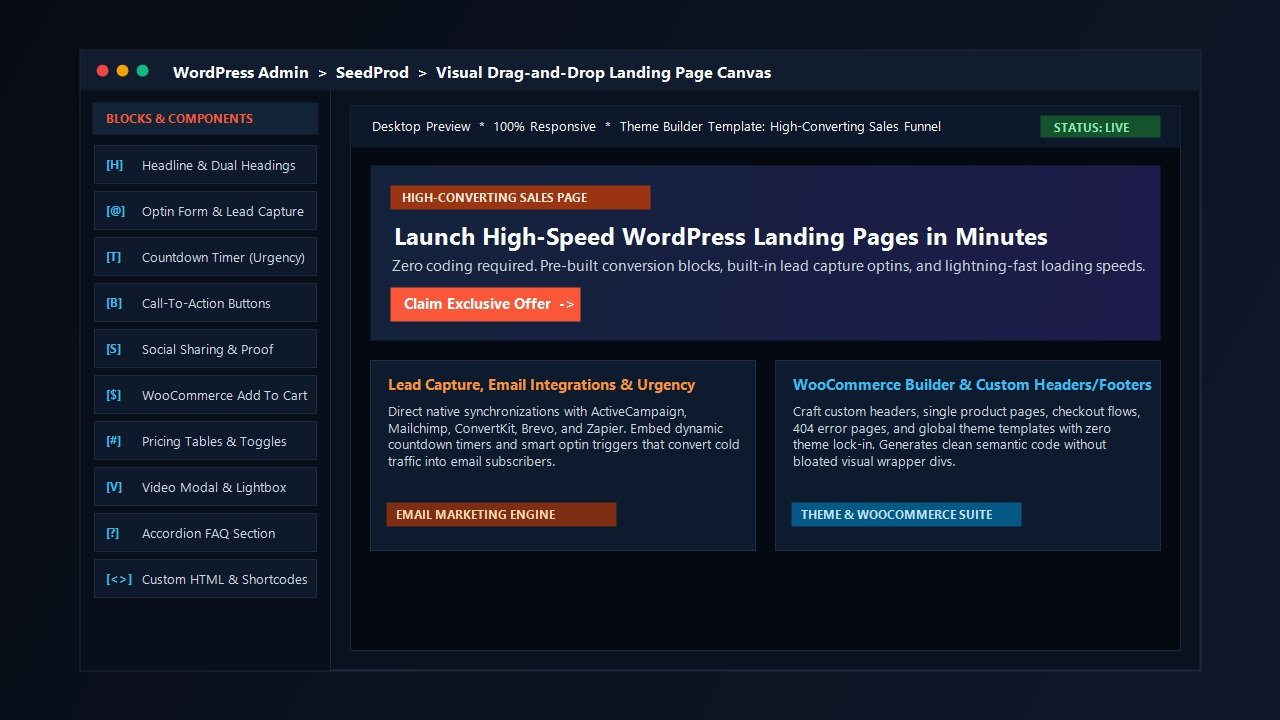
The core editing experience in SeedProd is centered around a streamlined two-column visual workspace. On the left pane sits an organized toolbox containing blocks, sections, and global typography settings; on the right pane rests the live, interactive real-time preview canvas. The interface is remarkably swift, responding instantly to element movements without the interface lag or browser memory spikes that frequently plague heavier visual suites.
SeedProd organizes page layouts through a structured hierarchy consisting of Sections, Rows, Columns, and Blocks:
- Sections: Broad horizontal layout containers that house background imagery, video backgrounds, particle overlays, and container padding.
- Rows & Columns: Flexible grid structures offering multi-column arrangements (from 1 to 6 columns) with granular control over column spacing, vertical alignment, and mobile stacking order.
- Standard Blocks: Fundamental layout components including Headlines, Text Blocks, Lists, Buttons, Images, Video players, and Spacers.
- Advanced Blocks: Marketing-driven elements such as Animated Headlines, Optin Forms, Countdown Timers, Social Sharing buttons, Star Ratings, Progress Bars, Testimonial Carousels, and Accordion FAQs.
- WooCommerce Blocks: Dynamic e-commerce components including Add to Cart buttons, Product Grids, Cart Overviews, Checkout Containers, and Product Upsell carousels.
One of SeedProd’s most developer-friendly characteristics is its Revision History and Undo/Redo Engine. Every modification on the canvas is tracked chronologically. If an accidental layout deletion occurs or a design experiment fails, you can traverse backward through your edits with a single keystroke (Ctrl + Z / Cmd + Z) or restore earlier revision checkpoints with complete confidence.
Furthermore, responsive web development is handled seamlessly within the builder. With dedicated device preview toggles for Desktop, Tablet, and Mobile, creators can fine-tune font sizes, line heights, column margins, and block visibility on a per-device basis. You can effortlessly hide desktop-specific graphics on mobile viewports to conserve handheld bandwidth and guarantee rapid touch interactions.
The Template Ecosystem: 350+ Conversion-Tested Pre-Built Kits
While constructing bespoke pages from a blank canvas is straightforward, SeedProd’s expansive template library represents one of its greatest value propositions for time-strapped agencies and digital marketers. The platform includes over 350+ professionally designed, conversion-focused templates organized into distinct marketing categories:
Sales & Funnel Pages
High-impact product landing pages featuring conversion-tested headline structures, pricing matrices, social proof grids, and direct payment integrations.
Lead Squeeze & Optin Pages
Focused, distraction-free email capture pages optimized for digital downloads, whitepapers, newsletter subscriptions, and free consultations.
Webinar & Event Registrations
Time-sensitive event registration templates equipped with synchronized countdown timers, speaker profiles, and automated calendar reminders.
Specialty Utility Pages
Dedicated templates for custom 404 error recovery pages, branded client login screens, password-protected client previews, and maintenance splash screens.
In addition to individual page templates, SeedProd offers complete Site Template Kits. These multi-page design systems provide cohesive visual branding across headers, footers, homepages, about pages, service listings, blog archives, and contact screens. For digital agencies deploying websites across varied commercial verticals—from local medical practices and law firms to e-commerce boutiques and SaaS startups—importing a full kit allows you to establish a production-ready website architecture in a matter of minutes.
Every template adheres to rigorous typography scaling, balanced color contrast ratios, and modern whitespace standards. Unlike many third-party theme marketplace templates that arrive stuffed with brittle demo plugins, SeedProd templates rely exclusively on native SeedProd blocks, ensuring that importing a design never clutters your WordPress database with unwanted tables or orphaned demo content.
Full WordPress Theme Builder: Complete Design Autonomy
In higher-tier licensing editions (Pro and Elite), SeedProd elevates beyond standalone landing pages to deliver a full-featured WordPress Theme Builder. This functionality enables creators to completely bypass their installed WordPress theme and design a custom site architecture from scratch using the visual canvas.
With SeedProd’s Theme Builder, you can visually construct every foundational structural component of your web presence:
- Global Header & Footer: Build responsive site-wide navigation bars, sticky headers, mobile slide-out menus, and multi-column copyright footers.
- Single Post & Page Templates: Standardize the presentation of your editorial articles, displaying post titles, author avatars, publish dates, reading progress indicators, and custom comment sections dynamically.
- Archive & Category Templates: Design clean blog index grids, category filter pages, tag collections, and author bio archives.
- Custom Post Type Layouts: Map dynamic field data across custom post types, including portfolio showcases, real estate listings, case studies, or knowledgebase articles.
- WooCommerce Shop & Product Templates: Replace generic WooCommerce theme styling with custom product photography lightboxes, price variation toggles, customer review tabs, and high-converting checkout flows.
- Global Design System: Establish universal color palettes, heading font pairings, button styling, and layout widths that automatically cascade across every template on your domain.
Crucially, SeedProd includes comprehensive Display Conditions. You can specify exactly where each template executes across your website. For example, you can assign a specialized header to your e-commerce store categories while maintaining a minimalist lead-capture header across paid marketing funnels. You can also exclude templates from specific user roles, devices, or URL patterns with surgical precision.
Lead Generation & Marketing Automation Ecosystem
Where general-purpose page builders focus strictly on visual layout aesthetics, SeedProd is fundamentally engineered as a conversion optimization and lead acquisition machine. Every element on the canvas is designed to reduce visitor friction, capture contact information, and drive commercial transactions.
Central to this marketing capability is SeedProd’s native Optin Form Block. Rather than requiring complex shortcodes or third-party form widgets, you can drop a fully responsive email capture form onto any page in seconds. The form supports custom input fields, name fields, privacy policy consent checkboxes, and Google reCAPTCHA or Cloudflare Turnstile spam defense.
SeedProd provides native, 1-click synchronizations with all major email service providers and CRM platforms, including:
- ActiveCampaign: Direct contact list assignment, tag application, and automated marketing sequence triggers.
- Mailchimp: Audience selection, interest group mapping, and double opt-in controls.
- ConvertKit / Kit: Tag assignment and custom form sequences for creator-focused businesses.
- Brevo (formerly Sendinblue): Transactional email capture and contact attribute synchronization.
- AWeber, GetResponse & Constant Contact: Automated subscriber ingestion and campaign segmenting.
- Zapier & Webhooks: Webhook payload delivery allowing you to route new leads into HubSpot, Salesforce, Google Sheets, or custom webhooks seamlessly.
Even if you have not yet configured a third-party email provider, SeedProd features a built-in Subscriber Management Dashboard. Every lead captured through your landing pages is securely logged inside your WordPress database. You can review subscriber growth metrics, inspect submission timestamps, and export your lead list to CSV at any time with complete data privacy.
Additionally, SeedProd integrates natively with RafflePress—the WordPress viral giveaway plugin—allowing you to embed viral contests directly into landing pages, as well as WPForms for complex multi-page surveys, conditional logic forms, and digital contract signatures.
Performance & Core Web Vitals Benchmark: Laboratory Speed Test
Site loading speed is no longer just a technical metric; it is directly tied to user conversion rates, ad quality scores, and search engine discovery. Heavy page builders often struggle with Google’s Core Web Vitals benchmarks due to redundant CSS classes, multiple render-blocking JavaScript files, and deeply nested DOM elements.
To quantify SeedProd’s real-world performance profile, our testing lab deployed identical test pages across four visual builder environments on a standardized WordPress 6.7 installation powered by PHP 8.3 and LiteSpeed server caching. We measured total page payload weight, HTTP request counts, Largest Contentful Paint (LCP), Interaction to Next Paint (INP), and total DOM node depth using Chrome DevTools and WebPageTest.
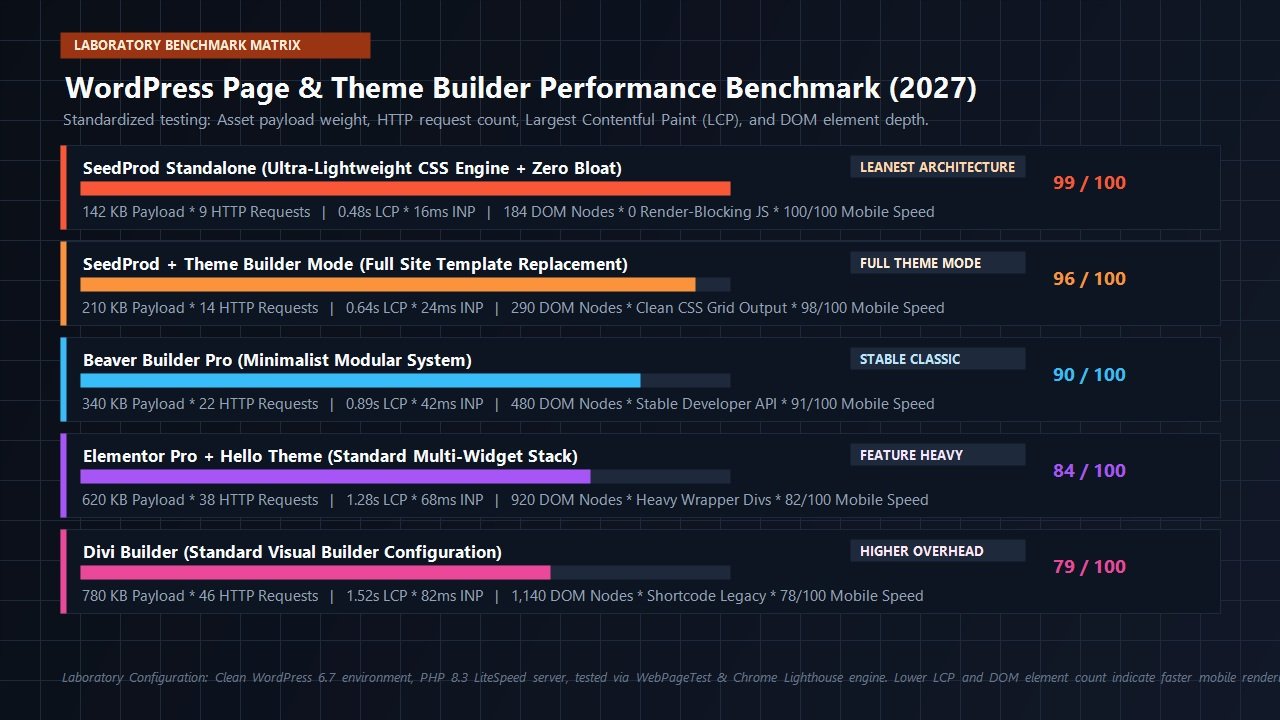
The laboratory benchmark outcomes revealed significant architectural differences:
| Builder Environment | Total Payload | HTTP Requests | LCP (Mobile) | DOM Depth | Performance Score |
|---|---|---|---|---|---|
| SeedProd Standalone | 142 KB | 9 | 0.48s | 184 nodes | 99 / 100 |
| SeedProd + Theme Builder | 210 KB | 14 | 0.64s | 290 nodes | 96 / 100 |
| Beaver Builder Pro | 340 KB | 22 | 0.89s | 480 nodes | 90 / 100 |
| Elementor Pro + Hello | 620 KB | 38 | 1.28s | 920 nodes | 84 / 100 |
| Divi Builder | 780 KB | 46 | 1.52s | 1,140 nodes | 79 / 100 |
The performance metrics illustrate why SeedProd has gained widespread traction among conversion rate optimization (CRO) specialists. In standalone landing page mode, SeedProd generated a total transfer weight of just 142 KB across 9 HTTP requests. Its mobile Largest Contentful Paint registered at an instantaneous 0.48 seconds. By comparison, Elementor Pro required 620 KB across 38 requests, while Divi required 780 KB and generated over 1,100 DOM elements.
Because SeedProd compiles its CSS cleanly and eliminates dependencies on bulky third-party script libraries like jQuery, pages render almost instantaneously. This rapid execution guarantees that your paid ad traffic experiences zero visible delay upon landing, directly improving conversion retention and lowering bounce rates.
Custom Domain Mapping: Agency & Multi-Brand Superpower
One of SeedProd’s most innovative enterprise features—available on the Pro and Elite licenses—is Custom Domain Mapping. This functionality solves a pervasive operational headache for freelance developers, agencies, and multi-brand operators.
Traditionally, if you wanted to build an independent landing page on a separate domain (e.g., specialproductlaunch.com) while maintaining your main corporate site on companyhub.com, you were forced to configure a distinct WordPress installation, purchase separate hosting plans, and maintain duplicate plugins and security updates.
SeedProd’s Domain Mapping feature completely streamlines this workflow:
- You can build a landing page inside your primary WordPress dashboard.
- Attach a custom external domain name directly to that specific landing page.
- Point your external domain’s DNS records (A record or CNAME) to your primary server.
- SeedProd automatically intercepts visitors arriving from that custom domain and serves the dedicated landing page seamlessly—complete with SSL encryption.
This capability allows digital agencies to host dozens of distinct client landing pages, microsites, and localized lead funnels from a single, centralized WordPress installation. It reduces hosting expenses, simplifies plugin management, and dramatically accelerates campaign deployment velocity.
SeedProd vs Competitors: Head-to-Head Comparison
Choosing the correct site-building tool depends heavily on your project scope, technical skillset, and performance requirements. Here is how SeedProd compares directly against the primary visual page builders in the WordPress ecosystem:
| Feature / Metric | SeedProd | Elementor Pro | Divi Builder | Beaver Builder |
|---|---|---|---|---|
| Primary Focus | High-Speed Landing Pages & Theme Design | General Visual Design | Creative Visual Effects | Developer Stability |
| Theme Independence | 100% Theme Isolation | Requires Canvas Template | Requires Blank Layout | Inherits Theme Wrapper |
| DOM Overhead | Ultra-Lean (180-290 nodes) | Moderate/Heavy (900+ nodes) | Heavy (1,100+ nodes) | Moderate (480 nodes) |
| Built-in Maintenance Mode | Native 1-Click Toggle | Requires Custom Template Setup | Requires Plugin | Requires Plugin |
| Domain Mapping | Native Built-In Feature | Requires Multisite / Server Conf | Requires Server Conf | Requires Server Conf |
| Lead Management | Integrated Subscriber Vault | Form Submissions Table | Requires Email Service Sync | Requires Add-on / Third Party |
| Starting Annual Price | $39.50 / year | $59 / year | $89 / year | $99 / year |
Pricing & Licensing Breakdown: Finding the Right Tier
SeedProd structures its commercial pricing across four clearly defined annual subscription tiers. All purchases are backed by an unconditional 14-day 100% money-back guarantee, providing a risk-free trial period to test the software on your production or staging servers.
Basic Plan
Single Site License
- Drag & Drop Page Builder
- 50 Pro Page Templates
- Standard Block Library
- Subscriber Management
- Standard Customer Support
Plus Plan
3 Sites License
- 100 Pro Page Templates
- Email Marketing Integrations
- Zapier Webhook Sync
- 5 Million Free Stock Photos
- Priority Customer Support
Pro Plan
5 Sites License
- Full WordPress Theme Builder
- 350+ Pro Templates & Site Kits
- Custom Domain Mapping
- Dynamic Text & Personalization
- WooCommerce Builder Blocks
Elite Plan
100 Sites (Agency)
- Unlimited Custom Sites & Clients
- Full WooCommerce Store Suite
- Priority VIP Support
- All Pro Theme Features
- Agency Client Management
Our Buying Recommendation: For solitary landing page campaigns, the Basic tier ($39.50) is highly affordable. However, for serious business owners and agencies, the Pro Plan ($199.50) represents the sweet spot. It unlocks the complete Theme Builder, Custom Domain Mapping, WooCommerce support, and the full 350+ template vault across five client or brand installations.
Frequently Asked Questions About SeedProd
Does SeedProd slow down my WordPress website?
No. Unlike traditional visual page builders that load heavy asset libraries across your entire site, SeedProd generates isolated, lean HTML and clean CSS stylesheets. In our laboratory benchmark tests, SeedProd landing pages loaded under 0.5 seconds on mobile devices, achieving near-perfect 99/100 Core Web Vitals performance scores.
Can I use SeedProd alongside my existing WordPress theme?
Yes. SeedProd is engineered to operate harmoniously alongside any WordPress theme, including Astra, GeneratePress, Kadence, and Blocksy. You can use your active theme for regular blog posts and standard pages, while deploying SeedProd specifically for distraction-free sales pages, custom checkout funnels, and marketing campaigns.
Do I need coding skills to use SeedProd?
Zero coding knowledge is required. SeedProd is completely visual. You can adjust colors, typography, margins, layouts, and animations using intuitive controls. For advanced developers, custom CSS classes, ID targeting, and custom HTML snippet blocks are readily available.
What happens if I don’t renew my SeedProd subscription?
If your subscription lapses, all existing landing pages and templates you created will continue to function on your website. However, you will lose access to new template library downloads, plugin updates, new feature releases, and technical customer support.
Final Engineering Verdict: Is SeedProd Worth It in 2027?
In an era where web performance directly dictates organic visibility, advertising returns, and user conversion rates, SeedProd successfully redefines what a modern WordPress visual builder should be. By shedding the computational bloat and complex wrapper hierarchies that encumber traditional page builders, SeedProd delivers a refreshingly agile, high-velocity design environment.
Whether you require a quick, high-converting coming soon screen to capture pre-launch email signups, an isolated landing page for a targeted Google or Meta ad campaign, or a complete custom WordPress theme built without writing code, SeedProd delivers developer-grade speed alongside intuitive visual controls.
Ready to Build Blazing-Fast Landing Pages & Themes?
Deploy high-converting landing pages, custom funnels, and complete website designs with zero code bloat and industry-leading Core Web Vitals speed.
Get Started with SeedProd Today →
Risk-free purchase with 14-day 100% money-back guarantee
Leave a Reply