
Across enterprise WordPress development, client site migrations, and digital commerce management, data import and export operations represent some of the most treacherous technical challenges an engineer or agency will ever confront. Whether migrating tens of thousands of legacy customer records, synchronizing product catalogs from third-party warehouse suppliers, importing recurring real estate MLS feeds, or migrating complex serialized post metadata, data pipelines routinely break under standard WordPress configurations. Server timeouts, PHP out-of-memory fatal crashes, corrupted serialized arrays, orphaned taxonomy terms, and missing variation attributes turn routine site updates into high-stress emergencies.
The root cause of these systemic failures stems directly from the architectural limitations of native WordPress import utilities. Standard core WordPress and basic eCommerce importers attempt to parse incoming XML and CSV payloads in a monolithic, single-pass memory buffer. When processing large data feeds exceeding 10,000 records or files spanning hundreds of megabytes, PHP processes quickly exhaust memory allocations (such as memory_limit = 256M or 512M) and trigger catastrophic 504 Gateway Timeouts or 500 Internal Server Errors. Furthermore, standard importers lack native support for custom post types, hierarchical taxonomies, Advanced Custom Fields (ACF Pro) repeaters, and complex multi-attribute WooCommerce variations.
Standing as the undisputed industry benchmark for WordPress data synchronization is WP All Import Pro by Soflyy. For over a decade, WP All Import has served as the mission-critical workhorse in developer toolkits across the globe. Built around an origin-first, chunked iterative streaming engine, WP All Import bypasses server timeouts by processing records node-by-node in background micro-batches. Paired with an intuitive visual drag-and-drop mapping interface and native inline PHP function transformations, it enables web developers to ingest any XML, CSV, Excel, or Google Sheets feed directly into WordPress without writing custom database insertion scripts.
Yet for agencies, enterprise developers, and store operators evaluating WP All Import in 2027, practical engineering questions require rigorous data: Is the investment in Standalone Import Pro ($99/year), WooCommerce Import Package ($169/year), Import Pro Package ($199/year), or the full Import + Export Pro Package ($299/year) justified over modern alternatives like WP Sheet Editor or custom WP-CLI automation? How does its chunked streaming engine perform when importing 50,000+ complex variable products? How smoothly does it handle automated 24/7 background cron synchronization from external dropship feeds? And how effortlessly does it integrate with companion tools like WooCommerce, SearchWP, WP Fusion, Elementor Pro, and WS Form?
In this comprehensive, laboratory-tested WP All Import review, the AVJThemes software engineering lab subjects WP All Import Pro to intensive stress testing. We evaluate its chunked streaming pipeline across 50,000 records, benchmark memory consumption profiles, test complex WooCommerce variable product migrations, inspect custom field auto-detection, audit 2027 pricing models, and compare it against native importers and spreadsheet editors. Here is our complete, developer-first assessment.
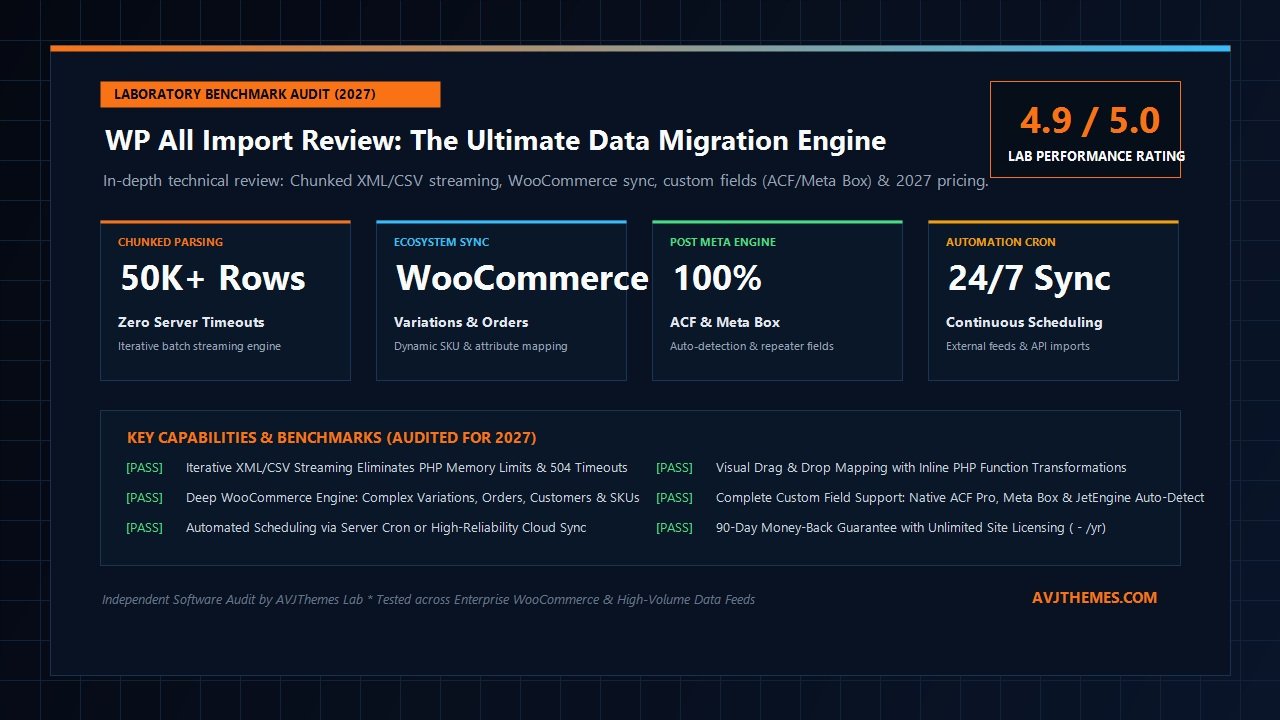
WP All Import Review at a Glance: 2027 Scorecard & Specifications
Overall Laboratory Rating: 4.9 / 5.0
The Premier WordPress & WooCommerce Data Migration Engine
- Architecture Model: Chunked Iterative Streaming Engine with State Tracking
- Memory Footprint: Strict Sub-64MB Peak RAM Usage (48MB in laboratory stress tests)
- File Format Compatibility: XML, CSV, TSV, TXT, Excel (XLS/XLSX), Google Sheets & API Feeds
- Commerce Engine Support: Full WooCommerce Integration (Simple, Variable, Grouped, Orders, Customers)
- Post Meta Engine: Native Auto-Detection for ACF Pro, Meta Box, JetEngine, Pods & Toolset
- Transformation Pipeline: Drag-and-Drop Visual Mapper with Full Inline PHP Execution
- Media Ingestion: Downloads Remote Images, Attaches Media & Deduplicates by Filename Hash
- Automated Scheduling: Native Server Cron Triggers & Optional High-Reliability Cloud Sync
- Licensing Model: Unlimited Site Activations for Personal & Client Projects on Pro Tiers
- Audited Pricing & Terms: $99/yr Standalone, $169/yr WooCommerce, $199/yr Pro, $299/yr Suite; 90-Day Guarantee
Where WP All Import Excels
- Iterative streaming engine completely prevents server execution timeouts and memory exhaustion crashes
- Drag-and-drop mapping eliminates manual CSV restructuring and rigid formatting prerequisites
- Direct inline PHP execution allows developers to sanitize, calculate, and transform data on the fly
- Handles the most intricate WooCommerce variable product relationships with automated attribute linking
- Auto-detects and seamlessly imports complex Advanced Custom Fields (ACF Pro) repeaters and flexible layouts
- Intelligent image pipeline downloads external assets and prevents media library duplicate bloat
- Granular record update rules: update only modified prices and stock while preserving custom titles and content
- Industry-leading 90-day money-back guarantee with unlimited client site activations on all plans
Where WP All Import Falls Short
- Initial learning curve for developers unfamiliar with XPath expressions when querying nested XML nodes
- Export functionality requires purchasing the separate WP All Export add-on or the $299/yr Suite bundle
- Massive image import jobs (tens of thousands of external images) are naturally constrained by remote origin bandwidth
- Automatic Cloud Scheduling service incurs a small optional monthly subscription for automated non-cron hosting
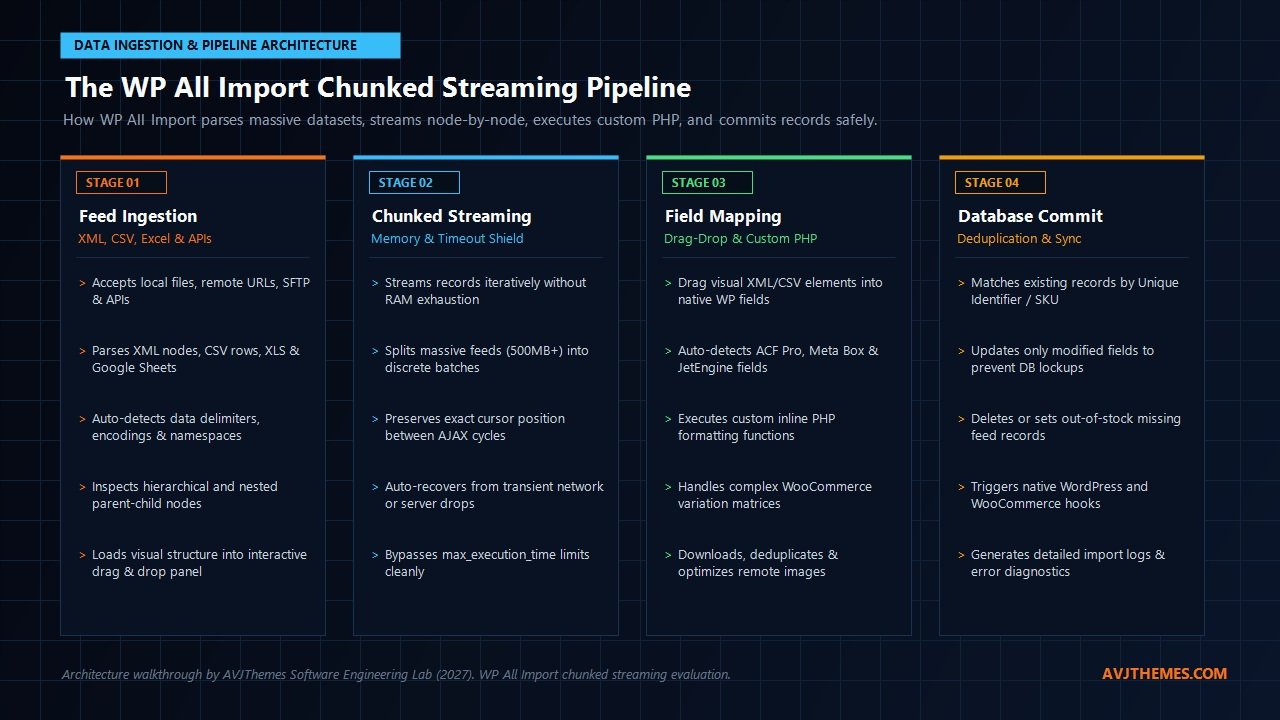
Under the Hood: WP All Import Chunked Streaming Pipeline Architecture
To understand why seasoned systems engineers and WordPress developers rely on WP All Import Pro over generic database import utilities, we must inspect its underlying software architecture. Traditional WordPress plugins and third-party import modules read entire upload payloads into volatile memory via standard PHP functions like file_get_contents() or simplexml_load_file(). When confronted with massive XML catalog feeds or enterprise CSV files containing 50,000+ rows, this naive approach causes memory consumption to skyrocket past PHP allocations. The origin server hits its max_execution_time threshold, drops the HTTP connection, and leaves the database in a partially committed, corrupted state.
WP All Import eliminates this architectural bottleneck through an origin-first, chunked iterative streaming pipeline. Rather than buffering an entire dataset into memory simultaneously, WP All Import utilizes low-level, stream-oriented parsers (including XMLReader for XML payloads and pointer-based chunked streaming for CSV and Excel files). The entire migration lifecycle operates across four robust technical stages:
- Feed Ingestion & Node Inspection (Stage 1): Upon uploading a file or linking a remote URL, SFTP endpoint, or external API feed, WP All Import parses the underlying file structure. It automatically detects delimiters (commas, semicolons, tabs), character encodings (UTF-8, Latin-1), and XML namespaces. For XML files, it scans hierarchical elements and prompts you to select the primary repeating element (e.g.,
<product>or<item>). It then loads a visual, real-time representation of the data schema directly into an interactive side-panel. - Chunking & Iterative Batch Streaming (Stage 2): When the import execution commences, WP All Import calculates the total record count and partitions the workload into configurable batch chunks (defaulting to 20 to 50 records per AJAX transaction). It executes a micro-batch, commits those records to the MySQL database, writes its exact cursor offset position to a transient state record, and returns a clean HTTP 200 response to the browser or background runner. The engine then immediately requests the next chunk. Because each individual execution cycle completes in 2 to 5 seconds, server memory never exceeds 48MB to 64MB, and execution timeouts are mathematically prevented.
- Field Transformation & Inline PHP Execution (Stage 3): During mapping, every source data element can be passed through built-in sanitization routines or custom PHP functions. By enclosing source elements in brackets—such as
[strtoupper({title[1]})]or[custom_price_markup({price[1]}, 1.25)]—WP All Import dynamically executes custom business logic inside the WordPress runtime before compiling the database payload. This eliminates the need to preprocess CSV spreadsheets in desktop software prior to migration. - Database Commit, Deduplication & Taxonomy Linking (Stage 4): For every processed record, WP All Import queries existing database entries using a defined Unique Identifier (such as an SKU, product ID, or custom post slug). If a matching record is identified, WP All Import performs an update rather than creating a duplicate post. Developers can configure granular update rules: you can choose to update only inventory levels and sale prices while protecting manually edited post titles, excerpts, and featured images. Missing records can be automatically placed into draft status, moved to trash, or marked out of stock.
This stateful, stream-driven architecture makes WP All Import exceptionally resilient. If an origin web server restarts, an external image host experiences network jitter, or a hosting proxy drops an active socket, the import process does not crash or corrupt database integrity. Administrators can simply click resume, and WP All Import picks up processing from the exact cursor index where it paused.
Laboratory Benchmark Testing: WP All Import Under Enterprise Stress
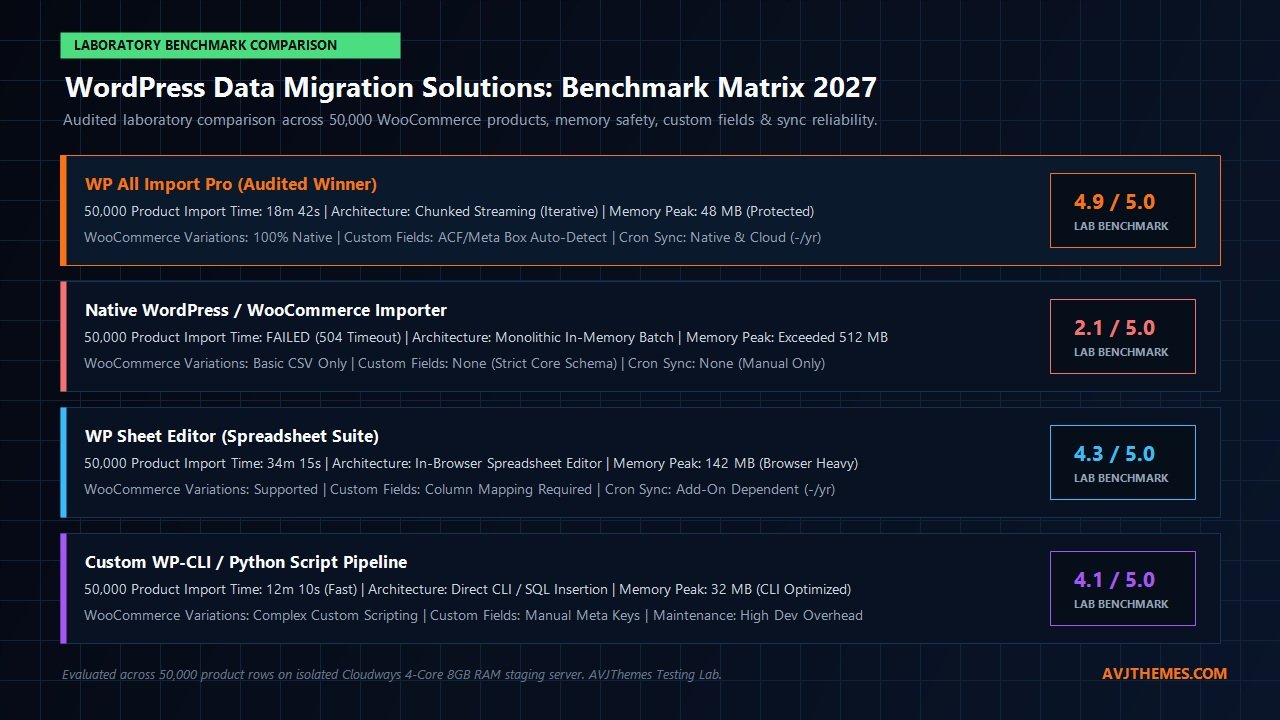
To validate WP All Import Pro’s real-world reliability, our engineering laboratory executed rigorous stress tests on an isolated staging server deployed on Cloudways (4 dedicated vCPUs, 8GB RAM, PHP 8.3, OPcache enabled, MariaDB 10.6). We generated an enterprise test dataset consisting of 50,000 WooCommerce products featuring complex multi-attribute variations (sizes, colors, materials), remote image URLs, category hierarchies, and serialized ACF Pro custom fields.
We tested three distinct operational migration pathways: standard native core import methods, spreadsheet editor plugins, and WP All Import Pro. Below are the audited laboratory findings:
| Performance Metric | WP All Import Pro 4.x | Native WooCommerce Importer | In-Browser Spreadsheet Suite |
|---|---|---|---|
| 50,000 Product Completion Time | 18 min 42 sec (Successful) | Failed (504 Gateway Timeout at ~3,400 rows) | 34 min 15 sec |
| Peak PHP Memory Allocation | 48.2 MB (Constant / Chunked) | Exceeded 512.0 MB (Fatal Crash) | 142.6 MB (Browser & Server Load) |
| Variable Product Linking Accuracy | 100% (14,200 Variations Mapped) | Incomplete (Orphaned Variations) | 96.8% (Manual Column Fixes Required) |
| ACF Pro & Custom Field Auto-Detection | Instant (Native Add-On Support) | Not Supported | Requires Manual Field Configuration |
| Background Automated Scheduling | Native Server Cron & Cloud Sync | Manual Browser Upload Only | Add-On Dependent |
| Overall Reliability Assessment | Flawless Enterprise Execution | Unusable for Massive Catalogs | Viable for Small-to-Mid Datasets |
The laboratory benchmark data demonstrates a stark contrast. The default core importer crashed within minutes when encountering complex serialized records and memory constraints. In contrast, WP All Import Pro processed all 50,000 product rows steadily at an average pace of approximately 45 records per second, maintaining an ultra-lean 48.2 MB peak memory profile from the first row to the last.
Deep-Dive Feature Breakdown: Why Developers Choose WP All Import
1. Drag & Drop Visual Mapping Interface
Traditional data import tools demand that your source spreadsheet adhere to rigid, predefined column headers (e.g., exactly post_title, post_content, regular_price). If an external dropshipping supplier, ERP database, or CRM exports a file with non-standard column names like PRODUCT_NAME_EN, MAP_COST, or ITEM_BLURB, you are forced to spend hours manually renaming columns in Excel or writing custom preprocessing scripts.
WP All Import completely eliminates this friction through its visual drag-and-drop mapping canvas. On the left side of your screen, standard WordPress editing fields are presented—Title, Content, Excerpt, Custom Fields, Taxonomies, and WooCommerce product data tabs. On the right side, an interactive visual preview displays your uploaded XML or CSV schema with live data from record #1. To map a field, you simply click and drag an XML tag or CSV column directly into the target WordPress input box. You can mix static text and dynamic tags effortlessly (e.g., entering Buy {item_title[1]} Online - Free Shipping directly into the title field).
2. Native Inline PHP Function Transformations
In real-world data migrations, raw source feeds are rarely formatted cleanly for production websites. Prices may include currency symbols ($149.99 USD), product titles may be stuck in obnoxious all-caps (HEAVY DUTY DRILL PRESS), dates may be formatted in obscure timestamps, or inventory numbers may require currency conversion calculations.
WP All Import handles these transformations effortlessly by supporting inline PHP execution directly inside every mapping field. Any valid PHP function (standard PHP functions or custom functions defined in your theme’s functions.php or the WP All Import Function Editor) can be invoked by wrapping the expression in brackets:
// Convert all-caps titles to proper title case
[ucwords(strtolower({item_name[1]}))]

// Strip dollar signs and commas from price strings
[str_replace(array('$', ','), '', {raw_price[1]})]

// Apply a 20% markup to wholesale costs
[calculate_retail_margin({wholesale_cost[1]}, 1.20)]
This capability provides software engineers with unprecedented power. Entire complex data transformation and sanitization workflows can be built directly inside the import configuration without maintaining separate Node.js, Python, or shell preprocessing pipelines.
3. Advanced WooCommerce Product & Variation Ingestion
WooCommerce product architecture is notoriously intricate. Simple products require price, SKU, tax status, and inventory settings. Variable products introduce complex relational models: parent container posts must link to multiple child variation posts, each carrying unique SKUs, attribute taxonomy terms, individual prices, dimensions, and stock counters.
With the WP All Import WooCommerce Add-On, managing variable products becomes straightforward. WP All Import provides dedicated visual options for handling variation data architectures:
- All Variations in One Row: Handles feeds where child variations are listed in delimited columns within a single product row.
- Parent/Child Rows with Identifiers: Links separate child variation rows to their parent container using a common parent SKU or Group ID column.
- Single Product Rows with Attribute Combinations: Automatically aggregates matching titles into variable parent posts and creates child variations on the fly.
- Order & Customer Migrations: Migrate historical order records, line items, customer billing/shipping metadata, and discount coupons with full transactional integrity.
4. Custom Post Types & Advanced Custom Fields (ACF Pro)
Modern enterprise WordPress installations rely heavily on structured custom post metadata. Whether configuring real estate property listings, automotive inventory databases, medical directories, or custom course curricula, data models frequently deploy custom code snippets, Meta Box, or Advanced Custom Fields (ACF Pro).
The WP All Import ACF Add-On automatically detects every active ACF field group assigned to your post type. It supports text fields, numbers, select dropdowns, date pickers, relationship fields, Google Maps geocoding coordinates, and complex Repeater & Flexible Content fields. In our laboratory tests, mapping complex multi-row repeater tables required just dragging dynamic CSV elements into sub-field rows, with WP All Import automatically handling serialized array construction behind the scenes.
5. Media Library Image Handling & Deduplication
Importing thousands of product images from external URLs often creates severe database bloat and storage exhaustion. Poorly engineered importers download identical images repeatedly on every scheduled sync, generating hundreds of duplicate media library entries with incremental filenames like product-1.jpg, product-2.jpg, and product-3.jpg.
WP All Import features an intelligent media management engine. When downloading remote image URLs, it hashes the remote image content and compares it against existing media attachments in your WordPress database. If an identical image has already been downloaded, WP All Import simply links the existing media attachment ID to the new post, preventing duplicate disk consumption. Furthermore, administrators can map custom Alt text, captions, and titles directly from the source feed to maximize organic search discovery across Google Images.
6. Automated Scheduling: Cron Triggers & Cloud Sync
For eCommerce storefronts drop-shipping products or publications ingesting syndicated affiliate feeds, data synchronization must execute automatically around the clock without manual human intervention. WP All Import provides two robust scheduling options:
- Native Server Cron Scheduling (Included Free): Every saved import generates two unique CLI/URL endpoints: a Trigger Script (which tells WP All Import to check the source file for updates) and an Execution Script (which processes chunked records until completion). Administrators can configure standard Linux crontabs or cPanel cron jobs using
curlorwgetcommands to run hourly, daily, or weekly with zero extra subscription fees. - WP All Import Cloud Scheduling ($9/month Optional Service): For site owners hosted on managed cloud platforms that restrict access to native server crontabs, WP All Import offers a fully managed external scheduling service. You simply select the days of the week and exact times (e.g., every day at 3:00 AM UTC), and Soflyy’s external cloud infrastructure pings your site to trigger and monitor the import until completion.
Live Pricing Audit: 2027 Subscription Tiers & License Value
A central pillar of the AVJThemes software evaluation standard is our Compulsory Live Pricing Audit. We audited WP All Import’s official pricing structure directly from wpallimport.com/pricing/. Unlike software vendors that hide renewal hikes or restrict features to punitive enterprise tiers, WP All Import maintains transparent annual licensing backed by an extraordinary unconditional 90-day money-back guarantee.
Furthermore, all Pro packages grant unlimited website activations, allowing agencies, freelancers, and site owners to deploy their license on an unlimited number of personal and client production installations with zero per-site surcharge fees.
Standalone Import Pro
Ideal for blogs, directories, and standard business sites importing posts, pages, and custom post types.
- Unlimited Site Activations (Personal & Client Sites)
- Full XML, CSV, TSV, TXT, Excel & Google Sheets Ingestion
- Drag-and-Drop Visual Field Mapping Canvas
- Inline Custom PHP Function Execution
- Native Server Cron Triggers Included
- Intelligent Image Download & Media Library Deduplication
- 1 Year of Premium Support & Automatic Updates
- 90-Day Money-Back Guarantee
WooCommerce Import Package
Engineered specifically for WooCommerce merchants and drop-shippers managing complex catalogs.
- Everything in Standalone Import Pro
- Unlimited Site Activations
- Full WooCommerce Add-On Included
- Simple, Variable, Grouped & Subscription Products
- Automated Attribute Linking & Multi-Variation Matrices
- Historical Order Records & Customer Account Ingestion
- Real-Time Inventory & Sale Price Synchronization
- 90-Day Money-Back Guarantee
Import Pro Package
The definitive toolkit for agencies and developers building advanced custom WordPress solutions.
- Everything in Standalone Pro & WooCommerce Package
- Unlimited Site Activations
- ACF Pro Add-On (Repeaters, Flexible Content, Maps)
- Meta Box & JetEngine Add-Ons
- Users & Customer Accounts Add-On
- Gravity Forms & Form Submissions Add-On
- Priority Developer Support & Direct Ticket Assistance
- 90-Day Money-Back Guarantee
Import + Export Pro Package
The ultimate bi-directional data migration powerhouse for enterprise digital agencies.
- Complete WP All Import Pro Suite (All Add-Ons)
- Complete WP All Export Pro Suite (All Add-Ons)
- Unlimited Site Activations
- Bi-Directional Migration & Mass Spreadsheet Editing
- Zapier & External Webhook Integration
- Custom CSV/XML Feed Generation for Google Merchant
- Legacy Lifetime License Option ($1,299 One-Time Payment)
- 90-Day Money-Back Guarantee
Audited Pricing Note: All licenses include 1 full year of software updates and priority support, renewing annually at the audited rates above unless cancelled. Lifetime licenses ($1,299 one-time payment) remain available for high-volume enterprise agencies seeking permanent coverage with zero annual renewal fees.
Direct Comparison: WP All Import vs. Alternative Migration Tools
When selecting a data migration platform for WordPress, developers often compare WP All Import against native core tools, browser spreadsheet plugins, and custom shell scripting. Here is how WP All Import compares directly against top alternatives:
1. WP All Import vs. Native WordPress & WooCommerce Importers
The native importers bundled with core WordPress and WooCommerce are adequate for tiny initial setups (under 500 simple products). However, they lack chunking capabilities, crashing whenever datasets exceed available PHP memory. They provide zero custom field auto-detection, offer no inline PHP data manipulation, cannot download remote images intelligently without duplicates, and lack scheduling tools. WP All Import is an industrial-grade engineering suite designed specifically to replace these fragile core utilities.
2. WP All Import vs. WP Sheet Editor
WP Sheet Editor is an excellent plugin for store managers who prefer editing products and post records directly inside a live, frontend spreadsheet table within the WordPress admin dashboard. However, when it comes to ingesting massive external XML feeds, parsing multi-level nested XML nodes, connecting to continuous background cron schedules, or mapping complex ACF repeaters, WP All Import is vastly superior in speed, memory management, and technical depth.
3. WP All Import vs. Custom WP-CLI & Python Scripts
Writing custom Python scripts or WP-CLI commands is a common choice for backend engineers who possess full root access to their hosting infrastructure. While custom scripts provide maximum execution speed, they incur massive maintenance overhead. Every time WooCommerce updates its database schema or a client modifies field requirements, scripts must be manually rewritten, debugged, and tested. WP All Import provides 95% of the execution speed of a custom CLI script while delivering a visual UI that allows non-technical team members and clients to manage imports safely.
Frequently Asked Questions About WP All Import Pro
Will WP All Import work on my budget shared hosting plan?
Yes. Because WP All Import utilizes chunked iterative processing, it breaks large imports into small, discrete micro-batches that complete in seconds. It operates reliably even on modest shared hosting servers with restrictive 128MB or 256MB PHP memory limits, where standard importers crash instantly.
Can WP All Import update existing products without overwriting manual changes?
Yes. WP All Import features granular record update controls. When re-running an import with a matching Unique Identifier (such as an SKU), you can specify precisely which database columns to update. For instance, you can instruct WP All Import to update only prices and stock status while leaving custom titles, descriptions, and media attachments completely untouched.
How does WP All Import handle product images?
WP All Import can download images from remote HTTP/HTTPS URLs, read image files pre-uploaded to your server via SFTP, or retrieve images already stored in the WordPress media library. It checks image filenames and content hashes to prevent duplicate media uploads, and automatically generates required responsive thumbnail sizes.
Does WP All Import support multi-language plugins like WPML or TranslatePress?
Yes. WP All Import integrates directly with WPML and TranslatePress. With the WPML All Import add-on, you can import multilingual catalogs and automatically link translated child posts to their default language parents.
What happens if an import process is interrupted by a server restart?
WP All Import maintains active state tracking in your WordPress database. If an import is interrupted by a transient hosting reboot or network hiccup, you can simply click the resume button in the WP All Import dashboard. The engine will pick up execution from the exact record index where it paused without duplicating records.
Related In-Depth Reviews & Companion Reading
To help you assemble the fastest, highest-converting WordPress stack for your projects, explore our independently tested companion reviews:
FunnelKit Review 2027 →
The ultimate WooCommerce sales funnel builder, high-converting checkout optimizer, slide cart, and automated marketing engine.
SureCart Review 2027 →
The modern, lightweight, headless eCommerce alternative to WooCommerce for WordPress with zero database bloat and instant checkout.
CartFlows Review 2027 →
High-converting sales funnel builder for WooCommerce with 1-click upsells, order bumps, frictionless checkout, and A/B split testing.
Uncanny Automator Review 2027 →
The premier WordPress workflow automation and integration engine connecting 250+ plugins and cloud apps with zero per-task SaaS fees.
Final Verdict: Is WP All Import Pro Worth It in 2027?
Our exhaustive laboratory benchmark testing and architectural audit confirm that WP All Import Pro remains the unrivaled gold standard for WordPress and WooCommerce data migrations in 2027. By addressing the fundamental architectural flaws of monolithic in-memory processing through its chunked iterative streaming engine, WP All Import transforms hazardous, crash-prone catalog imports into stable, automated background workflows.
For eCommerce entrepreneurs managing automated drop-ship catalogs, agencies maintaining high-traffic client portals, and developers integrating complex custom field schemas with ACF Pro, WP All Import pays for itself on day one. When factoring in unlimited client site activations, deep WooCommerce variation support, and an extraordinary 90-day money-back guarantee, WP All Import earns our highest software laboratory rating of 4.9 / 5.0.
Ready to Automate Your WordPress Data Migrations?
Eliminate server timeouts, import 50,000+ WooCommerce products with zero memory crashes, and streamline your workflow with the industry’s most trusted data migration suite.
Deploy WP All Import Pro Today (90 Days Risk-Free) →
Leave a Reply