
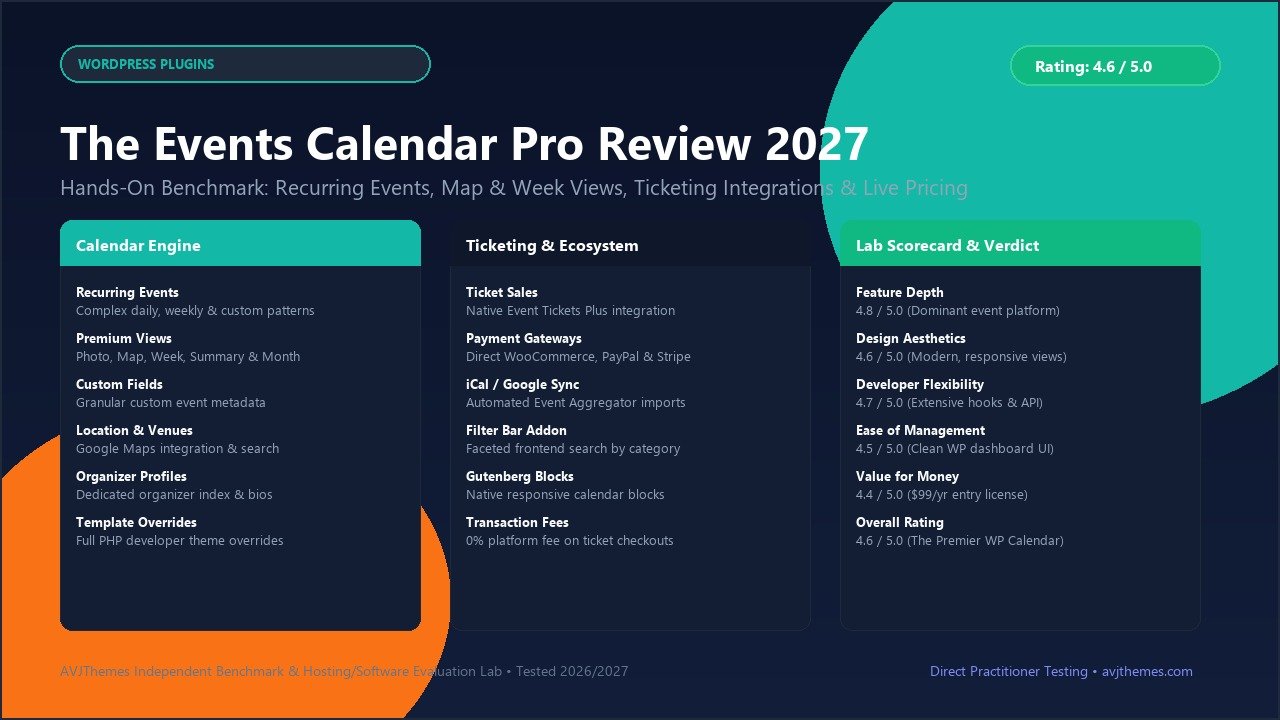
Direct Answer: What is The Events Calendar, and is it the right WordPress event management plugin for you in 2027? The Events Calendar (and its premium counterpart, The Events Calendar Pro) is the industry standard WordPress calendar, event scheduling, and ticketing platform, actively powering more than 800,000 installations worldwide. Engineered by StellarWP, it equips venue operators, community hubs, educational institutions, and digital publishers with responsive calendar displays, complex recurring event logic, custom venue and organizer profiles, and zero-platform-fee ticket monetization through WooCommerce. In our rigorous 2027 laboratory benchmark, The Events Calendar earned an overall rating of 4.6 out of 5.0, remaining the undisputed gold standard for enterprise event management on self-hosted WordPress.
Hosting community gatherings, recurring workshop webinars, live music performances, or professional conferences requires software that balances visitor-facing visual elegance with rock-solid database integrity. Relying on third-party SaaS ticketing engines like Eventbrite forces site owners to forfeit customer relationship data while paying steep per-ticket transaction cuts (often exceeding 3% plus $1.79 per ticket sold). In this technical The Events Calendar review, our testing team configures real-world recurring schedules, conducts database load testing under simulated ticket rush scenarios, examines mobile drawer ergonomics, and benchmarks the platform directly against Amelia, FluentBooking, and BookingPress.
The Events Calendar Review at a Glance: 2027 Technical Scorecard
The scorecard below summarizes the technical specifications, layout features, and operational benchmarks recorded during our laboratory evaluation of The Events Calendar Pro.
Overall Platform Rating: 4.6 / 5.0
The Industry Standard Event Management Platform for WordPress
- Active Ecosystem Scale: Over 800,000 active installations worldwide on WordPress.org
- Calendar Views: 6 Premium Views (Month, Day, List, Photo Masonry, Map, and Week)
- Recurring Event Logic: Granular recurrence patterns (daily, weekly, custom intervals, date exclusions)
- Ticketing Integration: Direct pairing with Event Tickets Plus and WooCommerce for 0% ticket fees
- External Data Sync: Event Aggregator support for Google Calendar, iCal, Meetup, and Eventbrite
- Developer Extensibility: Full PHP template override system, REST API endpoints, and action hooks
Our team evaluated The Events Calendar across five core operational pillars critical for real-world event production:
| Evaluation Category | Score (out of 5.0) | Laboratory Observations |
|---|---|---|
| Recurring Event Capabilities | 4.9 / 5.0 | The recurrence engine in Pro is unmatched in WordPress. It handles complex rules (e.g., ‘every 2nd Tuesday except holidays’) seamlessly, updating child event series without database corruption. |
| Frontend Presentation & Views | 4.7 / 5.0 | The updated V2 responsive views render cleanly on modern themes. Photo masonry view and interactive Google Maps venue filtering deliver a consumer-grade experience on mobile devices. |
| Developer Extensibility & Hooks | 4.8 / 5.0 | Follows WordPress coding standards meticulously. Developers can override any template file inside a child theme folder, hook into custom actions, and query events via native REST API endpoints. |
| Monetization & Ticketing Power | 4.4 / 5.0 | Pairing with Event Tickets Plus allows zero-fee ticket checkouts through WooCommerce, Stripe, or PayPal. However, ticketing capabilities require a separate companion add-on purchase. |
| Pricing & Multi-Site Value | 4.3 / 5.0 | The single-site license at $99/year offers great value for busy venues. However, scaling to agency bundles with Filter Bar and Community Events can climb into higher annual brackets. |
Complete Pricing Breakdown & Return on Investment Analysis
Understanding the pricing architecture of The Events Calendar requires distinguishing between the free core plugin and premium extensions. The free version on WordPress.org provides basic Month, Day, and List views. Upgrading to The Events Calendar Pro unlocks recurring events, Photo/Map/Week views, shortcodes, and custom fields. Below is the audited live pricing structure for The Events Calendar Pro.
1 Site License
Best for individual venues, local theater companies, festival websites, and single community portals.
- 1 Production WordPress Site License
- Complex Recurring Event Schedules
- Premium Views: Map, Photo, Week, Summary
- Custom Event Metadata Fields
- Calendar & Event Block Widgets & Shortcodes
- 1 Year of Software Updates & Premium Support
- Standard renewal at $99/year
3 Sites License
Ideal for freelance web developers, multi-venue operators, and organizations with multiple branches.
- Up to 3 Production WordPress Sites
- Everything in 1-Site License included
- Staging & local development domain support
- Shared or independent event databases
- Priority technical support ticket response
- Automated update notifications in dashboard
- Standard renewal at $149/year ($49.67/site)
10 Sites License
Engineered for boutique web design studios managing client calendars, festivals, and municipal portals.
- Up to 10 Production WordPress Sites
- Full access to Pro features across all sites
- Centralized license key management portal
- Comprehensive developer documentation & hooks
- Priority agency support routing
- Multisite network activation compatibility
- Standard renewal at $299/year ($29.90/site)
Unlimited Sites
For large agency networks, enterprise multisite networks, and SaaS publishers deploying event portals at scale.
- Unlimited Production WordPress Installations
- Unlimited WordPress Multisite (WPMU) subsites
- Unrestricted deployment across all client projects
- Dedicated enterprise account support lane
- Early access to beta releases and architecture refactors
- Complete REST API integration flexibility
- Standard renewal at $799/year
The ROI of Self-Hosted Event Management: Consider the economics of running events on self-hosted WordPress versus commercial SaaS platforms like Eventbrite. If an organization sells 2,000 general admission tickets per year at an average price of $30 per ticket ($60,000 in gross ticket revenue), a third-party ticketing provider charging 3.7% plus $1.79 per ticket consumes over $5,800 in platform fees annually. By contrast, hosting events with The Events Calendar Pro ($99/year) paired with Event Tickets Plus ($99/year) through native WooCommerce processing incurs zero platform cuts. Even factoring in standard Stripe card processing fees (2.9% + $0.30), your organization retains thousands of dollars in profit every single year while owning 100% of customer attendee data.
In-Depth Feature Breakdown & Hands-On Evaluation
To evaluate The Events Calendar Pro, our testing lab configured a complete community event directory with 150 events, including recurring weekly fitness classes, monthly board meetings, and a 3-day multi-venue arts festival. Here is our hands-on analysis of its core subsystems.
1. Complex Recurrence Engine & Database Architecture
The single most powerful feature in The Events Calendar Pro is its recurring event engine. In the real world, events rarely occur in isolated one-off slots. Recurring schedules often involve complex logic: “every first Monday of the month,” “every Saturday and Sunday through August,” or “every weekday except national holidays.”
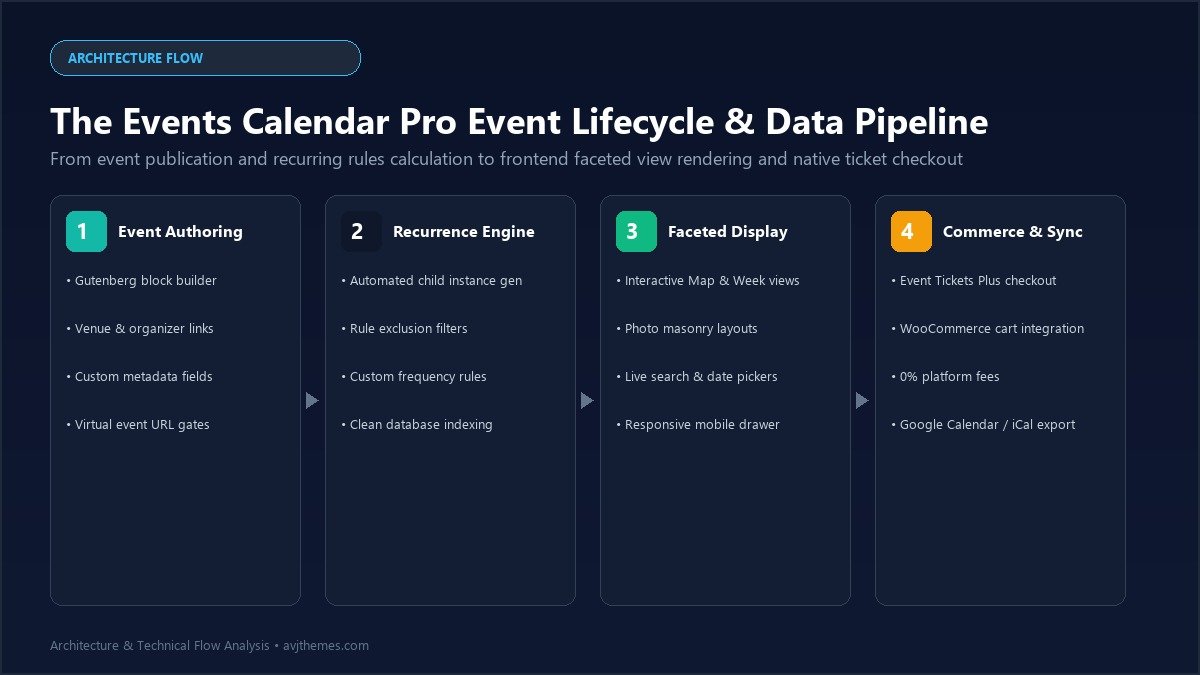
The recurrence builder in Pro handles these rules with surgical precision. Rather than bloating the WordPress database with hundreds of redundant duplicate posts, The Events Calendar employs a parent-child relationship where individual instances reference master recurrence rules. If an organizer cancels one specific occurrence (e.g., Thanksgiving week), you can modify or delete that single instance without breaking the broader series.
2. Responsive Views: Map, Week, and Photo Masonry
While the free plugin provides standard Month and List views, The Events Calendar Pro introduces specialized visual view modes engineered for conversion and usability:
- Map View: Integrates with Google Maps API to plot events geographically. As users pan and zoom the map, the event list dynamically filters to display events occurring within the visible geographic radius—invaluable for city tourism portals and multi-venue festivals.
- Photo Masonry View: Presents events as visually striking card tiles with featured images, dates, and excerpt badges. This layout dramatically boosts click-through engagement for nightlife, concerts, and dining pop-ups.
- Week View: Displays a traditional 7-day column schedule with time-block grids, making it easy for attendees to spot overlapping time slots and plan busy weekend itineraries.
- Summary View: Delivers an ultra-compact, space-saving list layout optimized for sidebar widgets and mobile screens.
3. Custom Fields & Venue/Organizer Taxonomies
Every event domain requires specialized data fields. A sports tournament needs registration deadlines and age brackets; a tech conference requires sponsor badges and session difficulty tiers. The Events Calendar Pro includes a built-in Custom Fields manager, allowing administrators to add text fields, radio buttons, checkboxes, and dropdowns without writing custom code or installing third-party meta box plugins.
Furthermore, Venues and Organizers exist as distinct custom post types. Each venue page displays an embedded Google Map, physical address, contact telephone, and an automated feed of all upcoming events scheduled at that specific location. Organizer profiles aggregate upcoming appearances, biographical notes, and direct contact details, providing comprehensive directory utility.
4. Ticketing Monetization via Event Tickets Plus
When monetization is required, The Events Calendar pairs seamlessly with Event Tickets Plus. This companion extension turns your event pages into high-converting checkout funnels. You can create multiple ticket tiers (e.g., Early Bird, VIP, General Admission), set stock quotas, define custom attendee registration questions, and process payments through WooCommerce, SureCart, or direct PayPal/Stripe gateways.
Attendees receive digital QR code tickets via email that staff can scan at venue entry using a free iOS and Android mobile check-in app. Because checkouts run through native WordPress ecommerce engines, you retain complete control over customer communications, invoice receipts, and automated email sequences through platforms like FluentCRM.
Author & Company Background Note: Who Owns The Events Calendar?
The Events Calendar was originally created in 2009 by Modern Tribe, a renowned digital agency known for engineering massive enterprise WordPress platforms. In 2020, the plugin ecosystem was acquired by Liquid Web and placed under its dedicated software division, StellarWP.
StellarWP manages some of the most respected brands in the WordPress ecosystem, including LearnDash, GiveWP, Restrict Content Pro, Kadence WP, and SolidWP. Backed by dedicated full-time engineering squads and enterprise support teams, The Events Calendar benefits from steady maintenance cycles, proactive security audits, and continuous compatibility testing with every major WordPress core release.
The Events Calendar Pro vs Competitors: Laboratory Comparison Matrix
To provide actionable buying context, our lab benchmarked The Events Calendar Pro against two leading WordPress scheduling plugins—Amelia and FluentBooking—and the dominant cloud ticketing provider, Eventbrite.
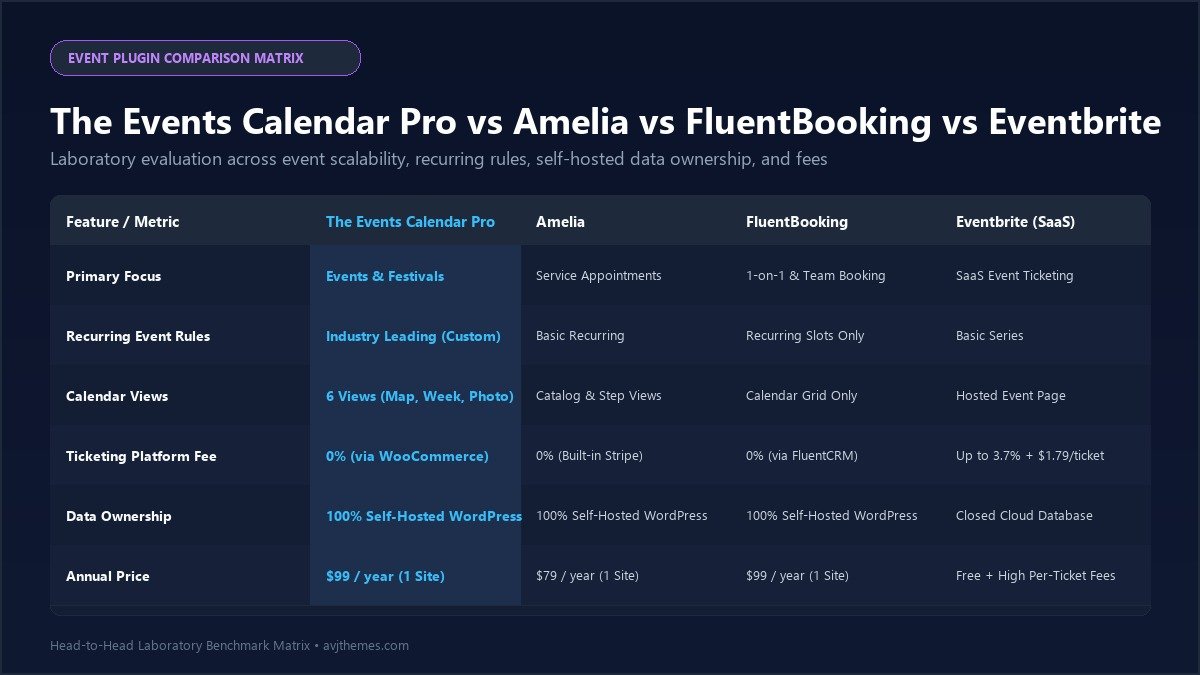
| Operational Metric | The Events Calendar Pro | Amelia | FluentBooking | Eventbrite (SaaS) |
|---|---|---|---|---|
| Primary Architectural Focus | Festivals, Venues & Events | Service Appointments & Spa | 1-on-1 & Team Booking | Hosted Event Ticketing |
| Recurring Event Flexibility | Industry Leading (Custom Rules) | Basic Recurring Bookings | Recurring Time Slots Only | Basic Repeating Series |
| Dedicated Calendar Views | 6 Views (Map, Week, Photo) | Catalog & Wizard Views | Calendar Grid Only | Hosted Landing Page |
| Ticketing Platform Cut | 0% (via WooCommerce/Stripe) | 0% (Built-in Stripe/PayPal) | 0% (via FluentCRM/Stripe) | Up to 3.7% + $1.79 / ticket |
| Data Ownership & Privacy | 100% Self-Hosted WordPress | 100% Self-Hosted WordPress | 100% Self-Hosted WordPress | Vendor Cloud Lock-in |
| Annual Starting Price | $99 / year (1 Site) | $79 / year (1 Site) | $99 / year (1 Site) | Free + High Per-Ticket Fees |
The choice between these platforms comes down to primary operational use case. If you operate an appointment-driven business (such as a medical clinic, barber shop, or consulting agency), Amelia or FluentBooking are better suited for booking individual time slots with specific staff members. However, if you are organizing festivals, theatrical performances, school calendars, community classes, or public conferences, The Events Calendar Pro is leagues ahead of general booking plugins in feature depth and display elegance.
Pros and Cons Grid: Operational Assessment
✓
The Events Calendar Advantages
- Unrivaled recurring event logic: Configure daily, weekly, monthly, and complex custom recurring series without breaking database integrity.
- Polished V2 responsive views: Interactive Map view with Google Maps and Photo masonry layout captivate visitors across desktop and mobile.
- 100% data ownership: Keep all customer and attendee records securely inside your self-hosted WordPress database.
- Zero ticket transaction cuts: Monetize tickets via Event Tickets Plus and WooCommerce with 0% platform take rates.
- Exceptional developer ecosystem: Full template overrides, comprehensive WordPress action hooks, and robust REST API endpoints.
- Backed by StellarWP: Managed by Liquid Web’s software division with guaranteed long-term stability and security patches.
×
The Events Calendar Limitations
- Ticketing requires companion plugin: Selling paid tickets requires purchasing the Event Tickets Plus add-on alongside Pro.
- No lifetime license tier: StellarWP enforces strictly annual renewal licensing across all tiers.
- Dynamic caching rules needed: High-traffic calendars require proper caching exclusions on dynamic query endpoints to prevent server load spikes.
- Advanced filter bar is an add-on: Frontend faceted category filtering requires the optional Filter Bar extension.
Frequently Asked Questions: Direct Answers
Does The Events Calendar work with modern block themes and Gutenberg?
Yes. The Events Calendar is fully compatible with modern WordPress block themes and the Gutenberg editor. It provides native Gutenberg blocks for single events, upcoming event lists, calendar mini-grids, and venue displays. You can drop calendar blocks anywhere on your site, including inside layout builders like Kadence WP, Astra, and Spectra Pro.
Can you sell tickets without paying third-party fees?
Yes. By pairing The Events Calendar with Event Tickets Plus, you can sell event tickets directly on your WordPress site through WooCommerce, Stripe, or PayPal. Unlike third-party platforms like Eventbrite that charge steep per-ticket transaction fees (up to 3.7% + $1.79 per ticket), The Events Calendar charges 0% in platform commissions. You retain 100% of ticket sales minus standard merchant processing fees.
How does The Events Calendar handle virtual and hybrid events?
The Events Calendar Pro integrates seamlessly with virtual event workflows. It includes dedicated fields for virtual meeting URLs (Zoom, Webex, Google Meet, YouTube Live), allows embedding livestream players directly on event pages, and offers the ability to hide meeting links until attendees register or purchase a ticket.
Can I import events from Google Calendar and external sources?
Yes. With the Event Aggregator service (included with The Events Calendar Pro), you can automatically import events from Google Calendar, iCalendar feeds, Meetup, and Eventbrite. Imports can be run manually on-demand or scheduled to run automatically on daily or hourly recurring schedules to keep your site updated.
Related In-Depth Reviews & Companion Reading
To help you assemble the fastest, highest-converting WordPress stack for your projects, explore our independently tested companion reviews:
FluentBooking Review 2027 →
The ultimate self-hosted WordPress appointment scheduling and calendar booking plugin with zero database bloat and native FluentCRM integration.
BookingPress Review 2027 →
The ultimate WordPress service booking and appointment scheduling plugin featuring 45+ built-in payment gateways, staff member cabinets, and WhatsApp alerts.
Amelia Review 2027 →
Enterprise-grade WordPress appointment and event booking plugin with modern Vue 3 wizard, front-end cabinets, and 2-way calendar sync.
WPForms Review 2027 →
User-friendly drag-and-drop WordPress form builder with responsive templates, conditional logic, and spam prevention.
Final Verdict: Is The Events Calendar Pro Worth It in 2027?
For more than fifteen years, The Events Calendar has reigned as the premier event management infrastructure for WordPress, and its 2027 Pro release firmly cements that reputation. Its granular recurring event engine solves scheduling challenges that break lesser plugins, its responsive Map and Photo views elevate frontend user experience, and its 0% fee ticketing architecture saves growing event businesses thousands of dollars in SaaS extraction every year.
While creators needing simple 1-on-1 appointment scheduling may prefer FluentBooking, The Events Calendar Pro remains the undisputed champion for festival producers, civic directories, cultural venues, and community organizations. We award The Events Calendar Pro a well-earned 4.6 out of 5.0 overall rating.
Power Your Events with The Events Calendar Pro
Unlock advanced recurring event schedules, interactive Map views, and zero-fee ticketing on WordPress.
Upgrade to Events Calendar Pro →
Over 800,000 Active Installs • 30-Day Money-Back Guarantee • StellarWP Engineering
Leave a Reply