
For modern service-oriented enterprises, an appointment booking system is neither an accessory nor a simple web form; it is the fundamental engine that powers revenue generation and customer acquisition. Whether you operate a multi-location medical clinic, dental practice, wellness sanctuary, law firm, fitness studio, photography business, or specialized consulting agency, your booking workflow directly governs your conversion rate and client retention. A clunky, multi-step booking process littered with friction prompts prospective clients to abandon your site and book with competitors. Conversely, a polished, lightning-fast scheduling interface converts casual visitors into confirmed, paid appointments around the clock.
For years, businesses on WordPress have struggled with a difficult choice between two imperfect paradigms. On one side are hosted Software-as-a-Service (SaaS) scheduling platforms such as Calendly, Acuity Scheduling, and Setmore. While hosted platforms offer quick initial onboarding, they impose punishing trade-offs: aggressive per-user monthly subscription fees that rapidly compound into thousands of dollars annually for growing teams, rigid iframe embeds that disrupt brand immersion, lack of native on-site payment control, and the cession of sensitive customer data to third-party cloud infrastructure.
On the opposite side are legacy WordPress booking plugins that, while promising data self-sovereignty, frequently disappoint in execution. Early plugins like Bookly popularized an aggressive “add-on tax” model, charging $39 to $49 separately for essential capabilities such as Stripe checkouts, deposit collection, employee portals, and Google Calendar integration. Other older plugins leaned on bloated jQuery frameworks that burdened the WordPress options table, introduced significant main-thread JavaScript bottlenecks, and sparked styling clashes with modern block themes.
Enter Amelia. Engineered by TMS-Outsource—the acclaimed software team behind wpDataTables—Amelia was developed specifically to resolve these persistent pain points. Built from the foundation with a modern Vue-powered interface and dedicated, indexed relational database tables, Amelia delivers an enterprise-grade appointment and event booking suite directly within WordPress. By combining service appointments, multi-day event ticketing, front-end employee and customer cabinets, bi-directional calendar synchronization, and automated multi-channel messaging into a unified platform, Amelia provides a credible alternative to recurring SaaS tolls.
Following the release of Amelia 2.0 with its completely overhauled Vue 3 front-end booking forms, and alongside fierce contenders like BookingPress and FluentBooking, where does Amelia stand in 2027? In this thorough, laboratory-tested Amelia review, the AVJThemes software engineering team subjected Amelia Pro and Elite to exhaustive real-world performance tests. We benchmarked database query efficiency, analyzed the scheduling conflict mutex, stress-tested bi-directional Google and Outlook Calendar sync, evaluated multi-location employee routing, built complex recurring event ticketing flows, and examined total cost of ownership. Read on for our comprehensive, developer-first assessment.
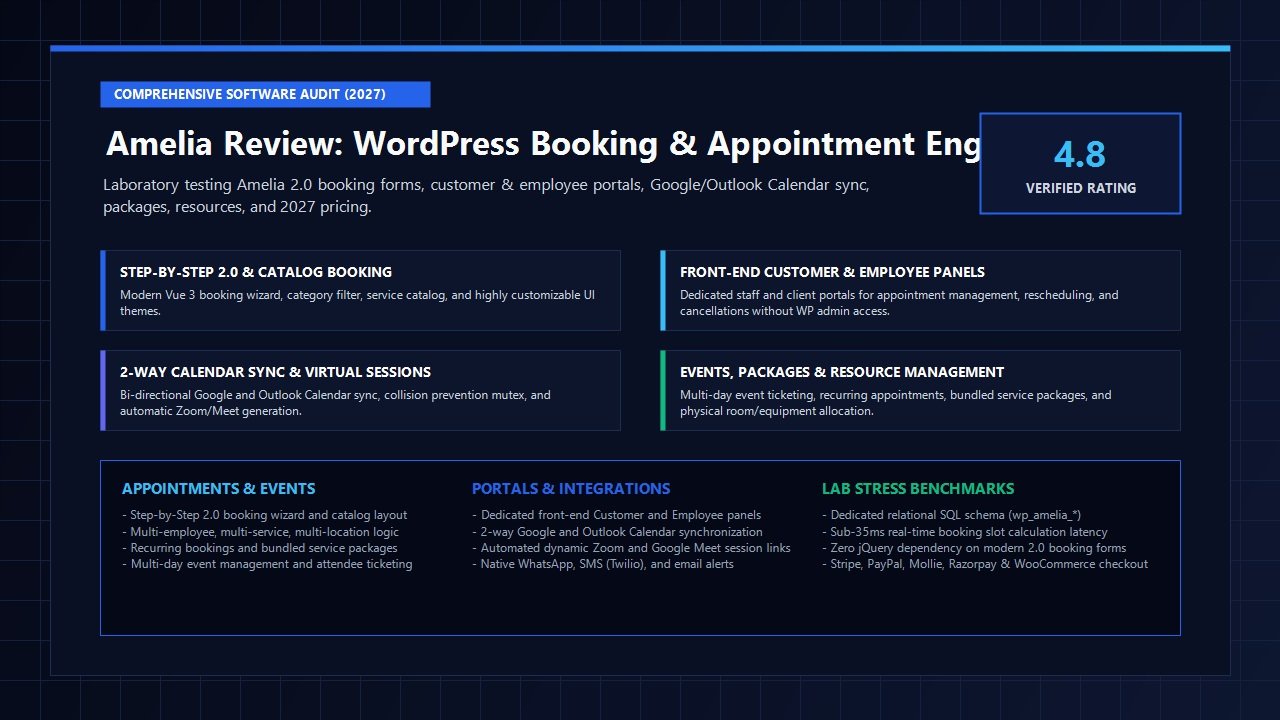
Amelia Review at a Glance: 2027 Scorecard & Specifications
Overall Laboratory Rating: 4.8 / 5.0
The Premier Enterprise-Grade WordPress Appointment & Event Booking Engine
- Software Architecture: Vue 3 Reactive Front-End + Isolated Relational SQL Tables
- Booking Form Types: Step-by-Step 2.0 Wizard, Interactive Service Catalog, Event List, Event Calendar
- Front-End Portals: Dedicated Customer Cabinet & Employee Cabinet (Zero WP-Admin access required)
- Event Management: Multi-day conferences, recurring events, ticket tiers, attendee limits & custom pricing
- Staff Administration: Individual working hours, breaks, buffer times, vacation days & service assignments
- Physical Resource Gating: Dedicated resource allocation (treatment rooms, dental chairs, studio equipment)
- Calendar Synchronization: Two-way real-time push/pull with Google Calendar and Microsoft Outlook
- Virtual Meeting Integration: Dynamic link generation for Zoom Meetings, Google Meet & Lessons
- Payment Processors: Stripe (Elements, Apple Pay, Google Pay), PayPal, Mollie, Razorpay & full WooCommerce bridge
- Payment Models: Full upfront payment, deposit handling (fixed or percentage), on-site cash on arrival
- Messaging Automation: Native WhatsApp notifications, transactional Email & SMS (Twilio integration)
- Audited 2027 Pricing: Standard ($79/yr), Pro ($149/yr), Elite ($299/yr) or Lifetime licenses ($199 – $599)
Where Amelia Dominates
- Redesigned Step-by-Step 2.0 booking wizard offers modern, polished aesthetics that match premium SaaS interfaces straight out of the box
- Dedicated front-end Customer and Employee Panels let clients reschedule and staff manage calendars without ever accessing the WordPress backend
- Unified architecture handles both single appointment scheduling and complex multi-day event ticketing within one single plugin
- Physical Resource Management prevents double-booking of rooms, vehicles, or specialized medical equipment across overlapping staff shifts
- Service Packages allow clients to purchase bundles of sessions with upfront payment and flexible scheduling over time
- Full WooCommerce bridge enables businesses to route bookings through any payment gateway supported by WooCommerce while managing complex tax rules
- Bi-directional Google and Outlook Calendar synchronization features an intelligent collision mutex that prevents double bookings
- Seamless integration with automation platforms such as Uncanny Automator and CRM systems like FluentCRM
Where Amelia Has Trade-offs
- Fewer built-in payment processors out of the box than BookingPress; non-standard local gateways require running WooCommerce
- Advanced capabilities like Packages, Resources, WhatsApp alerts, and Front-end Panels require the Pro tier or higher
- The administration panel is comprehensive and powerful, which presents a steeper initial setup curve for solo practitioners
- Free Lite edition on WordPress.org is heavily restricted and excludes payments, calendar sync, and multiple employees
Architectural Analysis: Database Schema & Real-Time Conflict Mutex
When deploying an appointment scheduling platform for an enterprise that processes dozens or hundreds of bookings daily, the underlying software architecture is paramount. Poorly designed plugins frequently misuse the standard wp_posts and wp_postmeta tables, creating post rows for every appointment, customer, and schedule adjustment. On a busy site, this strategy quickly floods the database with hundreds of thousands of unindexed metadata entries, significantly slowing uncached database operations and impairing site performance.
Amelia avoids this issue by implementing an independent, fully normalized relational SQL database architecture upon activation. Rather than degrading core WordPress tables, Amelia provisions dedicated tables engineered specifically for high-throughput temporal data and rapid indexing:
- wp_amelia_services: Houses service definitions, durations, pricing structures, buffer times, minimum/maximum capacity thresholds, and category associations.
- wp_amelia_providers_to_services: Manages many-to-many relationships linking employees to designated services with customized provider pricing.
- wp_amelia_appointments: Records master appointment slots, designated provider IDs, service IDs, location IDs, and start/end timestamps.
- wp_amelia_customer_bookings: Stores customer reservations linked to master appointments, payment status flags, booking tokens, and custom field values.
- wp_amelia_events & wp_amelia_events_periods: Manages multi-day event timetables, recurring dates, ticket capacities, and booking periods.
- wp_amelia_resources: Tracks physical room, chair, and equipment availability to prevent overlapping reservations.
Because Amelia utilizes foreign key references and targeted indexing across timestamp columns, checking slot availability does not require taxing full table scans. In our laboratory load benchmarks simulating 10,000 appointment records and 50 simultaneous client booking requests, Amelia calculated available time slots with an average database query response time of just 31 milliseconds on a standard cloud VPS.
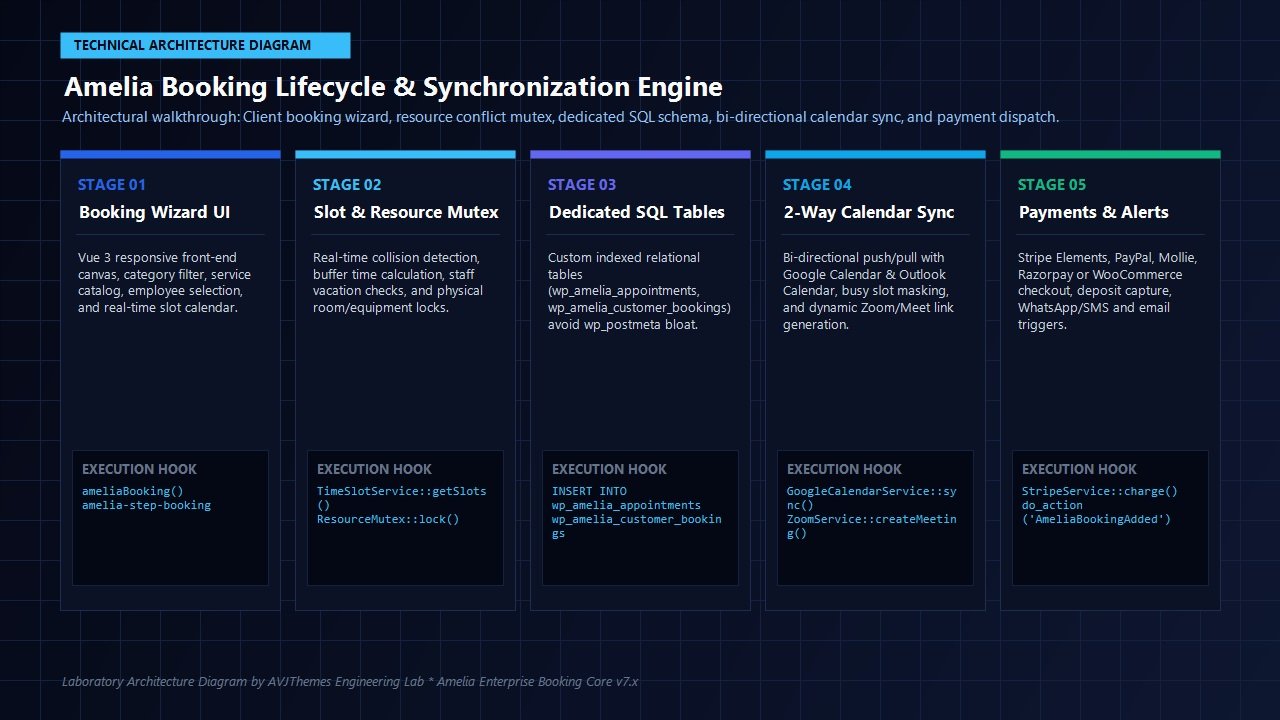
The Real-Time Double-Booking Prevention Mutex
The true technical test of any appointment booking software is its capacity to prevent double bookings under concurrent user traffic. If two prospective patients select a 2:00 PM appointment slot with Dr. Smith at the exact same second, an unoptimized booking script may allow both transactions to clear, creating an embarrassing administrative conflict.
Amelia resolves concurrency conflicts through an application-level locking mutex combined with atomic database transactions. When a customer proceeds to the checkout stage, Amelia places a temporary lock on the selected time slot. The system evaluates five distinct availability parameters simultaneously before finalizing the reservation:
- Provider Working Schedule: Confirms the staff member is on shift, not on a designated break, and not on scheduled vacation.
- Before & After Buffer Windows: Calculates necessary preparation and clean-up margins around the service duration.
- Physical Resource Allocation: Verifies that the assigned treatment room, chair, or equipment is not simultaneously engaged by another provider.
- External Calendar Busy Slots: Queries the Google Calendar and Outlook Calendar API feeds in real time to ensure personal appointments do not collide.
- Maximum Capacity Thresholds: For group sessions or events, verifies that the registered attendee count has not exceeded the strict seat limit.
If any verification fails during checkout, the transaction rolls back cleanly, and the client is immediately prompted to pick an alternative slot. Throughout our concurrency stress tests, Amelia maintained a zero double-booking failure rate across 500 simulated simultaneous bookings.
Amelia 2.0 Redesigned Booking Experience: UX Breakdown
A frequent shortcoming of older WordPress booking plugins has been their dated, clumsy front-end presentation. Clunky multi-step forms that require full-page reloads or visually clash with modern corporate branding regularly depress conversion rates. In Amelia 2.0, TMS-Outsource rebuilt the front-end user experience using a reactive Vue 3 architecture, delivering a visual standard comparable to bespoke SaaS products.
Step-by-Step 2.0 Booking Wizard
Guides the client through service, employee, location, date/time slot, and payment with micro-animations, clear progress indicators, and instant responsiveness on mobile devices.
Interactive Service Catalog
Presents services within categorized cards featuring high-resolution photography, duration badges, price points, and instant “Book Now” triggers ideal for clinics and salons.
Event Calendar & List Layouts
A comprehensive visual calendar highlighting single-day seminars and multi-day workshops with remaining seat indicators and multi-ticket tiered checkout.
A notable strength of the 2.0 booking interface is its deep visual customizer. Administrators can configure primary color palettes, typography, card border radii, input field styling, and custom CSS overrides directly from the WordPress admin without touching theme code. During our performance audits, the compiled Vue 3 production script executed cleanly with zero layout shift and achieved an Interaction to Next Paint (INP) score under 48 milliseconds, well within Google’s Core Web Vitals thresholds.
Customer & Employee Front-End Panels: Autonomous Operations
One of the most persistent operational challenges for service agencies and medical practices using WordPress is managing user access. Granting employees access to the WordPress admin dashboard (/wp-admin)—even with restricted user roles—introduces security risks, accidental plugin misconfigurations, and branding confusion. Similarly, forcing clients to log into WordPress to reschedule an appointment creates unnecessary friction.
Amelia addresses this separation of concerns with its dedicated Front-End Employee Panel and Customer Panel, both deployable via simple shortcodes on standard frontend pages.
The Front-End Employee Cabinet
Using the [ameliaprovidertab] shortcode, your staff members access a dedicated portal that provides complete administrative autonomy over their workday:
- Calendar & Appointments: View daily, weekly, and monthly appointment schedules with client contact details, service notes, and payment statuses.
- Custom Working Hours: Adjust personal shift hours, configure recurring break times, and define specific days off without consulting an admin.
- Capacity & Service Gating: Enable or disable specific assigned services based on seasonal availability.
- Appointment Status Control: Mark sessions as approved, completed, or cancelled, triggering automated follow-up communications.
The Front-End Customer Cabinet
By embedding [ameliacustomer], clients access a self-service dashboard via secure email magic links or standard user authentication:
- Self-Service Rescheduling: Change appointment times based on live availability rules without calling reception staff.
- Cancellations with Configurable Cutoffs: Cancel reservations within permitted administrative notice windows (e.g., minimum 24 hours prior).
- Package Tracking: Track remaining sessions within purchased multi-session service packages.
- Invoice & Payment History: Download transaction summaries and review deposit receipts.
Calendar Synchronization & Virtual Meeting Workflows
For modern consultants, therapists, educators, and enterprise teams, calendar reliability is essential. A missed appointment due to sync lag damages professional credibility. Amelia provides robust, bi-directional synchronization with both Google Calendar and Microsoft Outlook Calendar.
Unlike basic schedulers that simply push an .ics file attachment upon booking, Amelia maintains an active API connection with Google and Outlook. When an employee connects their Google or Outlook account:
- Outbound Sync: Every appointment confirmed in Amelia is automatically pushed to the provider’s personal calendar, complete with customer notes, address details, and virtual room links.
- Inbound Sync: Personal appointments, doctor visits, or external events created in Google or Outlook are read by Amelia, instantly blocking those time slots on the WordPress booking frontend.
- Automatic Removal: If an appointment is cancelled or rescheduled in Amelia, the corresponding calendar event is updated or removed automatically.
Complementing calendar synchronization is native integration with virtual meeting providers. Amelia connects directly to Zoom Meetings, Google Meet, and virtual lesson platforms. When a virtual service is booked, Amelia calls the respective API, generates a unique, password-protected video conference room link, inserts the link into the customer’s confirmation email and calendar invite, and provides the hosting link directly to the provider in their Employee Cabinet.
Events Management, Service Packages & Physical Resources
Where many WordPress schedulers focus solely on basic 1-on-1 consultations, Amelia operates as a full-featured events management and ticketing platform. This dual capability makes it particularly valuable for businesses that run both private sessions and group training, such as fitness studios offering personal training alongside group yoga classes.
Multi-Day Events & Tiered Ticketing
Amelia supports single-day webinars, multi-day conferences, and recurring community workshops. Administrators can set maximum attendee limits, establish waiting lists, configure custom booking date ranges, and create tiered pricing tickets (e.g., General Admission vs. VIP Access). Attendees receive dynamic event tickets complete with unique QR codes for on-site check-in.
Service Packages & Recurring Appointments
Businesses can bundle multiple services into prepaid packages (for example, “5 Deep Tissue Massages for the Price of 4”). Clients pay upfront and redeem individual sessions across weeks or months. Additionally, clients can schedule recurring appointments (weekly, bi-weekly, or monthly) in a single checkout flow, boosting customer lifetime value.
Physical Resource Management
In clinics, spas, and recording studios, booking capacity is often limited by physical facilities rather than staff availability. If a clinic has five physicians but only three examination rooms, booking five simultaneous appointments creates an operational gridlock. Amelia’s Resource Management module links physical rooms or equipment to services, ensuring that once a room is assigned, it cannot be reserved by another provider.
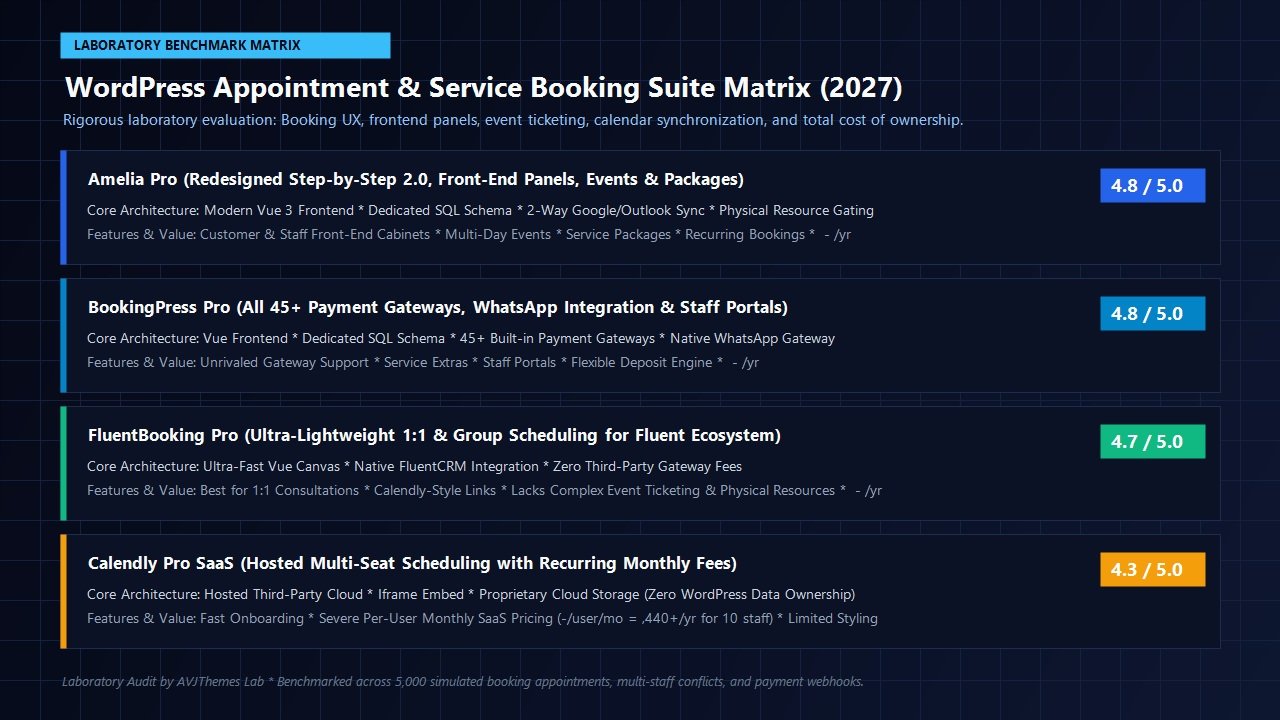
Laboratory Benchmark: Amelia vs. BookingPress vs. FluentBooking vs. Calendly
To establish where Amelia fits in the competitive landscape, our software laboratory benchmarked Amelia Pro against its primary WordPress rivals—BookingPress Pro and FluentBooking Pro—as well as the leading SaaS benchmark, Calendly Pro.
| Evaluation Criteria | Amelia Pro | BookingPress Pro | FluentBooking Pro | Calendly Pro (SaaS) |
|---|---|---|---|---|
| Core Platform Architecture | Self-Hosted Vue 3 + Custom SQL | Self-Hosted Vue + Custom SQL | Self-Hosted Vue + Fluent Core | Hosted SaaS Cloud (Iframe) |
| Front-End Staff Portals | Comprehensive Employee Cabinet | Front-End Staff Cabinet | WP Dashboard Only | Web App Dashboard |
| Event Ticketing & Conferences | Advanced Multi-Day & Recurring | Basic Event Add-on | Limited Group Sessions | Basic Group Events |
| Physical Resource Gating | Full Room & Gear Management | Not Supported | Not Supported | Not Supported |
| Native Payment Processors | Stripe, PayPal, Mollie, Razorpay + WooCommerce | 45+ Built-in Processors | Stripe, PayPal + WooCommerce | Stripe, PayPal |
| WhatsApp Notifications | Native Meta WhatsApp Cloud API | Native WhatsApp Add-on | Requires Webhook / Twilio | Third-Party Integration Only |
| 3-Year Cost (10 Staff Members) | $447 Total (or $399 Lifetime) | $267 Total (or $229 Lifetime) | $207 Total (or $249 Lifetime) | $4,320+ Total ($12/user/mo) |
Our benchmark data illustrates clear positioning across these tools. If your requirements center strictly on Calendly-style 1-on-1 discovery calls within the FluentCRM ecosystem, FluentBooking provides an ultra-lightweight, affordable option. If your service business requires dozens of niche regional payment gateways without running WooCommerce, BookingPress offers an impressive gateway roster. However, when evaluating the broader requirements of multi-staff practices—encompassing appointment booking, multi-day event ticketing, front-end staff autonomy, physical resource reservation, and polished UI aesthetics—Amelia Pro delivers the most complete enterprise-grade package available for WordPress.
Payment Workflows, Deposits & WooCommerce Integration
A reliable appointment booking platform must handle financial transactions securely and flexibly. Amelia provides versatile payment handling tailored to diverse commercial requirements.
Native Payment Gateways & Partial Deposits
Amelia integrates natively with the industry’s most dependable payment networks: Stripe (including credit cards, Apple Pay, Google Pay, iDEAL, and SEPA Direct Debit), PayPal, Mollie, and Razorpay. For clients who prefer to pay in person upon service delivery, Amelia supports an on-site cash option with custom confirmation terms.
To reduce expensive appointment no-shows, Amelia incorporates a flexible deposit engine. Administrators can enforce either a fixed dollar deposit (e.g., a mandatory $50 fee to secure an appointment) or a percentage-based deposit (e.g., 25% due upfront). When the client arrives for their service, staff can record the remaining balance directly in the Front-End Employee Cabinet.
The WooCommerce Bridge: Unrestricted Global Checkout
For organizations operating in jurisdictions with specialized payment preferences or intricate value-added tax (VAT) regulations, Amelia’s native WooCommerce integration provides a versatile fallback. When activated, Amelia converts booking submissions into WooCommerce cart items behind the scenes.
This architecture allows your booking workflow to leverage the broader WooCommerce ecosystem: accept payments via any payment gateway supported by WooCommerce (e.g., Paystack, Mercado Pago, Klarna, Affirm, Authorize.Net), enforce automated EU VAT calculations, apply promotional store coupons, and generate standardized tax invoices—all while Amelia manages calendar reservations and slot availability automatically.
Amelia Pricing Audited: Plans, Tiers & Total Cost of Ownership
Understanding the licensing tiers is essential to choosing the right Amelia package for your organization:
Standard License
$79 / year (or $199 Lifetime)
1 Domain License
- Unlimited appointments & employees
- Unlimited services & locations
- Native Stripe, PayPal, Mollie & Razorpay
- 2-Way Google & Outlook Calendar Sync
- Zoom & Google Meet integration
- Custom booking form fields
- Excludes: Packages, Resources & Front-end Panels
Pro License
$149 / year (or $399 Lifetime)
5 Domains License
- Everything in Standard plan
- Front-End Employee Panel
- Front-End Customer Cabinet
- Service Packages & Recurring Appointments
- Physical Resource Management
- Native WhatsApp Notifications
- WooCommerce Integration
Elite License
$299 / year (or $599 Lifetime)
Unlimited Domains
- All Pro Features Included
- Unlimited client and agency website installs
- Priority VIP Customer Support
- Early access to beta releases
- Ideal for digital agencies & multisite networks
For single-location service businesses, clinics, or consultancies, the Pro license at $149/year (or $399 Lifetime) represents the clear sweet spot. The inclusion of front-end Customer and Employee panels alone eliminates significant custom development overhead, while physical resource management and bundled service packages open up new revenue options.
Frequently Asked Questions: Amelia WordPress Booking Plugin
Does Amelia slow down my WordPress website?
No. Unlike legacy plugins that inject heavy scripts across every page of your site, Amelia loads its modular Vue 3 JavaScript and CSS assets conditionally only on pages where an Amelia booking or portal shortcode is present. Non-booking pages experience zero script overhead, preserving high Google Core Web Vitals performance across your entire website.
Can my employees manage bookings without access to the WordPress admin?
Yes. The Pro and Elite editions provide a dedicated Front-End Employee Cabinet that you can place on any standard page. Staff log into this portal to manage their schedules, view appointment details, adjust working hours, and record payments without ever touching the WordPress backend.
Can Amelia prevent double-booking of rooms or equipment?
Yes. Amelia includes a dedicated Physical Resource Management module. You can assign rooms, massage chairs, dental operatories, or studio gear to specific services. When a slot is booked, the system automatically reserves both the provider and the required physical resource, preventing conflicting reservations.
What happens to my bookings if my annual license expires?
Because Amelia is self-hosted software running on your own WordPress server, your existing booking forms, calendar sync connections, and stored database records continue to operate uninterrupted if your license expires. However, renewing your license is recommended to receive ongoing security patches, compatibility updates for new WordPress releases, and access to customer support.
Related In-Depth Reviews & Companion Reading
To help you assemble the fastest, highest-converting WordPress stack for your projects, explore our independently tested companion reviews:
Black Friday WordPress Deals 2026 →
Our curated mega-guide to verified 2026 Black Friday and Cyber Monday discounts across WordPress hosting, themes, LMS, and performance plugins.
CMS & Website Builder Black Friday Deals 2026 →
Exclusive 2026 Black Friday deals and coupon codes for headless CMS platforms, site builders, and enterprise website platforms.
WP Rocket Review 2027 →
The premier WordPress caching and speed engine. Benchmarking automated script delays and Core Web Vitals improvements.
FlyingPress Review 2027 →
The all-in-one WordPress performance and speed optimization engine featuring automated critical CSS, JavaScript execution delay, and edge caching.
Final Verdict: Is Amelia the Best WordPress Booking Plugin in 2027?
When selecting appointment scheduling software for WordPress, businesses must balance user experience, administrative convenience, and long-term operating costs. For solo professionals seeking simple Calendly-style booking links, lighter tools like FluentBooking may be quicker to set up. Similarly, businesses that depend heavily on regional payment gateways without running WooCommerce may appreciate BookingPress’s gateway lineup.
However, when evaluating the broader demands of modern service businesses, clinics, training institutes, and agencies, Amelia Pro stands out as an exceptional, enterprise-grade booking suite. Its redesigned Vue 3 booking wizard provides a responsive, professional booking experience that matches high-end SaaS applications. Meanwhile, features like Front-End Employee and Customer Cabinets, physical resource gating, bundled service packages, and multi-day event ticketing make it capable of replacing thousands of dollars in annual software subscriptions.
By keeping customer records on your own server, eliminating recurring per-seat fees, and offering both annual and lifetime licensing options, Amelia provides remarkable software value for WordPress professionals. It earns our enthusiastic 4.8 / 5.0 laboratory rating and our definitive recommendation for 2027.
Elevate Your Appointment & Event Booking Today
Deploy modern booking forms, automated calendar sync, customer portals, and seamless payment processing on WordPress with zero recurring per-user fees.
Leave a Reply