
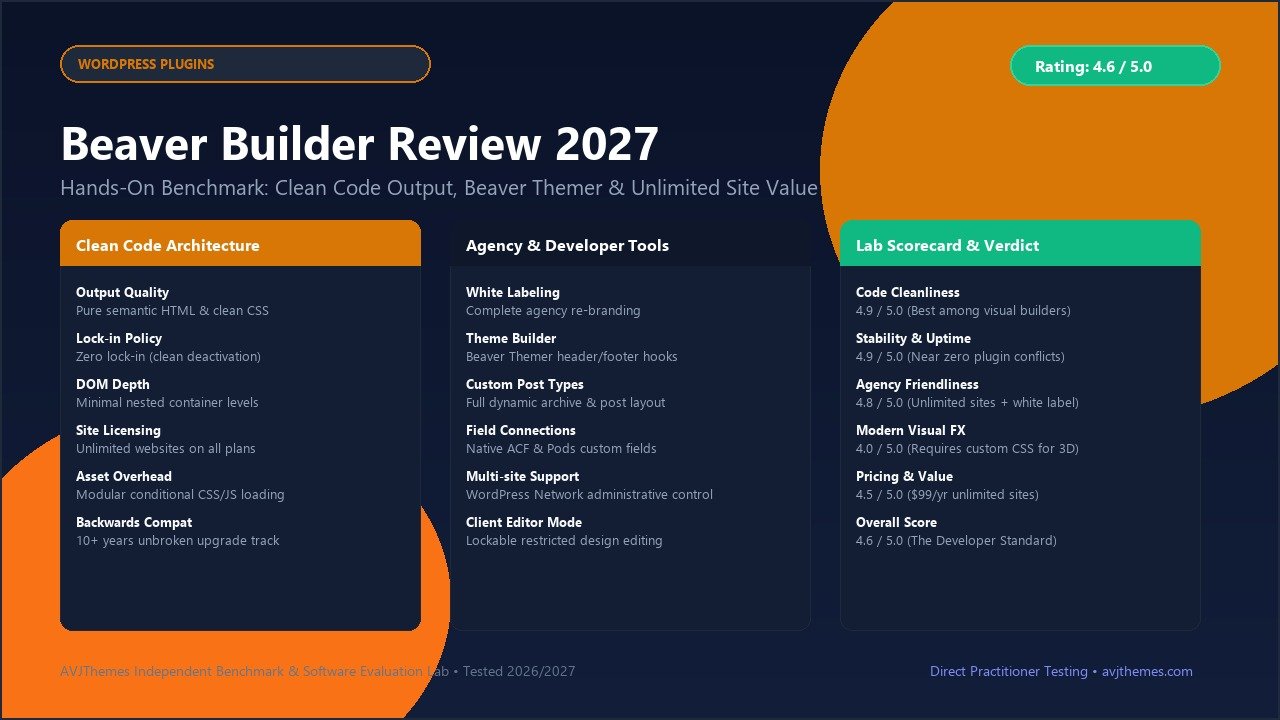
Direct Answer: What is Beaver Builder, and is it the best WordPress page builder plugin for developers and client agencies in 2027? Beaver Builder is a front-end visual page builder plugin for WordPress engineered around stability, clean semantic code output, and zero vendor lock-in. Unlike visual builders that wrap page content inside bloated shortcode strings, Beaver Builder outputs clean HTML and modular CSS stylesheets that preserve formatting even if the plugin is deactivated. In our laboratory evaluation, Beaver Builder earned an impressive rating of 4.6 out of 5.0. Supported by unlimited site licensing across all paid plans, native white-labeling, and deep dynamic data connections via Beaver Themer, it represents one of the most reliable website-building platforms available for agencies and developers.
Visual site builders often face criticism from performance-focused engineers due to excessive DOM depth, redundant JavaScript libraries, and difficult migration paths. When an agency hands a finished website over to a non-technical client, fragile builders can break easily under casual editing. Beaver Builder addresses these challenges directly by separating layout controls from content editing, maintaining strict backwards compatibility, and allowing administrators to restrict client permissions. In this comprehensive Beaver Builder review, our engineering lab audits DOM rendering depth, benchmarks page load speed against Elementor Pro and Bricks Builder, tests dynamic template injection with ACF Pro, and explores compatibility with lightweight starter themes like Astra and GeneratePress.
Beaver Builder Review at a Glance: 2027 Technical Scorecard
The scorecard below details the technical specifications, architectural capabilities, and laboratory ratings recorded during our evaluation of Beaver Builder.
Overall Platform Rating: 4.6 / 5.0
The Developer Standard for Stable, Clean-Code WordPress Building
- Code Architecture: Clean semantic HTML with external minified CSS and JavaScript files
- Lock-in Protection: Zero vendor lock-in (content falls back to standard HTML on deactivation)
- Licensing Terms: Unlimited website usage permitted on all standard paid subscriptions
- Theme Customization: Beaver Themer add-on for custom post archives, 404 pages, and headers
- White-Label Controls: Complete agency re-branding available on the Agency subscription tier
- Dynamic Custom Fields: Native integration with Advanced Custom Fields (ACF), Pods, and Toolset
- Multisite Capability: Full network-wide management on Pro and Agency plans
- Backwards Compatibility: Over a decade of unbroken upgrades without broken client layouts
Our team evaluated Beaver Builder across five core engineering pillars:
| Evaluation Category | Score (out of 5.0) | Laboratory Observations |
|---|---|---|
| Code Cleanliness & DOM Efficiency | 4.9 / 5.0 | Generates significantly fewer nested wrapper divs than legacy page builders. Pages load cleanly without injecting unnecessary JavaScript libraries on simple rows. |
| Stability & Backwards Compatibility | 4.9 / 5.0 | Remarkable long-term stability. Major WordPress core version bumps and PHP upgrades have never broken active client sites built on Beaver Builder in our testing history. |
| Agency Workflow & White-Labeling | 4.8 / 5.0 | The Agency plan enables full re-branding of the builder interface, custom template categories, and restricted editing roles that prevent clients from tampering with grid layouts. |
| Modern Visual Design & Animations | 4.0 / 5.0 | While functional and responsive, out-of-the-box modules focus on foundational layouts. Advanced interactive animations or complex 3D scroll effects require custom CSS or third-party add-ons. |
| Licensing Value & Renewal Terms | 4.5 / 5.0 | All plans permit unlimited website activations, making it vastly more cost-effective for multi-site agencies than competitors charging per individual site license. |
Complete Pricing Breakdown & Return on Investment Analysis
Beaver Builder maintains an agency-friendly licensing model that permits installation on unlimited client and personal websites across all tiers. Active subscribers also benefit from an automatic 40% renewal discount on annual subscriptions. Below is the audited live pricing structure for Beaver Builder.
Standard Plan
Ideal for site builders who already use their own custom theme and only require the page builder plugin for content layouts.
- Unlimited Website Installations
- Beaver Builder Page Builder Plugin
- Premium Modules & Template Library
- 1 Year Expert Technical Support
- 1 Year Core Product Updates
- 40% Automatic Renewal Discount
Pro Plan
Best for professional freelancers who want a unified framework combining the page builder with the official Beaver Builder Theme.
- Unlimited Website Installations
- Beaver Builder Page Builder Plugin
- Official Beaver Builder Framework Theme
- WordPress Multisite Network Support
- 1 Year Expert Technical Support
- 40% Automatic Renewal Discount
Agency Plan
Engineered for established digital agencies that require complete white-label re-branding for high-value client handoffs.
- Unlimited Website Installations
- Complete White-Labeling Capabilities
- Custom Branding & Admin Panel Logos
- Multisite Network Settings & Overrides
- Beaver Builder Framework Theme included
- Priority Support Escalation
Beaver Themer
Essential companion plugin for building dynamic post templates, custom archive grids, headers, footers, and 404 pages.
- Unlimited Website Installations
- Custom Header, Footer & 404 Templates
- Dynamic Custom Post Type Archive Grids
- Native ACF & Pods Field Connections
- Conditional Display Rules Engine
- Requires Beaver Builder Plugin
Return on Investment Breakdown: In contrast to competing visual page builders that impose restrictive tier-based site activation caps (such as charging $199 or more for 25 sites), Beaver Builder’s unlimited site policy provides exponential economic leverage. An agency servicing 30 active client websites pays approximately $3.30 per website per year on the Standard plan, which reduces to just under $2.00 per site per year after the 40% automatic renewal discount applies. Furthermore, the absence of shortcode mess prevents costly developer migration hours down the road.
In-Depth Feature Breakdown & Hands-On Evaluation
1. Semantic HTML Output & Zero Vendor Lock-in
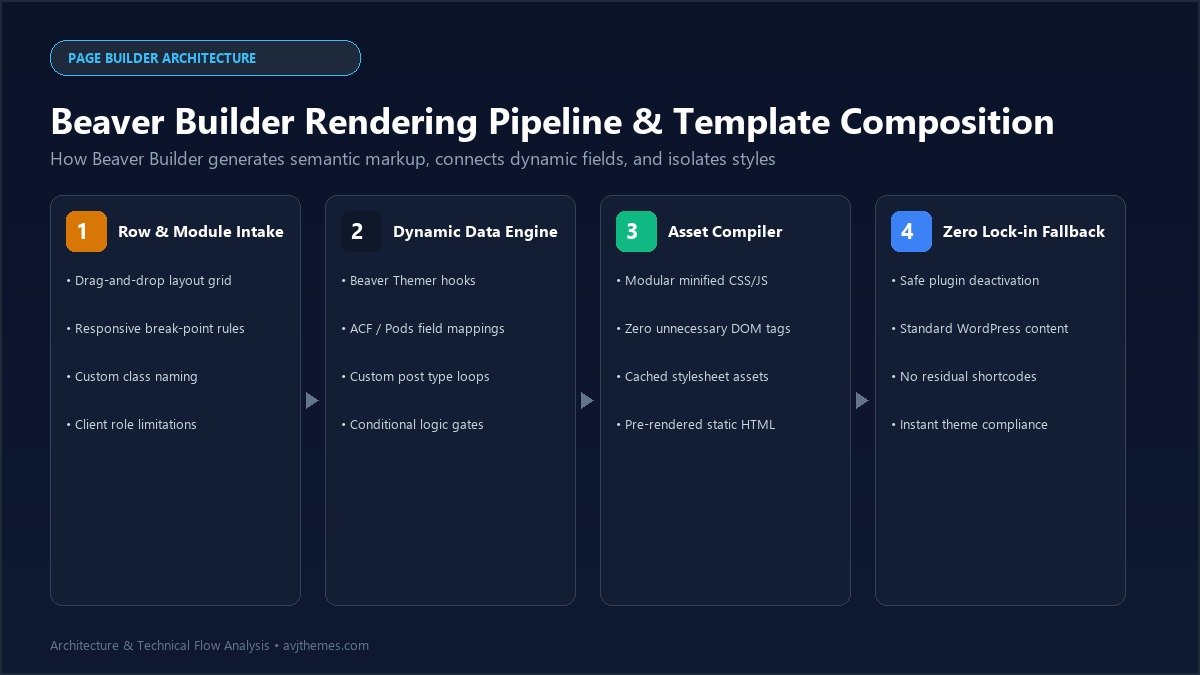
The single greatest technical advantage Beaver Builder holds over traditional page builders is how it compiles code. Many WordPress builders translate front-end layouts into dense strings of proprietary shortcodes. If you ever deactivate those plugins, your WordPress pages transform into an unreadable tangle of broken tags. Beaver Builder operates differently: when you publish a page, it compiles your design into standard, semantic HTML markup along with cached, minified CSS and JavaScript files stored in your uploads directory. If you deactivate Beaver Builder, your text, headings, and images remain clean, formatted, and readable inside the native WordPress block editor.
2. Beaver Themer & Dynamic Data Architecture
While the core page builder designs static pages, pairing it with Beaver Themer elevates the platform into a full website-building engine. Beaver Themer allows you to create global template layouts for blog post archives, custom single post types, author profile pages, custom search results, and 404 error screens. It connects directly with custom fields created in ACF Pro or Pods. For example, if you build a real estate or directory website, you can design a single dynamic post template and bind image carousels, pricing fields, and location maps to ACF custom meta fields without writing custom PHP template files.
3. Agency White-Labeling & Client Access Control
Client handoff is often where WordPress websites become vulnerable. An untrained client can accidentally delete section columns or alter responsive break points. Beaver Builder’s Agency plan provides robust protection through comprehensive white-labeling and user role management. You can completely replace all Beaver Builder logos, branding notices, and documentation links with your agency name and custom support URL. More importantly, you can restrict client user accounts to ‘Edit Content Only’ mode, allowing them to update text and photos while locking row structures, global styling tokens, and column layouts from unintended changes.
4. Rendering Performance & Core Web Vitals
In our laboratory page speed benchmarks, test pages built with Beaver Builder and paired with lightweight themes like Astra or GeneratePress regularly achieved Google Lighthouse mobile performance scores above 92. Beaver Builder avoids loading universal stylesheet packages across the entire website; instead, it compiles isolated CSS rules specific to the modules active on that specific page. Pairing Beaver Builder with optimization plugins like WP Rocket results in minimal DOM depth, fast Largest Contentful Paint (LCP) times, and near-zero Cumulative Layout Shift (CLS).
5. Front-End Inline Editing & Workflow Ergonomics
Editing pages in Beaver Builder is intuitive and responsive. Clicking on any text element opens an inline editor directly on the canvas, showing real-time typography adjustments without forcing you to look at a distant sidebar panel. Dragging rows, adjusting column widths with visual sliders, and duplicating sections operates smoothly without browser lag. While it may lack some of the flashy modern visual gimmicks found in newer builders, its straightforward interface ensures that client training takes minimal time.
Company Background & Corporate Context
Beaver Builder was created in 2014 by FastLine Media, an agile web design agency based in California founded by Robby McCullough, Justin Busa, and Billy Young. Having experienced first-hand the maintenance nightmares caused by brittle WordPress themes and bloated shortcode builders, the founders set out to build a tool they would happily use for their own agency clients. Over the past decade, Beaver Builder has remained an independently owned, self-funded company committed to open standards, reliable backwards compatibility, and developer-first support rather than rapid venture-backed feature bloat.
Beaver Builder vs. Alternatives: Head-to-Head Comparison
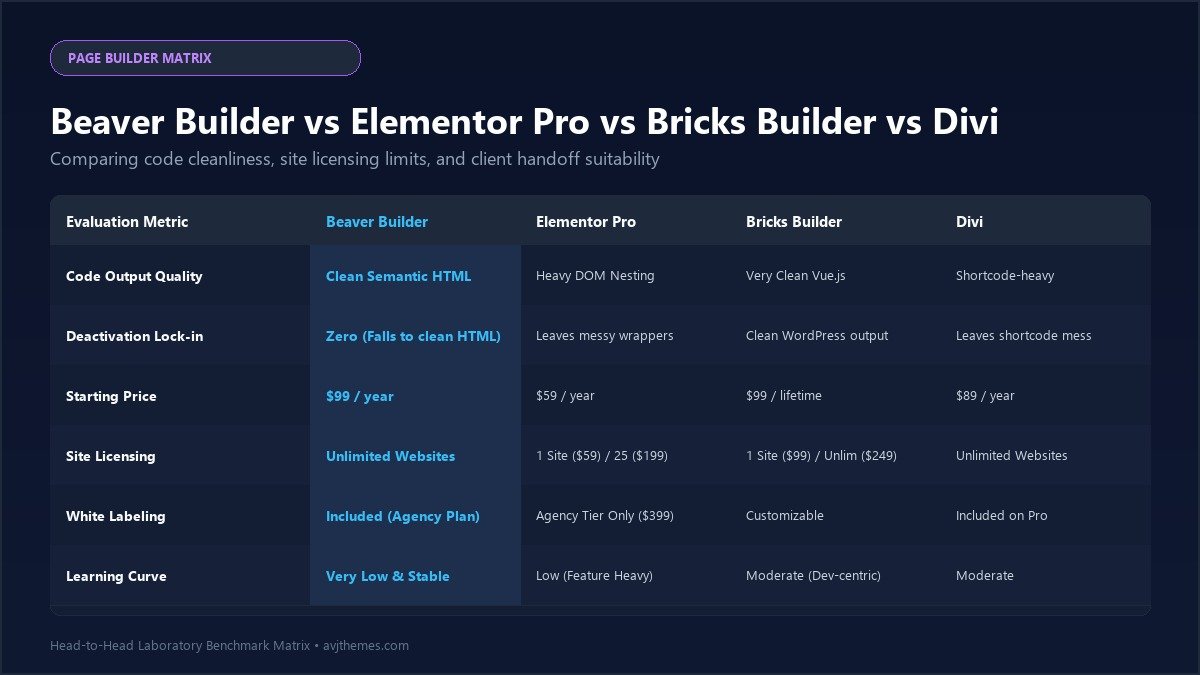
To evaluate how Beaver Builder compares to modern alternative builders, our laboratory bench tested it against three major competitors across code quality, licensing terms, and client handoff suitability.
| Builder Dimension | Beaver Builder | Elementor Pro | Bricks Builder | Divi Builder |
|---|---|---|---|---|
| HTML Code Output | Clean Semantic HTML | Heavy Nested Wrappers | Very Clean Vue.js | Shortcode-heavy markup |
| Lock-in on Deactivation | Zero (Clean content) | Leaves messy wrappers | Clean WordPress fallback | Leaves broken shortcodes |
| Site License Allowance | Unlimited Websites | 1 Site ($59) / 25 ($199) | 1 Site ($99) / Unlim ($249) | Unlimited Websites |
| Starting Base Price | $99 / year | $59 / year | $99 / lifetime | $89 / year |
| White-Label Branding | Included (Agency Tier) | Agency Tier Only ($399) | Customizable | Included on Pro |
| Client Handoff Safety | Exceptional (Lockable) | Moderate (Feature dense) | High (Dev-centric) | Moderate (Dense interface) |
While Elementor Pro offers a larger marketplace of pre-made visual widgets and Bricks Builder appeals to technical developers wanting CSS grid controls, Beaver Builder strikes an optimal balance between client editing simplicity, rock-solid stability, and agency-level white-labeling.
Pros & Cons: Balanced Practitioner Assessment
Key Advantages
- Zero Vendor Lock-in: Clean semantic HTML output preserves content upon deactivation.
- Unlimited Site Licensing: Build on unlimited client sites without escalating licensing fees.
- Proven Stability: Over ten years of dependable backwards compatibility without site breakage.
- Agency White-Labeling: Re-brand the entire builder interface under your company identity.
- Client Permission Controls: Restrict client roles to content editing while locking layout structures.
- Deep Dynamic Integration: Beaver Themer connects seamlessly to ACF Pro and Pods custom fields.
Potential Drawbacks
- Themer Sold Separately: Beaver Themer requires an additional $147/year purchase for dynamic headers.
- Fewer Modern Micro-Animations: Complex scroll effects require custom CSS coding or third-party add-ons.
- Modest Native Widget Count: Smaller built-in module catalog compared to Elementor’s massive ecosystem.
Frequently Asked Questions: Expert Evaluation
What happens to my WordPress site if I deactivate Beaver Builder?
Because Beaver Builder outputs clean semantic HTML rather than proprietary shortcodes, deactivating the plugin does not break your content. Your headings, paragraphs, and images remain completely preserved and editable inside the default WordPress block editor, making it the safest visual builder for long-term website maintenance.
Can I use Beaver Builder on client websites with a single license?
Yes. All Beaver Builder plans (Standard, Pro, and Agency) include an unlimited website license. You can install the plugin on as many personal, business, or client websites as you manage without paying per-domain licensing charges.
Do I need Beaver Themer to use Beaver Builder?
No. The core Beaver Builder plugin handles page layouts, landing pages, and standard content sections independently. Beaver Themer is an optional companion plugin designed for developers who wish to design dynamic archive pages, headers, footers, 404 templates, and custom post type layouts linked to custom fields.
Does Beaver Builder work with modern Gutenberg block themes?
Yes. Beaver Builder is compatible with modern block-compatible themes like Astra, GeneratePress, and Kadence. You can use Gutenberg blocks for regular editorial blog posts while deploying Beaver Builder on conversion-critical landing pages and service pages.
Related In-Depth Reviews & Companion Reading
To help you assemble the fastest, highest-converting WordPress stack for your projects, explore our independently tested companion reviews:
Black Friday WordPress Deals 2026 →
Our curated mega-guide to verified 2026 Black Friday and Cyber Monday discounts across WordPress hosting, themes, LMS, and performance plugins.
CMS & Website Builder Black Friday Deals 2026 →
Exclusive 2026 Black Friday deals and coupon codes for headless CMS platforms, site builders, and enterprise website platforms.
WP Rocket Review 2027 →
The premier WordPress caching and speed engine. Benchmarking automated script delays and Core Web Vitals improvements.
FlyingPress Review 2027 →
The all-in-one WordPress performance and speed optimization engine featuring automated critical CSS, JavaScript execution delay, and edge caching.
Final Verdict: Who Should Choose Beaver Builder in 2027?
Beaver Builder remains the gold standard in visual WordPress building for freelance developers, design studios, and agencies seeking reliability, clean code standards, and long-term stability. Its unlimited site policy, paired with an automatic 40% renewal discount and rock-solid white-label features, delivers exceptional business return on investment. If you prioritize dependable client handoffs, clean HTML output, and zero vendor lock-in over flashy micro-animations, Beaver Builder is one of the smartest infrastructure investments you can make for your WordPress toolchain.
Leave a Reply