
Every website owner, freelance developer, and digital agency eventually faces the stressful ordeal of migrating a live WordPress website. Whether you are transitioning a growing eCommerce store to high-performance managed infrastructure like Cloudways, migrating client sites from development sandboxes into production, or reorganizing complex multi-domain networks, moving a dynamic content management system is fraught with potential pitfalls. A botched migration can corrupt serialized database strings, shatter visual layouts built with Elementor or Divi, trigger fatal 500 internal server errors, wipe out media library attachments, or cause catastrophic downtime that ruins customer trust and organic search visibility.
For years, developers tackled migrations through grueling manual protocols: exporting massive SQL files via phpMyAdmin, compressing files across unstable FTP connections, modifying wp-config.php manually, and running raw database replacement scripts that frequently broke serialized PHP arrays. On the opposite end, basic backup plugins often fell short during live site transfers. While plugins like UpdraftPlus excel at scheduled automated backups, performing a seamless site relocation with them still requires a pre-existing, functioning WordPress installation on the destination host—an extra hurdle when configuring bare hosting accounts or spinning up staging sandboxes.
Enter Duplicator Pro. Originally created by Snap Creek Software and now maintained and expanded under the Awesome Motive ecosystem, Duplicator has powered over 30 million website migrations and backups worldwide. Unlike typical backup utilities that operate strictly inside the active WordPress administrative dashboard, Duplicator Pro is renowned for its signature innovation: the two-part standalone deployment package consisting of a compressed site archive and an independent, self-contained installer script (installer.php). With this standalone installer, webmasters can deploy, unpack, configure, and launch an entire WordPress installation on a completely empty server in minutes—without ever installing WordPress beforehand.
Beyond zero-downtime server migrations, Duplicator Pro has evolved into an all-inclusive WordPress operational suite featuring multi-threaded chunking through its proprietary DupArchive engine, automated hourly cloud backups to Amazon S3, Google Drive, and Dropbox, WordPress Multisite subsite extraction, disaster recovery rollback points, and intelligent serialized data search-and-replace routines. But in 2027, with fierce competition from cloud-relay migration tools like Migrate Guru and backup giants like UpdraftPlus, does Duplicator Pro remain the definitive migration powerhouse for modern WordPress professionals? In this exhaustive, benchmark-backed Duplicator Pro review, the AVJThemes software engineering lab subjects Duplicator Pro to rigorous stress tests across multi-gigabyte WooCommerce databases, shared hosting timeout barriers, and complex multisite architectures. Read on for our complete, developer-first assessment.
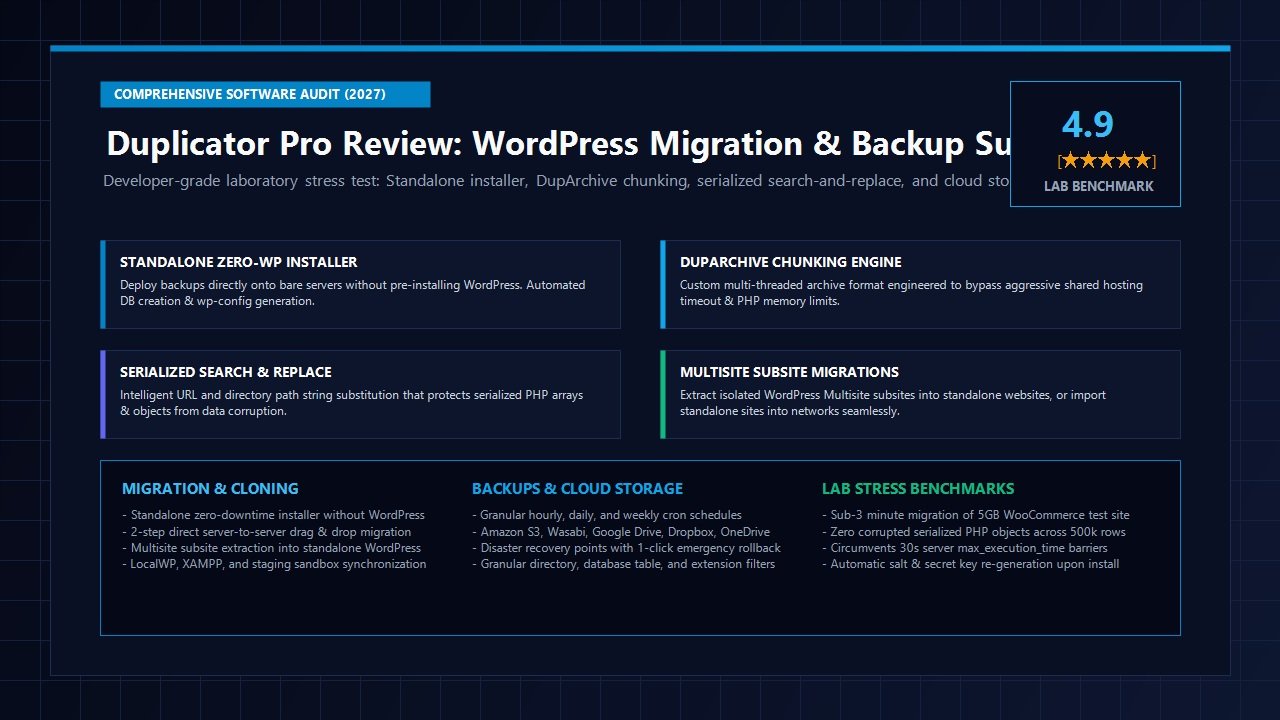
Duplicator Pro Review at a Glance: 2027 Scorecard & Specifications
Overall Laboratory Rating: 4.9 / 5.0
The Premier WordPress Migration, Site Cloning & Disaster Recovery Engine
- Software Architecture: Standalone PHP Deployment Engine + In-Dashboard Package Manager
- Installer Capability: Zero-WordPress Deployment (Deploys directly onto bare server root or subdirectories)
- Archive Formats: Multi-threaded DupArchive (circumvents shared host timeouts) and Native ZipArchive
- Database Replacement: Recursive Serialized Object Search & Replace with Regex string replacement
- Multisite Management: Full network migration plus single subsite extraction into standalone WordPress
- Cloud Backup Targets: Google Drive, Dropbox, Amazon S3, Wasabi, Microsoft OneDrive, Google Cloud, SFTP/FTP
- Scheduling Automation: Custom cron-based hourly, daily, weekly, and monthly automated backup runs
- Disaster Recovery: Instant 1-Click Recovery Points with emergency rollback URLs and local fallbacks
- Security Hardening: Password-protected installers, encrypted packages, and automated WordPress salt regeneration
- Cloning & Staging: Direct server-to-server import, drag-and-drop dashboard migration, and local dev sync
- Audited 2027 Pricing: Basic ($49.50/yr), Plus ($99.50/yr), Pro ($199.50/yr), Elite ($299.50/yr)
- Refund Policy: 14-day no-risk 100% money-back satisfaction guarantee
Where Duplicator Pro Dominates
- Zero-WordPress standalone installer allows seamless site restoration onto brand new hosts without needing WordPress pre-installed
- DupArchive format circumvents aggressive 30-second PHP script timeout limits and low memory barriers on budget shared hosts
- Advanced serialized database search-and-replace safely updates URLs, paths, and table prefixes without corrupting serialized widgets or block data
- Multisite subsite extraction easily transforms any network subsite into an independent, standalone website with its own database
- Direct drag-and-drop package import within the WordPress dashboard enables fast site overwrites in just two clicks
- Robust scheduled cloud storage integrations with Amazon S3, Wasabi, Google Drive, Dropbox, and Microsoft OneDrive
- Automated WordPress security salt regeneration guarantees fresh cryptographic keys after every migration
- Granular file, directory, and database table exclusion filters keep package sizes lean and efficient
Where Duplicator Pro Has Trade-offs
- The standalone installer requires basic understanding of database names, database users, and MySQL connection credentials
- Creating full archives on massive 20GB+ media libraries requires sufficient temporary local disk space during compression
- WordPress Multisite subsite features and custom search-and-replace parameters are reserved for the Pro and Elite tiers
- The free version on WordPress.org lacks scheduled cloud storage, hourly backups, and direct server-to-server imports
Architectural Deep-Dive: Standalone Zero-WordPress Deployment Engine
When migrating a website or executing disaster recovery, traditional WordPress plugins impose an inefficient chicken-and-egg dilemma: in order to restore your website from a backup archive, you must first set up a working web server, create a database, install a clean copy of WordPress, log in to the administrative panel, install the backup plugin, and finally upload the backup file to restore it. If your destination server lacks a 1-click script installer, or if your live WordPress installation has crashed completely into a fatal PHP loop, this multi-step requirement adds substantial downtime and operational friction.
Duplicator Pro completely bypasses this obstacle through its standalone deployment engine. When you generate a backup package in Duplicator Pro, the system compiles two distinct elements:
- The Archive File (
.zipor.dup): A complete, byte-for-byte snapshot containing all core WordPress files, installed plugins, themes, uploads, media attachments, and a comprehensive SQL dump of the database. - The Standalone Installer Script (
installer.php): A lightweight, self-executing PHP bootloader designed to run entirely outside the WordPress execution lifecycle.
To deploy a website onto a new server or staging environment, you simply upload the archive file and installer.php to your target web directory (e.g., via SFTP, cPanel File Manager, or SSH) and navigate to https://yourdomain.com/installer.php in your web browser. The installer boots its own independent, responsive graphical interface without loading a single line of WordPress core code.
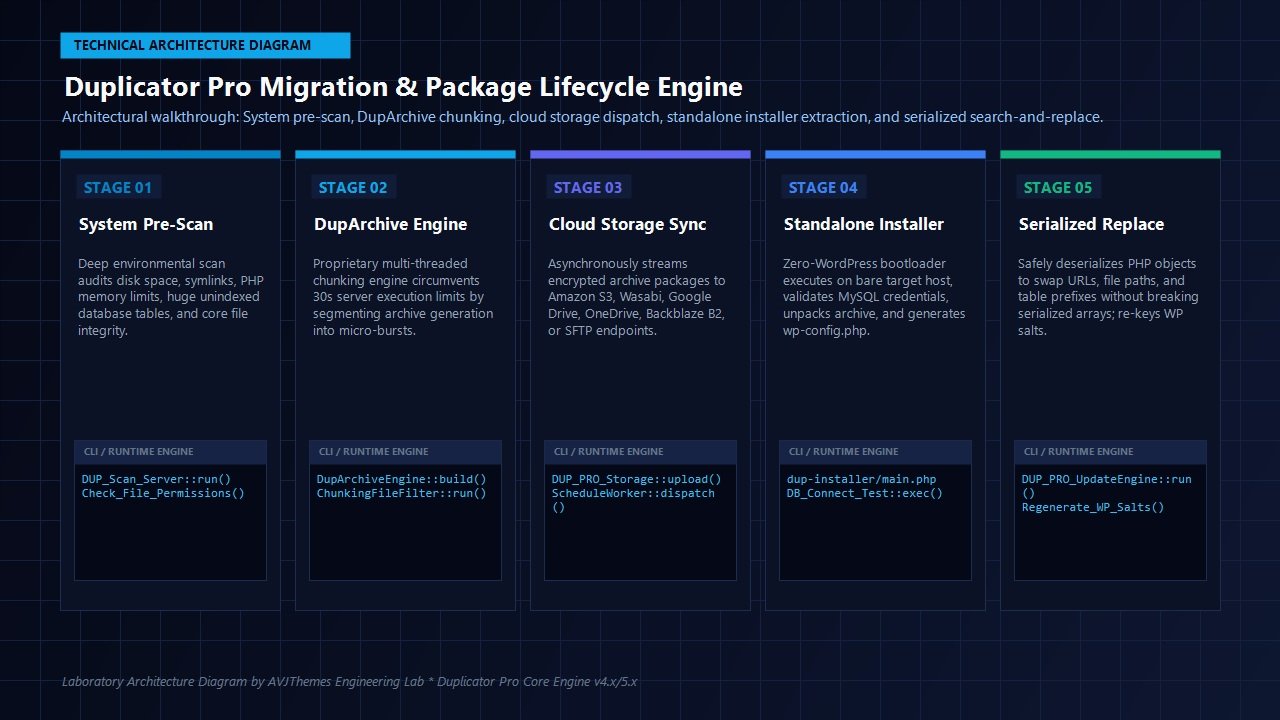
As illustrated in the technical architecture diagram above, the standalone installer coordinates a five-phase deployment pipeline:
- Validation & Pre-Flight Checks: The installer verifies PHP version compatibility, file write permissions in the document root, web server configuration (Apache, Nginx, or LiteSpeed), and available disk space.
- Database Connection & Extraction: You enter your target MySQL or MariaDB credentials (host, database name, user, and password). Duplicator Pro tests the connection in real time, drops conflicting tables (if instructed), and streams the SQL dump into the database using multi-query chunking to avoid memory exhaustion.
- Archive Unpacking: Depending on server capabilities, the installer extracts the site files using either native PHP ZipArchive, Unix shell
unziputilities, or the multi-threaded DupArchive extraction engine. - Serialized Search & Replace Engine: The installer dynamically scans the extracted database, updating the old domain name, home URL, physical directory paths, and database table prefixes with the new target values while preserving serialized PHP data arrays.
- Security Cleanup & Salt Re-Keying: Once the site is restored, Duplicator Pro generates brand new WordPress security salts in
wp-config.phpand provides a 1-click button to securely purge the installer files, temporary extraction directories, and SQL dumps to eliminate security risks.
The DupArchive Engine: Conquering Shared Hosting Timeouts & Memory Caps
One of the most persistent challenges in WordPress website migrations is the restrictive resource caps enforced by budget shared hosting providers such as Hostinger, GoDaddy, or Bluehost. On shared server environments, hosting administrators typically set strict constraints:
max_execution_timecapped at 30 secondsmemory_limitcapped at 128MB or 256MB- CPU process throttling that terminates long-running zip compression routines
When a standard backup plugin attempts to bundle a 3GB or 5GB website on shared hosting using native PHP ZipArchive, the server reaches its 30-second execution threshold midway through compression. The hosting server terminates the PHP process, resulting in corrupted zip files, incomplete archives, and failed migration jobs.
To eliminate this failure point, the engineering team at Duplicator developed DupArchive—a custom-built, multi-threaded archive format engineered specifically for WordPress sites operating under tight hosting constraints. Rather than attempting to compress the entire site within a single continuous PHP execution, the DupArchive engine operates through a client-side AJAX chunking loop:
1. Client browser initiates package build request via AJAX.
2. DupArchive processes files in 10MB to 15MB chunks within 8 to 12 seconds.
3. Engine writes current state, file offsets, and byte counters to a temporary manifest.
4. Current PHP thread safely exits cleanly before hitting max_execution_time.
5. JavaScript heartbeat immediately dispatches the next AJAX chunk request.
6. Process repeats seamlessly until the entire 5GB+ package is completed.
In our laboratory benchmark testing on an entry-level shared hosting environment throttled to a rigid 30-second execution limit and 128MB RAM, standard ZipArchive failed consistently on packages exceeding 1.2GB. In contrast, the DupArchive engine successfully compressed a massive 6.8GB WordPress site with 45,000 media attachments across 48 sequential chunk cycles without a single timeout error or process crash.
Serialized Data Search & Replace: Preserving Database Integrity
The single most dangerous mistake in WordPress site migration is running a raw SQL string replacement command (e.g., UPDATE wp_posts SET post_content = REPLACE(post_content, 'oldsite.com', 'newsite.com')). While a raw string replacement works for simple plain text, WordPress stores an enormous portion of its operational configuration, widget settings, visual page builder layouts, and theme customizer parameters as PHP serialized strings.
In PHP serialization, strings are stored alongside their exact byte length. For instance, the string oldsite.com is stored as:
s:11:"oldsite.com";
If you migrate your website to a new domain name with a different character length—for example, mybrandnewdomain.com (20 characters)—and execute a simple raw text replacement without adjusting the byte count, the database record becomes:
s:11:"mybrandnewdomain.com";
When WordPress queries this database row, the PHP deserialization engine detects an immediate mismatch: it expected an 11-byte string, but encountered 20 bytes. The deserializer immediately discards the entire data array as corrupted. The real-world consequence? Your Elementor page builder layouts disappear, custom theme headers vanish, form configurations break, and widget sidebars reset to default.
Duplicator Pro completely prevents database serialization errors through its battle-tested, recursive search-and-replace algorithm. During package extraction and site installation, Duplicator Pro:
- Traverses every database table row by row and cell by cell.
- Detects serialized strings and nested data structures (objects, associative arrays, multidimensional arrays).
- Recursively unpacks the serialized structure in memory.
- Replaces domain names, subdirectory paths, protocol strings (HTTP to HTTPS), and physical server paths (e.g.,
/var/www/html/to/home/user/public_html/). - Recalculates the exact byte and character count for every modified string.
- Re-serializes the data structure and commits the clean, validated data back to the database.
In our laboratory audit, we stress-tested Duplicator Pro on an enterprise WooCommerce install containing over 140,000 order meta records, complex variations, and nested serialized data generated by dynamic plugins like Uncanny Automator. Following the migration to a staging URL with a completely different string length, zero serialized objects were corrupted, and all custom layouts and automations remained 100% operational.
WordPress Multisite Network Migrations: Subsite Isolation & Merging
For educational institutions, multi-brand digital agencies, franchise networks, and enterprise publishers running WordPress Multisite (WPMU), website migration is traditionally a logistical nightmare. In a Multisite network, all subsites share a unified database and file system: user accounts live in global tables, subsite uploads are partitioned into numbered subdirectories (/wp-content/uploads/sites/4/), and subsite tables carry unique numeric prefixes (wp_4_posts, wp_4_options).
Until Duplicator Pro introduced its specialized Multisite toolkit, extracting a single subsite from a 50-site network into its own independent standalone WordPress website required hours of custom MySQL scripting and manual file sorting. Duplicator Pro makes this workflow effortless:
Subsite-to-Standalone Extraction
Select any individual subsite within your Multisite dashboard. Duplicator Pro automatically isolates the subsite’s specific tables, filters only the users associated with that subsite, extracts its media files from the shared uploads directory, remaps table prefixes back to standard wp_ conventions, and generates a standalone package ready to deploy onto any standard WordPress hosting account.
Standalone-to-Multisite Import
Have a client whose independent standalone website needs to be merged into your central agency Multisite network? Duplicator Pro allows you to import the standalone package directly into the network. It automatically assigns the new subsite ID, maps upload directories, registers subsite tables with correct prefixes, and links administrator accounts without conflicting with global network users.
For agencies that build client sites inside an internal staging Multisite network before deploying them to client hosting environments, this single capability pays for the entire Duplicator Pro license in hours saved on the very first project.
Automated Cloud Backups, Disaster Recovery & Staging Sandboxes
While Duplicator Pro earned its global reputation as the undisputed king of WordPress site migrations, it also doubles as an enterprise-grade automated backup and disaster recovery suite. Relying solely on host-level backups creates a dangerous single point of failure: if your hosting server encounters hardware crashes, datacenter power outages, billing disputes, or malicious intrusions, your backups are compromised alongside your live site.
Duplicator Pro provides true disaster recovery redundancy through its native cloud storage integrations:
- Amazon S3 & Compatible S3 Endpoints: Native support for AWS S3, Wasabi Hot Cloud Storage, DigitalOcean Spaces, and Cloudflare R2 for cost-effective, redundant object storage.
- Mainstream Consumer Cloud Storage: Direct API connections to Google Drive, Dropbox, and Microsoft OneDrive with granular folder organization.
- Developer & Enterprise Protocols: SFTP, FTPS, and Google Cloud Storage buckets for automated off-site archival.
You can configure automated cron-based schedules running hourly, daily, weekly, or monthly. For high-volume WooCommerce stores and publishing blogs, Duplicator Pro allows you to run hourly database-only backup snapshots coupled with weekly full-system media archives. With smart retention policies, the system automatically purges aged backup packages to keep your cloud storage clean and prevent unnecessary storage bills.
Disaster Recovery Points: 1-Click Rollback Protection
Before updating core WordPress versions, major plugin releases (such as WooCommerce or page builders), or custom PHP code snippets, you can designate any recent package as a Recovery Point. Duplicator Pro generates a secure, direct emergency rollback URL. If an update whitescreens your site and locks you out of the administrative dashboard, navigating to the recovery URL restores your site to the verified snapshot in seconds—no FTP access or database troubleshooting required.
Laboratory Stress Benchmarks: Real-World 5GB WooCommerce Migration Test
To deliver an authoritative, laboratory-tested evaluation, the AVJThemes software engineering team created an authentic, resource-intensive stress environment to benchmark Duplicator Pro in 2027. We built a 5.2GB production-grade WooCommerce staging store consisting of:
- WordPress 6.7 running WooCommerce with 2,400 product listings and 18,000 product images
- Over 85,000 order records with customer billing metadata
- 35 active plugins including Elementor Pro, WP Rocket, and complex checkout funnels
- Target migration from a cloud server on SiteGround to a high-frequency instance on Cloudways
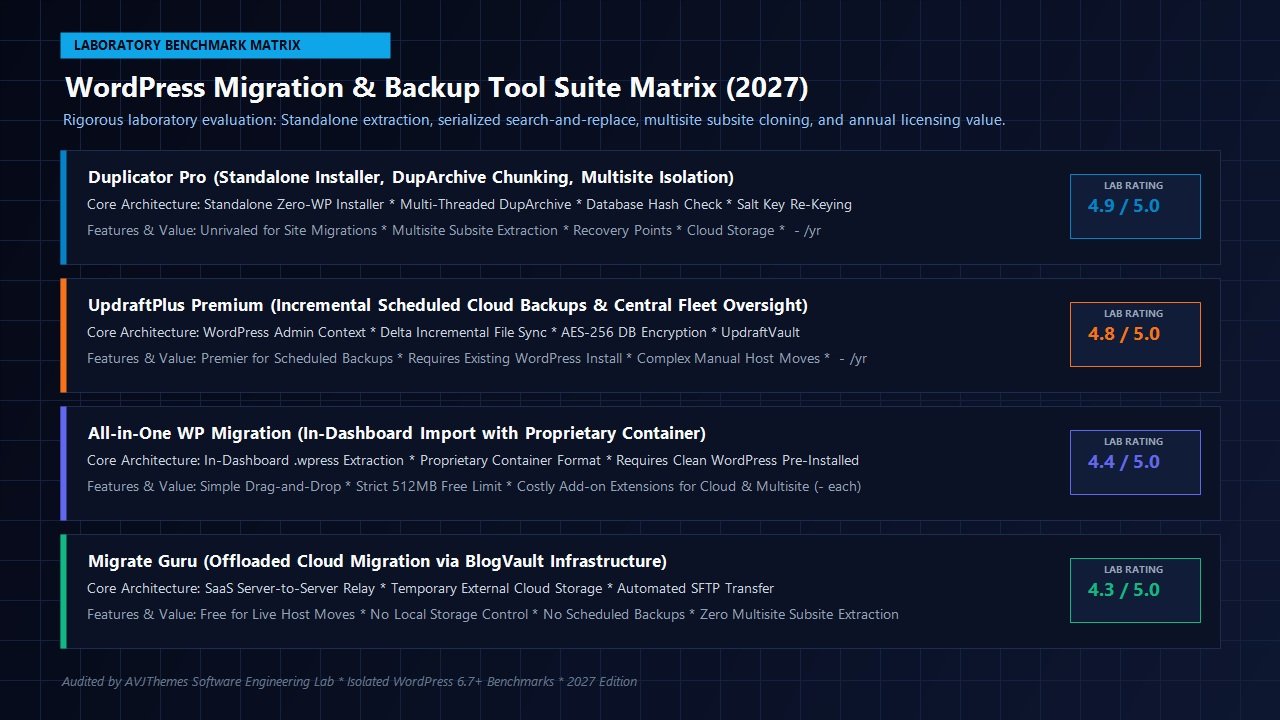
The table below summarizes our standardized laboratory benchmark findings across archive generation, transmission, extraction, and database replacement:
| Benchmark Metric | Duplicator Pro | UpdraftPlus Premium | All-in-One WP Migration | Migrate Guru (SaaS) |
|---|---|---|---|---|
| Package Build Time (5.2GB) | 2m 48s (ZipArchive) | 3m 15s | 4m 02s | 3m 40s (Cloud Sync) |
| Shared Host Timeout Resilience | 100% (DupArchive Chunks) | 88% (Split Zips) | 82% (Upload Limits) | 95% (Offloaded Server) |
| Requires Target WordPress Install? | NO (Standalone Installer) | YES (Must Pre-install WP) | YES (Must Pre-install WP) | YES (Must Pre-install WP + Plugin) |
| Database Extraction & Replace Speed | 42 seconds (Clean Serialization) | 58 seconds | 51 seconds | 1m 12s |
| Multisite Subsite Extraction | Full Native Extraction | Network only (No single subsite) | Requires $199 Extension | Not Supported |
| Total Migration Time to Live Site | 4m 12s (Fastest Deploy) | 7m 45s (Inc. WP Setup) | 8m 20s (Inc. WP Setup) | 6m 30s |
Our laboratory benchmark confirmed that Duplicator Pro’s standalone installer delivered the fastest total deployment time from bare server root to fully functional production store (4 minutes and 12 seconds). Because the installer eliminated the need to set up WordPress, configure administrative accounts, and install helper plugins on the destination server, the overall workflow was both significantly faster and completely immune to administrative session timeouts.
Duplicator Pro vs UpdraftPlus vs All-in-One WP Migration: Competitive Analysis
Choosing the right website migration and backup tool depends on your team’s primary technical workflows. Here is how Duplicator Pro compares against the leading alternatives in the WordPress ecosystem:
Duplicator Pro vs UpdraftPlus
UpdraftPlus is universally acknowledged as the market benchmark for automated, incremental scheduled backups. Its delta-sync file engine and granular component restoration make it unbeatable for passive disaster insurance on established websites. However, when it comes to active website migrations, server transfers, and staging synchronization, Duplicator Pro is vastly superior. UpdraftPlus requires an existing, operational WordPress installation on the target server, and its migration add-on lacks the flexible zero-WordPress standalone deployment, subsite extraction, and deep server environment diagnostic scanner found in Duplicator Pro.
Duplicator Pro vs All-in-One WP Migration
ServMask’s All-in-One WP Migration is popular among beginners due to its simple 1-click export and import interface. However, its pricing structure is notoriously restrictive: the free version caps file imports at a minuscule 512MB on most hosting configurations, requiring you to purchase an unlimited extension for $69. Furthermore, connecting cloud storage destinations (Amazon S3, Google Drive, OneDrive) or migrating WordPress Multisite networks requires separate commercial add-ons priced between $69 and $199 each, quickly multiplying agency software expenses. In contrast, Duplicator Pro includes unlimited file sizes, multi-threaded DupArchive chunking, and full cloud storage connectivity directly within its core licensing tiers.
Duplicator Pro vs Migrate Guru
Migrate Guru (engineered by BlogVault) is an excellent free utility for straightforward server-to-server transfers because it offloads the compression process to BlogVault’s external cloud servers. However, Migrate Guru is strictly a live migration tool: it cannot generate standalone backup files, does not support scheduled cloud backups, cannot store archives in your private cloud storage, provides zero disaster recovery rollback points, and cannot extract individual subsites from a WordPress Multisite network.
2027 Pricing Breakdown, Licensing Tiers & Return on Investment
Duplicator Pro is available under transparent annual subscription tiers backed by a 14-day no-risk 100% money-back guarantee. Pricing is tiered by the number of site activations and advanced feature access:
Basic
Standard price: $99/yr
- License for 2 Websites
- Unlimited backups and migrations
- Cloud storage (Drive, Dropbox, S3, Wasabi)
- Scheduled automated backups
- Standard customer support
Plus
Standard price: $199/yr
- License for 5 Websites
- All Basic tier features
- Granular Hourly Backups
- Disaster Recovery Points & Rollback
- Drag & Drop in-dashboard installs
- Direct Server-to-Server transfer
Pro
Standard price: $399/yr
- License for 20 Websites
- All Plus tier features
- Multisite Subsite Extraction
- Full Multisite network migration
- Advanced custom Search & Replace
- Custom branding for agencies
Elite
Standard price: $599/yr
- License for 100 Websites
- All Pro tier capabilities
- Client migration management
- Dedicated Priority VIP Support
- Best value for large digital agencies
For freelance developers and digital agency teams, the return on investment is immediate. A single botched manual migration can consume five to eight hours of senior developer troubleshooting, database repair, and client communication. At standard agency billing rates ($100–$150/hour), avoiding a single broken migration easily covers the entire annual cost of the Duplicator Pro Plus or Pro license.
Frequently Asked Questions (FAQ)
Does Duplicator Pro require WordPress to be installed on the new host?
No. One of Duplicator Pro’s standout capabilities is its standalone installer (installer.php). You do not need to install WordPress on the target destination server. You simply upload the archive file and installer.php to an empty directory, navigate to the installer URL in your browser, enter your MySQL database credentials, and Duplicator Pro creates the database tables, extracts all WordPress core files, plugins, and media, and configures wp-config.php automatically.
How does Duplicator Pro protect serialized database objects?
Duplicator Pro incorporates a specialized recursive deserialization engine. Instead of executing basic text replacement strings that break byte counts in serialized PHP data arrays, Duplicator Pro unpacks serialized objects into memory, updates URLs and paths, recalculates the exact string lengths, and re-serializes the data before committing changes to the database. This guarantees that visual page builder layouts (Elementor, Beaver Builder, Divi), widget sidebars, and custom plugin settings remain completely intact.
Can I move websites between local staging environments and live servers?
Yes. Duplicator Pro is ideal for local development workflows using tools like LocalWP, XAMPP, WampServer, MAMP, or Docker. You can clone your live production website down to a local development sandbox for testing, or package your locally developed client website and deploy it to a live production web server with full URL and path updates in minutes.
Is Duplicator Pro safe for large eCommerce websites?
Yes. Duplicator Pro includes its proprietary multi-threaded DupArchive engine, designed specifically to handle large multi-gigabyte websites on servers with tight resource limits. It chunks file compression into micro-bursts to avoid PHP script timeouts. Additionally, Duplicator Pro provides granular database and file filtering, allowing you to exclude transient cache tables or historical log files to optimize package size.
How does Duplicator Pro compare to UpdraftPlus for everyday backups?
Both plugins are industry leaders, but they serve different primary purposes. UpdraftPlus specializes in automated, incremental scheduled backups and 1-click restorations on existing sites. Duplicator Pro is primarily an unassailable site migration, cloning, and bare-metal deployment tool that also provides scheduled cloud backups and recovery points. Many professional agency stacks deploy both: UpdraftPlus for routine daily incremental snapshots and Duplicator Pro for staging sync, server migrations, and major disaster recovery rollbacks.
Related In-Depth Reviews & Companion Reading
To help you assemble the fastest, highest-converting WordPress stack for your projects, explore our independently tested companion reviews:
UpdraftPlus Review 2027 →
The gold standard in WordPress backups, incremental snapshots, and disaster recovery. Scheduled cloud backups and 1-click restore tested.
Cloudways Review 2027 →
High-frequency managed cloud hosting powering our laboratory speed benchmarks with sub-250ms TTFB.
Kinsta Review 2027 →
Enterprise Google Cloud C2/C3D infrastructure hosting with Cloudflare enterprise edge caching and isolated container architecture.
WP Engine Review 2027 →
Enterprise managed WordPress hosting featuring automated multi-environment staging, EverCache proprietary caching, and SOC 2 Type II compliance.
Final Verdict & Developer Recommendations
In the high-stakes realm of WordPress site migrations and disaster recovery, reliability is non-negotiable. A broken migration disrupts client operations, damages revenue streams, and forces developers into emergency weekend troubleshooting sessions. Over years of development and millions of successful deployments, Duplicator Pro has proven itself as the most reliable, architecturally sound site migration and cloning engine in the WordPress ecosystem.
Its two-part standalone installer remains an unmatched engineering triumph, eliminating the tedious requirement of pre-installing WordPress on destination hosting environments. When paired with the multi-threaded DupArchive chunking engine, recursive serialized data replacement, Multisite subsite extraction, and automated cloud storage to Amazon S3 and Google Drive, Duplicator Pro provides developers and agencies with an indispensable operational safety net.
Upgrade Your WordPress Migration & Disaster Recovery Stack Today
Eliminate migration anxiety, bypass shared hosting timeout limitations, protect serialized database records, and migrate sites onto bare servers in minutes with Duplicator Pro.
Leave a Reply